This guide is written for Amazon sellers who want clarity on product IDs and how an Amazon GTIN exemption works in 2025. It focuses on how to sell on Amazon without a UPC/EAN when you qualify, plus when it is smarter to buy GS1 barcodes.
Note: Examples use Amazon.com (US) for screenshots and menu paths, but the logic applies to most marketplaces, including UK and EU stores. Category rules and brand naming checks can vary by marketplace.
Key takeaways
- GTIN is the global family of product IDs. UPC and EAN are the most common GTIN formats, while ASIN and FNSKU are Amazon specific identifiers.
- If you qualify, an Amazon GTIN exemption lets you sell on Amazon without a UPC/EAN for a specific brand and category combination.
- If you plan multi channel selling or long term brand scalability, GS1 barcodes are usually the cleaner choice.
- Most GTIN exemption rejections we see come from avoidable mistakes: mismatched brand name capitalization, barcode visible in photos, or selecting the wrong category path.
Table of Contents
- Basics: GTIN vs UPC/EAN vs ASIN vs FNSKU
- Use cases: which ID you need and when
- What is Amazon GTIN exemption in 2025?
- GTIN exemption vs GS1 UPC: pros and cons table
- How to apply: step by step GTIN exemption request
- Listing and labeling after approval: ASIN, SKU, FNSKU
- FAQs: approval time, reusing across marketplaces, rejections
- About the author
- References
Basics: GTIN, UPC, EAN, SKU, ASIN, and FNSKU
Question: What is the difference between GTIN, UPC/EAN, SKU, ASIN, and FNSKU on Amazon?
Answer: GTIN is the global product ID family (including UPC and EAN). Your SKU is your internal inventory code. Amazon assigns an ASIN to the listing in its catalog. If you use FBA, Amazon may also generate an FNSKU label that ties physical units to your seller inventory.
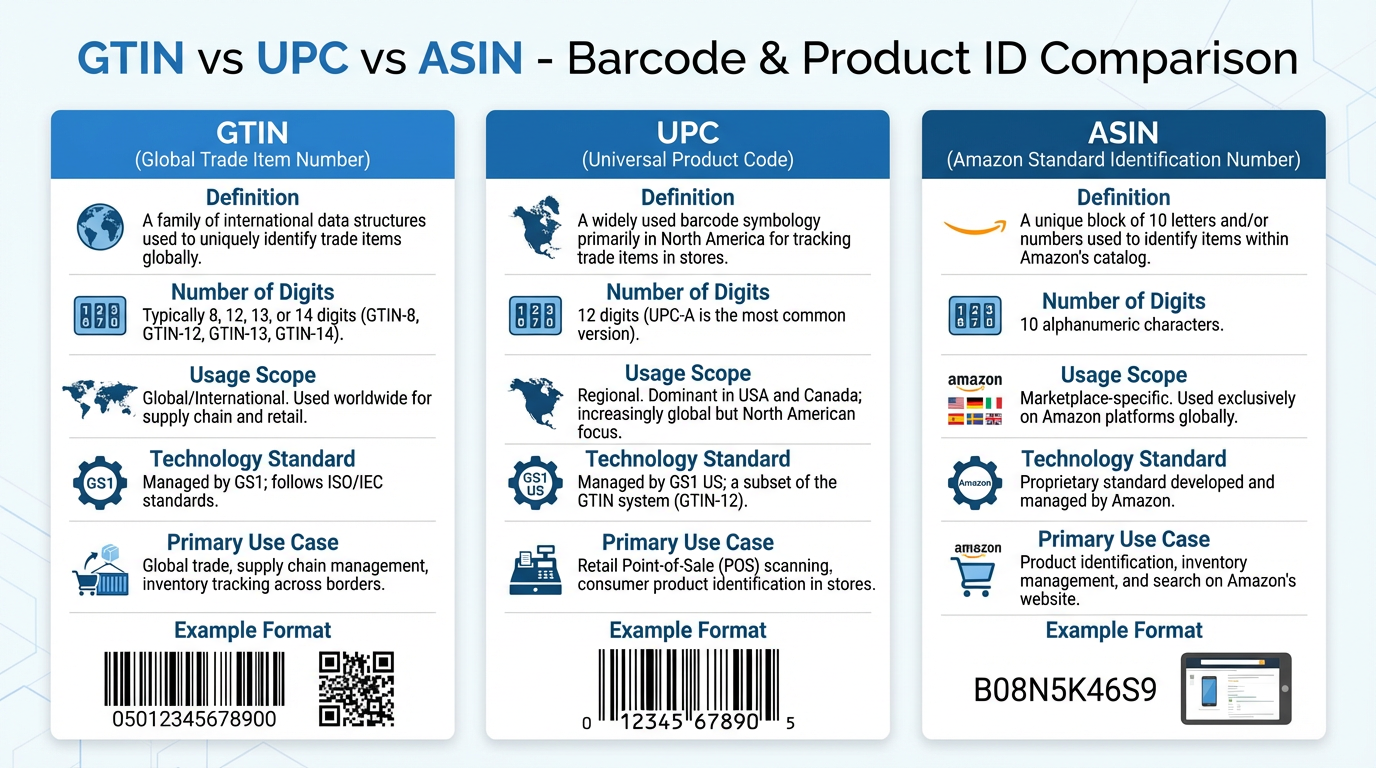
Visual cheat sheet: use this to quickly map which identifier belongs to global retail standards (GTIN, UPC, EAN) versus Amazon specific IDs (ASIN).
Relationship map (simplified)
Use cases: which product ID you need and when
Question: When do you need a UPC/EAN and when can you skip it?
Answer: If you are creating a new ASIN in many categories, Amazon may require a valid GTIN (UPC/EAN). You can skip it only if your product matches an existing ASIN, or you qualify for a GTIN exemption for your brand and category.
Use a GTIN (UPC or EAN) when
- You want multi channel distribution (Amazon plus retail, Shopify, other marketplaces).
- You expect many variations and long term catalog maintenance.
- Your category or compliance requirements strongly expect standard barcodes.
Consider a GTIN exemption when
- You are launching handmade, unbranded, bundles, or testing SKUs and want lower upfront costs.
- You can provide real product photos that show no GS1 barcode on product or packaging.
- You can keep brand name and category consistent with what you request in Seller Central.
Decide faster with data before you choose GTIN vs exemption
Use SellerSprite Product Research to validate demand, competition, and pricing power. This helps you decide whether a fast test via GTIN exemption makes sense, or whether you should invest in GS1 barcodes for a long term brand plan.
Explore SellerSprite Product Research Read: Find a Profitable FBA Niche
What is Amazon GTIN exemption in 2025?
Question: What does an Amazon GTIN exemption actually do?
Answer: A GTIN exemption removes the UPC/EAN requirement for creating a new listing for a specific brand and category, so you can create an ASIN without entering a standard product ID, as long as you follow Amazon photo and branding rules.
Eligibility checklist (what Amazon typically expects)
- Brand name matches exactly what is printed on product or packaging, including capitalization and spacing.
- 2 to 9 real photos showing all sides of product and packaging. Brand must be permanently affixed if you claim a brand.
- No GS1 approved barcode visible on product or packaging in your photos.
- You request the exemption under the correct category path for your listing.
Practical note from the field: most sellers get stuck because the brand name in the application does not match the brand shown in the photos, or because the chosen category path is different from the one used during listing creation.
GTIN exemption vs GS1 UPC: pros and cons table
Question: Which option is better for your Amazon business?
Answer: Use GTIN exemption for fast validation and low upfront cost. Use GS1 UPCs for maximum long term flexibility, multi channel selling, and cleaner catalog maintenance.
Two seller stories
Case A: fast test launch (Apr 2025 to May 2025)
A new handmade brand tested 2 SKUs in Home and Kitchen using an Amazon GTIN exemption. Approval came within 24 hours after they fixed the brand name capitalization to match packaging. They created listings the same day, shipped to FBA with FNSKU labels, and validated demand before committing to GS1. Result: time to first listing dropped from about 7 days to 1 day, and they avoided buying barcodes for a product that they later discontinued.
Case B: rejection fixed by photo cleanup (Aug 2025)
A private label seller was rejected twice because a faint barcode was visible on the outer carton in one photo. They reshot photos on a plain table, removed all barcode stickers, and resubmitted under the correct category path. Approval came after resubmission. Result: they avoided a launch delay, and later added GS1 UPCs when expanding to a second channel outside Amazon.
How to apply: step by step GTIN exemption request in Seller Central
Question: How do you request a GTIN exemption inside Seller Central?
Answer: Use the Catalog flow for adding a product not sold on Amazon, then apply for exemption using your target category and exact brand name. Upload compliant photos and submit.
GTIN exemption application flow (clickable style diagram)
Model based reminder: approval speed and eligibility are estimates based on documented requirements and observed seller outcomes. Always decide based on your own risk tolerance, category constraints, and the latest Seller Central help pages.
Seller Central screenshot: where the Product ID field shows up
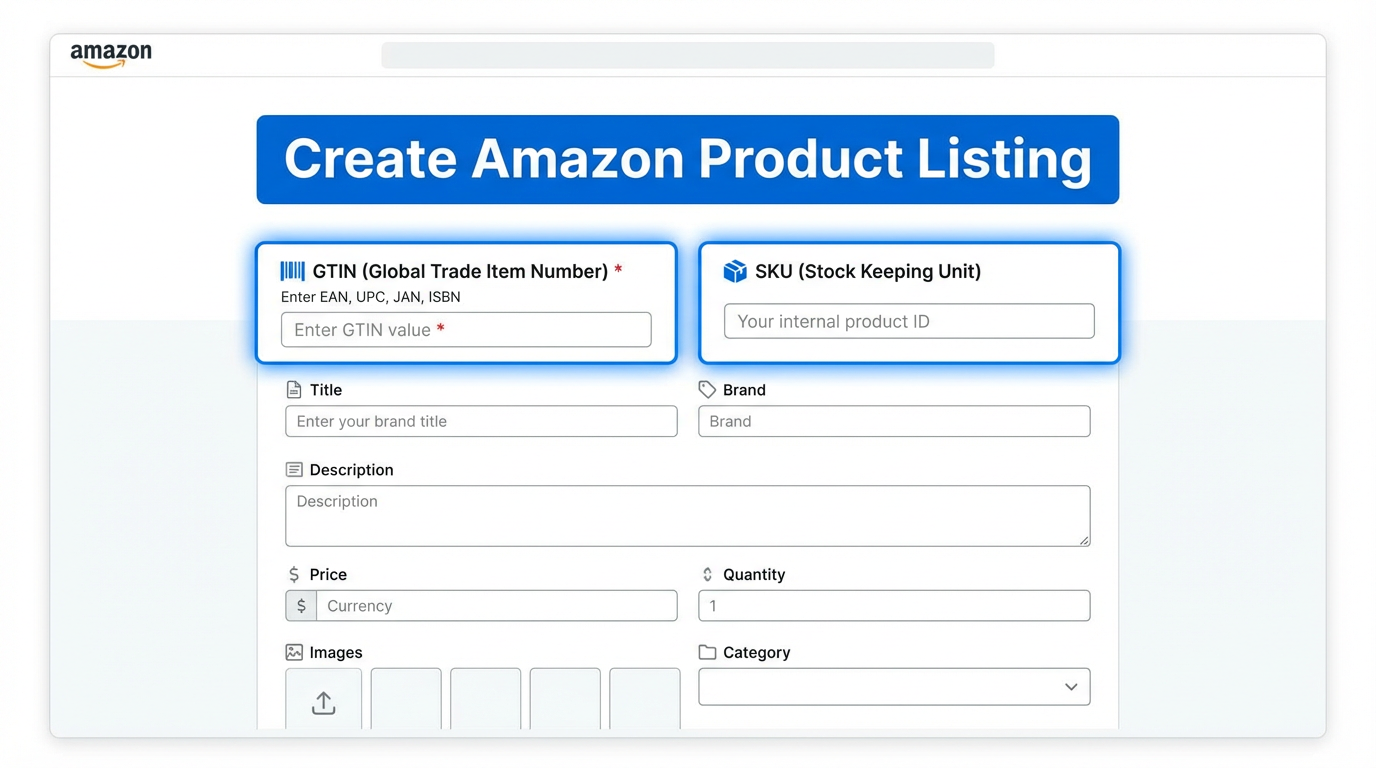
After your GTIN exemption is approved for the correct brand and category, the Product ID field should no longer block listing creation for that approved scope.
Step by step checklist (copy and follow)
- Prepare 2 to 9 real photos (no barcode visible). Make sure brand is permanently affixed if you claim a brand.
- In Seller Central, open the Catalog flow to add a product not sold on Amazon.
- Choose the exact category path you plan to list in. This choice matters.
- Enter the brand name exactly as shown on product or packaging. For truly unbranded items, use the no brand option if available.
- Select the I do not have a Product ID option, then submit your GTIN exemption request.
- If rejected, fix the specific reason (photos, brand mismatch, category mismatch), then resubmit.
Listing and labeling after approval: ASIN, SKU, and FNSKU
Question: What changes after your UPC exemption is approved?
Answer: You can create the listing without entering UPC/EAN for the approved scope. Amazon still creates an ASIN, you still use your seller SKU for inventory, and FBA units usually need FNSKU labels because there is no manufacturer barcode.
Common listing pitfalls to avoid
- Using a different brand spelling in the listing than in the exemption approval.
- Creating the listing in a different category path than the approved request.
- Trying to restructure variations later without consistent attribute naming.
FBA labeling quick guide
- If you do not use a manufacturer barcode, print FNSKU labels in Seller Central.
- Apply labels cleanly on each unit, not on removable packaging that can tear.
- Keep a consistent SKU structure so you can trace batches and supplier changes.
Create a safer listing draft in minutes
After exemption approval, reduce listing errors by drafting your title, bullets, and backend keyword plan with SellerSprite Listing Builder. This helps you keep brand wording consistent and avoid missing fields that can trigger catalog friction later.
FAQs
Can I reuse one Amazon GTIN exemption across multiple marketplaces?
Sometimes, but do not assume. Seller Central workflows look similar across Amazon.com, UK, and EU stores, yet eligibility and category rules can differ by marketplace. If you sell globally, treat each marketplace as its own checklist, then confirm in the relevant Seller Central help pages before you scale.
How long does GTIN exemption approval take in 2025?
Many sellers report decisions within 48 hours when photos and brand naming are correct, but timing can vary by category and case volume. Plan a buffer and avoid ordering inventory that depends on approval unless your risk tolerance supports it.
Why do Amazon GTIN exemption requests get rejected?
The most common reasons are: barcode visible in photos, brand name mismatch (including capitalization), requesting the wrong category path, or missing required real world photos. Fix the exact rejection reason, reshoot photos if needed, and resubmit.
Can I change my brand later or add variations after listing without a UPC?
Brand changes can be difficult because exemptions are tied to brand and category, and catalog edits may trigger additional checks. If you expect heavy variation expansion or future rebranding, GS1 UPCs may be safer. If you start with exemption, keep naming consistent and document approvals for future support cases.
Do I need paid tools to succeed with GTIN exemption and listing setup?
You can apply in Seller Central without paid tools, but data helps you decide whether UPC exemption is worth it. Many beginners use free tools or trials first, then upgrade once they validate demand. If your goal is to reduce mistakes, a guided workflow for product research and listing drafting can save time.
Next step actions
Step 1: Validate your category before choosing GTIN vs exemption.
Use SellerSprite Product Research to evaluate demand, competition, and pricing before you decide whether to sell on Amazon without a UPC/EAN or invest in GS1 codes.
Step 2: Ask GTIN exemption execution questions in the community.
Get Help From the SellerSprite Community
Share your negotiation situation, get feedback, and learn from other sellers in the SellerSprite Discord and Facebook Group.
Step 3: Continue learning with the SellerSprite Academy course directory.
View The SellerSprite Course Directory
Ready for the next step? Open the SellerSprite Academy course directory to continue building your Amazon FBA skills chapter by chapter.
About the author
SellerSprite Team
SellerSprite is an Amazon seller platform used by 1.6M+ registered sellers worldwide, with 700K+ browser extension installs, refined over 8+ years of product and workflow iteration. We publish step by step playbooks based on Seller Central documentation, tool driven workflows, and recurring patterns we observe from sellers across multiple marketplaces.
Reviewed and updated in Dec 2025.
References
- Amazon Seller guide: How to apply for a GTIN exemption (PDF)
- Sell on Amazon: product IDs and GTIN overview
- Internal link: Amazon SEO Tips
- Internal link: Amazon Keyword Research tutorial
- Internal link: SellerSprite Extension introduction
Important legal disclaimer
This content is for informational purposes only and is not legal advice. Amazon policies and category requirements can change. Before you apply for a UPC exemption or create listings without a barcode, verify the latest guidance inside your Seller Central account and official Amazon documentation.


