TL;DR: Amazon seasonal keywords drive predictable demand spikes. You can use Google Trends and Amazon data to identify, validate, and act on them early. A strategic 6-week execution plan maximizes ROI during peak seasons like holidays and Prime Day.
Key Takeaways
- Seasonal keywords have predictable demand cycles; don't confuse them with viral trends or evergreen terms.
- Use Google Trends (e.g. 5-year view, U.S. location) to spot repeating patterns before validating on Amazon.
- Build seasonal keyword clusters by event, holiday, weather, or use case to organize your strategy.
- Start preparing 6 weeks before peak: optimize listings, ramp PPC, and secure inventory.
- Apply seasonal terms strategically in titles, bullets, and backend fields to avoid stuffing.
Table of Contents
- What Seasonal Keywords Are (And Why They Move Your Rankings and ACoS)
- The Seasonality Signals That Matter for Amazon Sellers
- Build Your Seasonal Keyword System (Before You "Research")
- Step 1: Identify Seasonal Keywords with Google Trends (Correct Setup Matters)
- Step 2: Validate Seasonality on Amazon (So You Don't Overtrust Google)
- Step 3: Build Seasonal Keyword Clusters (So Execution Is Clean)
- Step 4: Prepare Early: The 6-Week Seasonal Execution Timeline
- Step 5: Apply Seasonal Keywords to Listing SEO (Without Keyword Stuffing)
- Step 6: Seasonal PPC Playbook (Protect Profit While Riding Demand)
- Seasonal Keyword Calendar
- Common Mistakes (And How to Avoid Them)
- FAQ
- References
Note on marketplaces: This guide is specifically optimized for the US market.
What Seasonal Keywords Are (And Why They Move Your Rankings and ACoS)
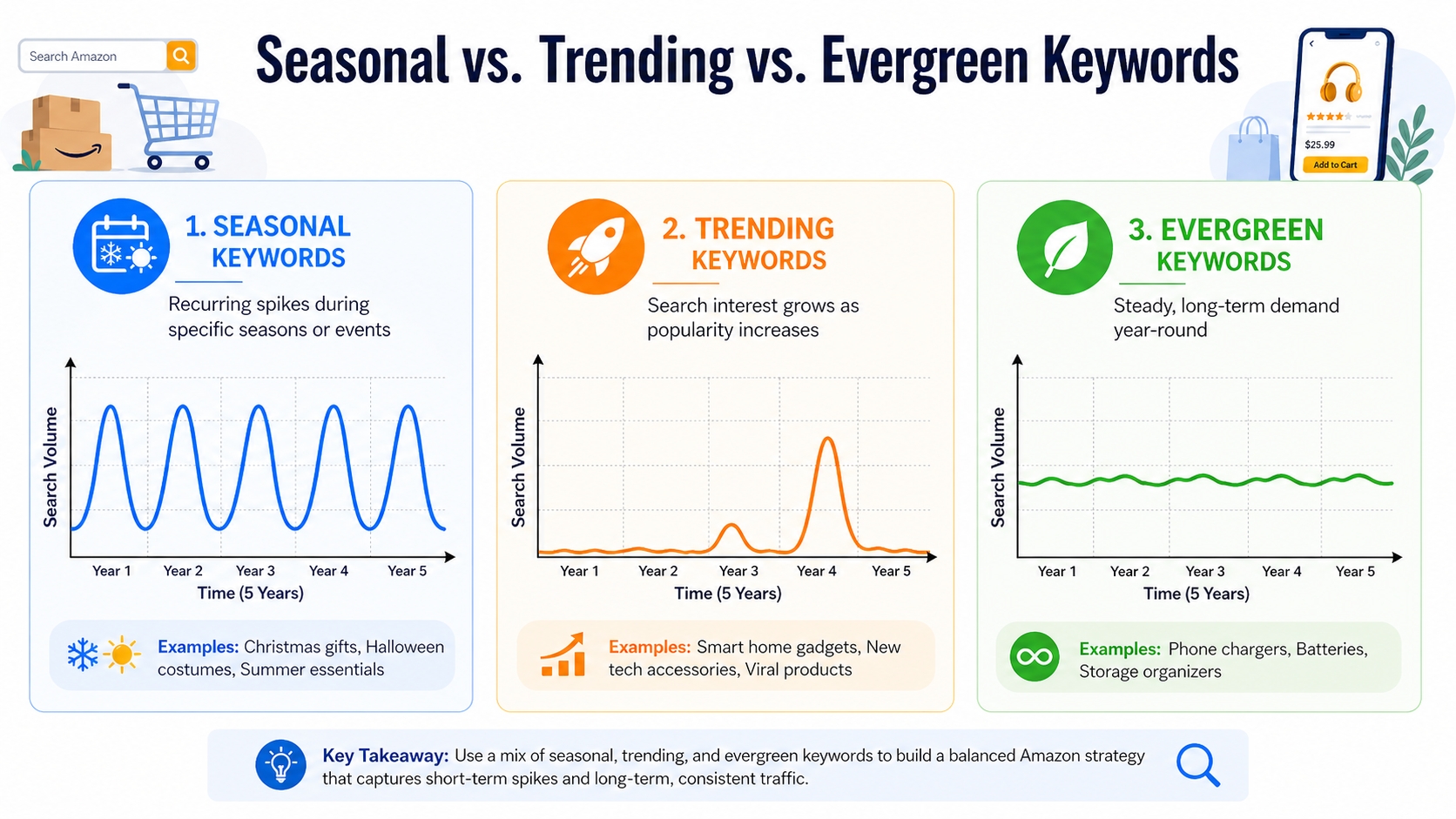
Seasonal keywords are search terms that experience predictable spikes and dips in demand based on time of year, holidays, or cultural events. Unlike trending or evergreen keywords, these follow a repeating annual cycle, making them powerful levers for Amazon sellers who plan ahead.
Definition: Seasonal Keywords
Seasonal keywords = terms with predictable demand peaks and valleys tied to calendar events (e.g., "Christmas gifts for mom," "back-to-school supplies," "Halloween costumes"). These patterns repeat annually, allowing proactive optimization.
Seasonal vs. Trending vs. Evergreen: Don't Confuse Spikes With Cycles
Understanding the difference is critical:
- Seasonal: Repeating annual pattern (e.g., "turkey roaster" peaks every November).
- Trending: Short-term spike due to news or virality (e.g., "fidget spinner" in 2017).
- Evergreen: Steady demand year-round (e.g., "water bottle" or "phone charger").
Mistaking a viral trend for a seasonal opportunity can lead to overstocking and losses. Always validate with multi-year data.
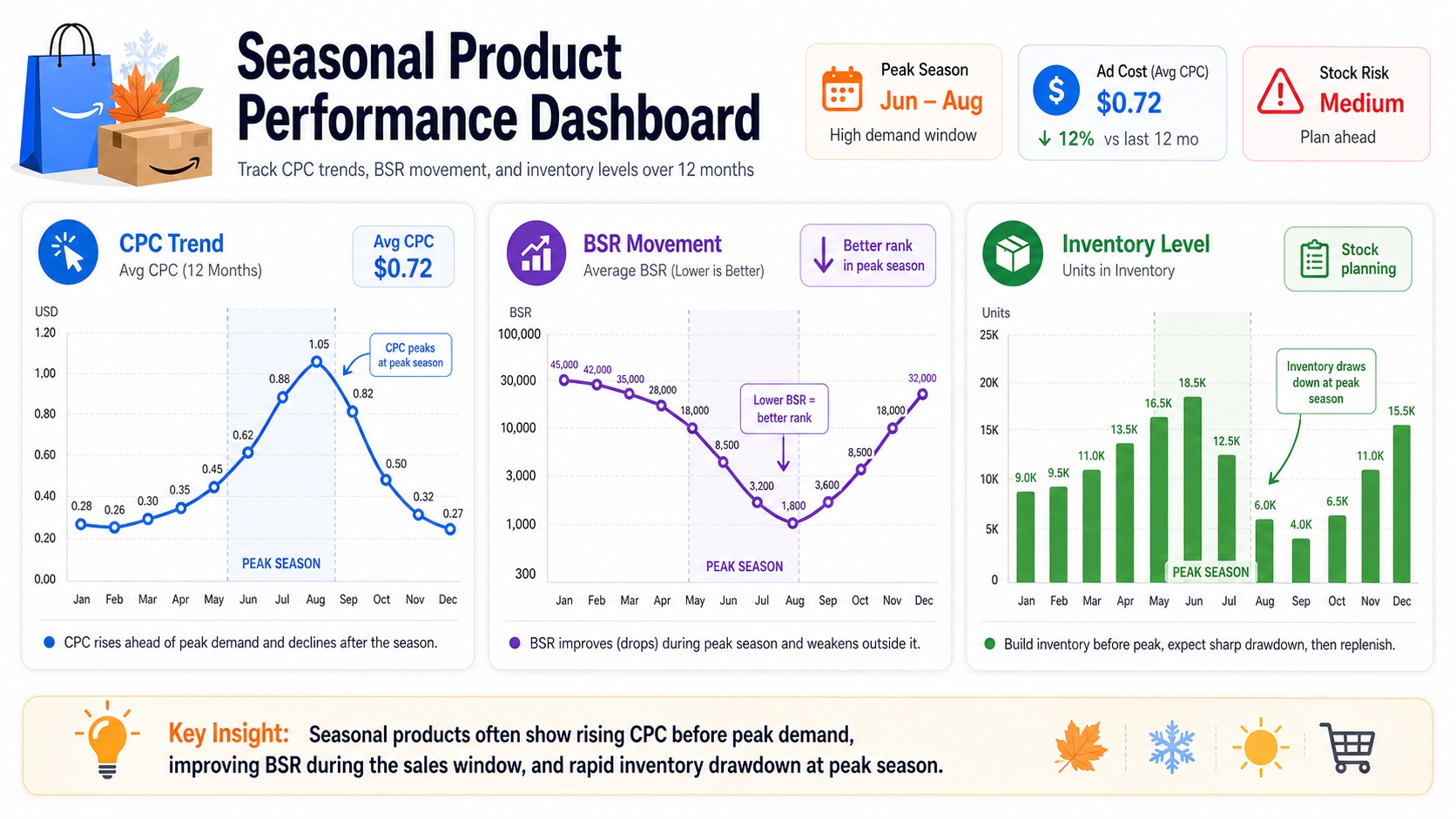
Why Seasonality Changes Performance: CTR, CVR, CPC, and Inventory Pressure
When seasonal demand rises, so do competition and costs:
- CTR (Click-Through Rate): Increases if your listing matches seasonal intent (e.g., gift-ready packaging).
- CVR (Conversion Rate): Can rise during gifting seasons when buyers are decision-ready.
- CPC (Cost Per Click): Often inflates by 30-100% during peak weeks due to ad competition.
- Inventory Pressure: Stockouts hurt BSR and ranking; overstocking leads to liquidation losses.
Proactive planning balances visibility, cost, and supply.
The Seasonality Signals That Matter for Amazon Sellers
To act confidently on seasonal keywords, monitor four types of signals across search, Amazon, ads, and supply chains.
Search-Demand Signals: Google Trends Patterns + Rising Queries
Google Trends reveals macro-level interest. Look for:
- Repeating annual peaks (e.g., "ugly Christmas sweater" every December).
- "Rising" and "Breakout" related queries that suggest emerging long-tail variations.
Use this to build a preliminary list before validating on Amazon.
Amazon-Demand Signals: Autocomplete Shifts, SERP Changes, BSR Movement
Amazon's own ecosystem shows real buyer behavior:
- Autocomplete: Type "gift for…" and see if seasonal modifiers appear (e.g., "gift for her Christmas 2026").
- SERP Changes: Top results shift toward gift bundles or seasonal variants.
- BSR Movement: Products with seasonal keywords climb faster during peak windows.
Ad-Market Signals: CPC Inflation, Sponsored Density, Competitor Promo Waves
As demand rises, so does ad competition:
- CPC Inflation: Monitor your campaigns; CPCs often double near Black Friday.
- Sponsored Density: More ads per SERP mean organic visibility drops.
- Competitor Promos: Watch for lightning deals, coupons, and A+ content updates.
Supply Signals: Stockouts, Lead Times, Price Compression Near Peak
Physical supply constraints reveal demand pressure:
- Frequent stockouts on top-ranking products = high demand.
- Extended lead times from suppliers = prepare early.
- Price drops late in season = liquidation phase beginning.
Build Your Seasonal Keyword System (Before You "Research")
Before diving into tools, design a framework that aligns with your goals and timeline.
Set Your Goals: Rank, Profit, Inventory Sell-Through, or New Launch Timing
Your objective shapes your strategy:
- Rank: Focus on high-volume seasonal terms to boost visibility.
- Profit: Target mid-competition terms with strong conversion potential.
- Inventory Sell-Through: Use seasonal modifiers to move excess stock.
- New Launch: Time product releases to coincide with rising seasonal demand.
Define Your Time Windows: 90 Days / 12 Months / 5 Years (What Each Is Good For)
Timeframe determines data reliability:
- 90 Days: Spot early momentum for upcoming events (e.g., back-to-school).
- 12 Months: Identify annual patterns and plan campaigns.
- 5 Years: Confirm true seasonality (not a one-time spike).
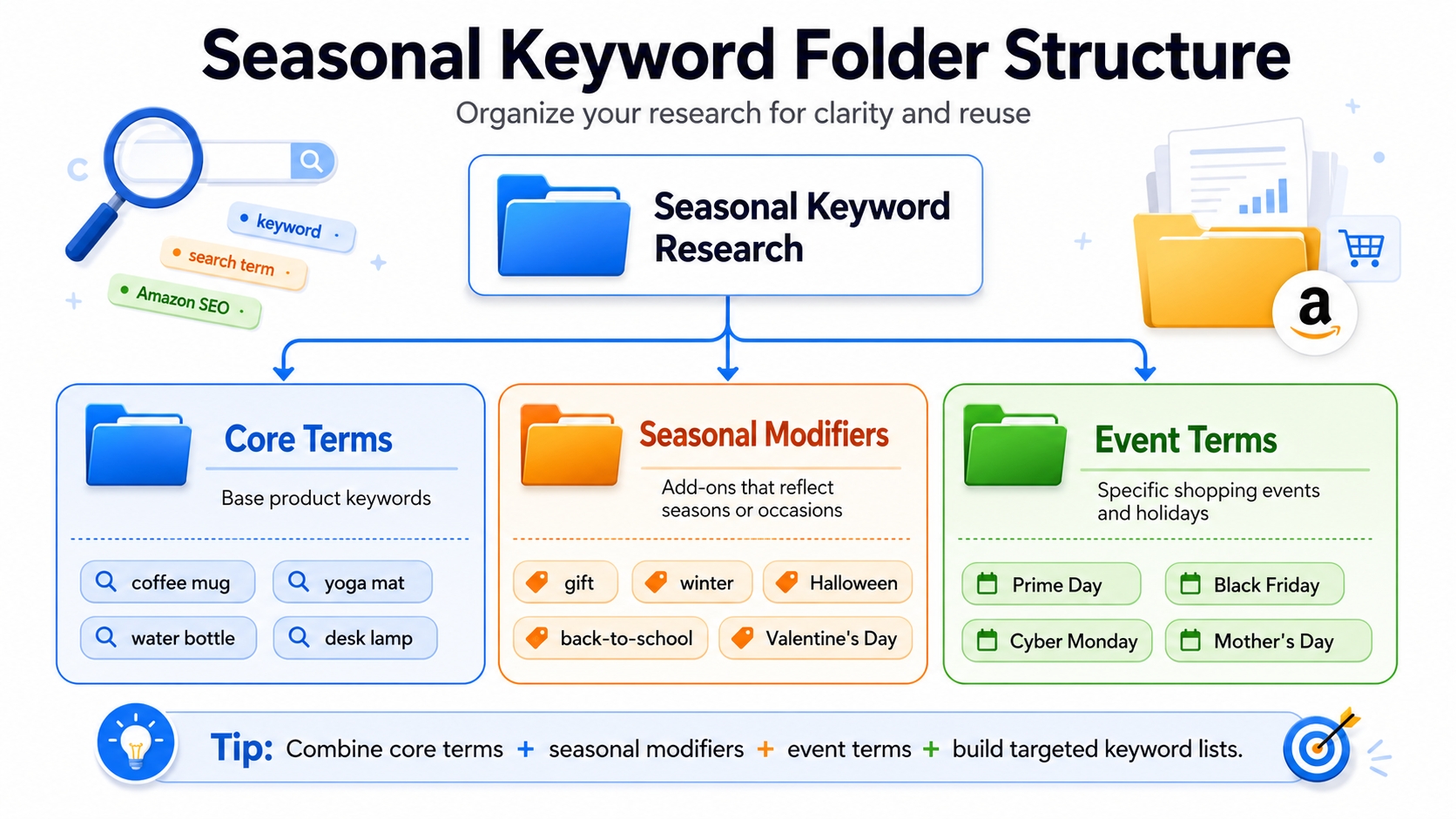
Create a "Seasonal Keyword Folder" Structure
Organize your research for clarity and reuse:
Core Terms
Base product keywords (e.g., "coffee mug," "yoga mat").
Seasonal Modifiers
Add-ons like "gift," "winter," "Halloween," "back-to-school," "Valentine's Day."
Event Terms
Specific events: "Prime Day," "Black Friday," "Cyber Monday," “Mother's Day.”
Step 1: Identify Seasonal Keywords with Google Trends (Correct Setup Matters)
Google Trends is your first filter. But only if configured correctly.
Settings Checklist
Location = United States
Ensure data reflects U.S. buyer behavior, the largest Amazon marketplace.
Time Range = Past 5 Years (Prove It's Seasonal)
A single peak isn't enough. You need 3-5 repeating cycles to confirm seasonality.
Category Filter (Reduce Noise)
Filter by "Shopping" or relevant category (e.g., "Apparel") to focus on purchase intent.
Topic vs. Search Term (When Each Helps)
Google Trends allows searching by topic or query:
- Topic: Broader concept (e.g., "Christmas") is good for early exploration.
- Search Term: Exact phrase (e.g., "Christmas gifts under $20") is better for validation.
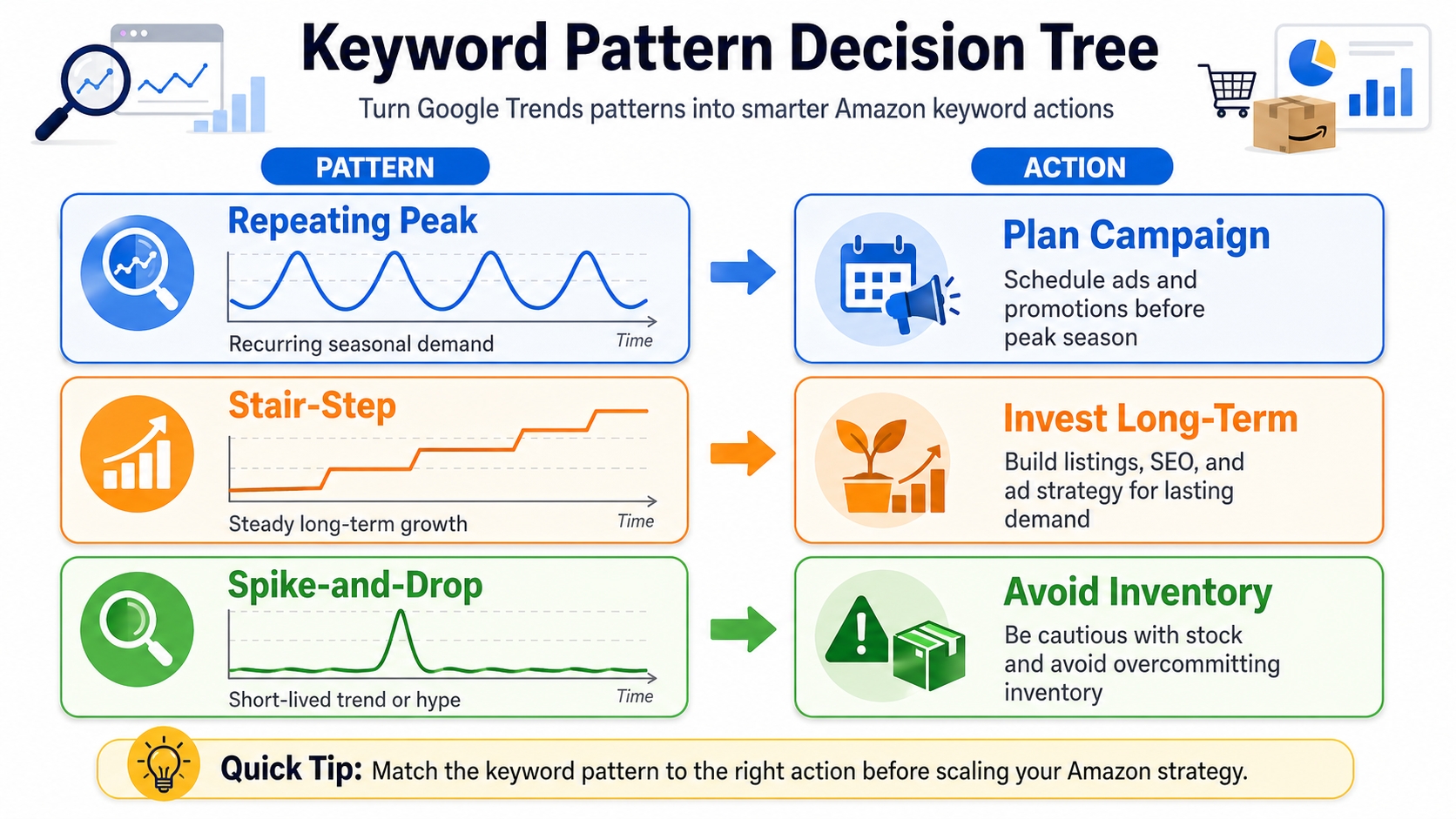
How to Read "Interest Over Time" Patterns
Repeating Peaks = Seasonal
Consistent annual spikes confirm true seasonality (e.g., "pumpkin spice latte" every fall).
Stair-Step Growth = Emerging Trend
Each year's peak is higher means opportunity for long-term growth (e.g., "reusable straw").
Spike-and-Drop = Viral Moment (Danger for Inventory)
One-time surge with no repeat indicates risky for stocking (e.g., "fidget spinner").
Find "Rising" and "Breakout" Related Queries to Build Seasonal Long-Tails
Scroll to "Related queries" and sort by "Rising." Look for breakout terms like "ugly Christmas sweater dog costume" perfect for niche targeting.
Step 2: Validate Seasonality on Amazon (So You Don't Overtrust Google)
Google shows intent; Amazon shows reality. Always validate.
Amazon Autocomplete Validation (What Buyers Actually Type)
Start typing your keyword in Amazon's search bar. If seasonal variants appear (e.g., "Christmas gift for dad 2026"), demand is active.
SERP Validation
Are Top Results Truly Your Product Type?
If "Halloween costume" returns wigs and makeup instead of apparel, your product may not fit.
Is Page One Flooded with Ads? (CPC Risk)
High ad density means CPCs will be steep; factor this into your budget.
Demand-Breadth Validation (Cluster Depth)
Seasonal Cluster = Multiple Relevant Long-Tails, Not One Keyword
True seasonal demand shows up across many variations (e.g., "gift for teen girl," "gift for teen boy," "gift for 13-year-old").
Use SellerSprite to Confirm Demand Signals and Competitor Positioning
Keyword Mining (Expand Seasonal Modifiers)
Use SellerSprite's Keyword Mining to uncover hidden seasonal variants and long-tail opportunities.
Reverse ASIN (See What Seasonal Terms Competitors Gain During Peak)
Analyze top sellers' keyword rankings over time to see which seasonal terms they rank for during holidays.
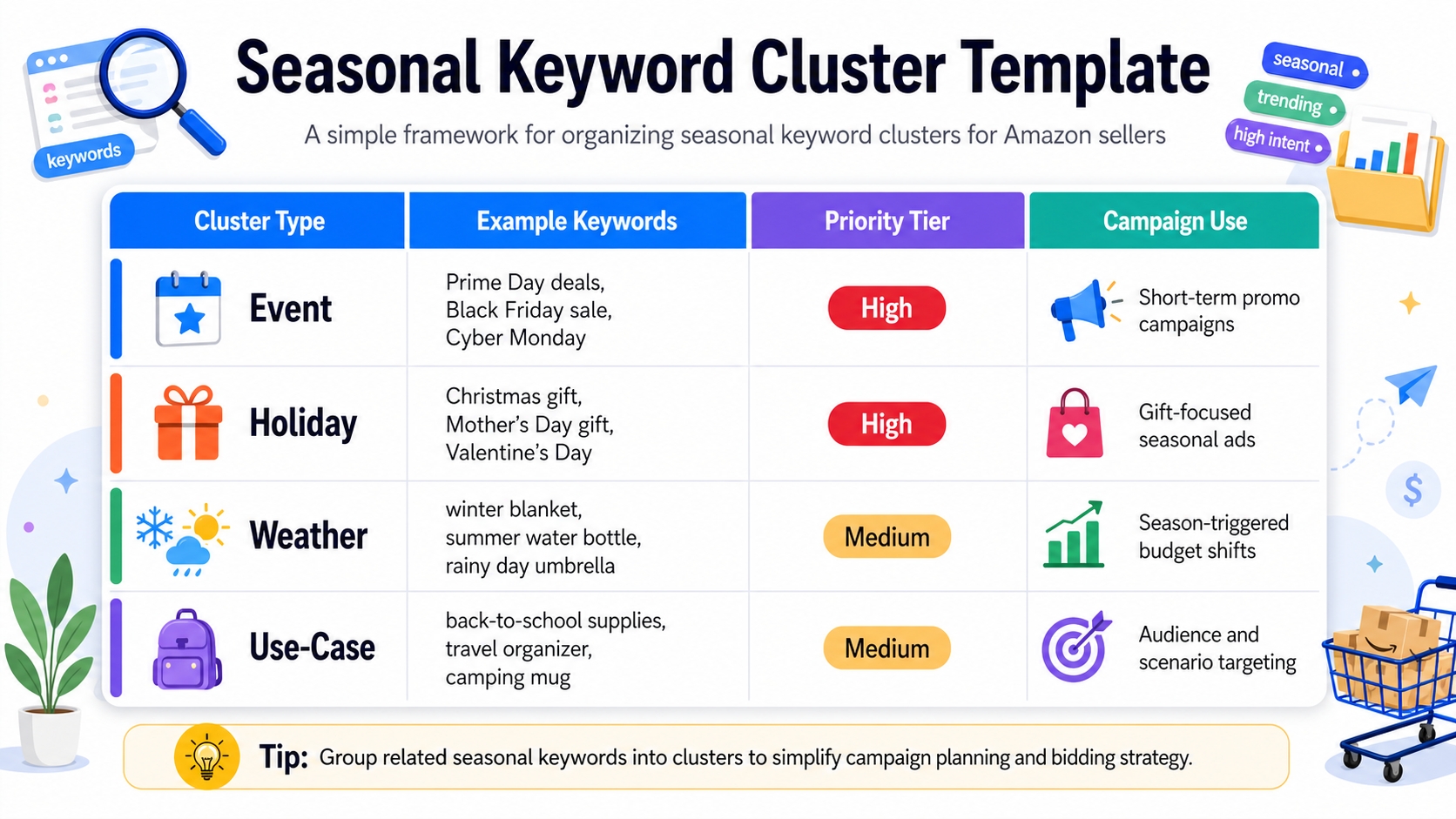
Step 3: Build Seasonal Keyword Clusters (So Execution Is Clean)
Clusters group related keywords for unified campaign and listing strategies.
Cluster Types That Work
Event Cluster (Prime Day / Black Friday)
Target terms like "Prime Day deals 2026" or "Black Friday phone deals."
Holiday Cluster (Christmas / Halloween / Valentine's)
Examples: "Valentine's Day gifts for him," "Halloween party supplies."
Weather Cluster (winter / summer / rain)
E.g., "winter hiking boots," "summer beach towels."
Use-Case Cluster (gift / travel / outdoor)
Focus on intent: "travel coffee mug," "gift for coworker."
Priority Tiers
P1: Highest Intent Seasonal Terms
High conversion potential (e.g., "Christmas gift for mom under $30").
P2: Supporting Modifiers
Broaden reach (e.g., "holiday," "festive," "seasonal").
P3: Exploratory Long-Tails
Low volume but high specificity (e.g., "personalized Christmas ornament for dog lovers").
Step 4: Prepare Early: The 6-Week Seasonal Execution Timeline
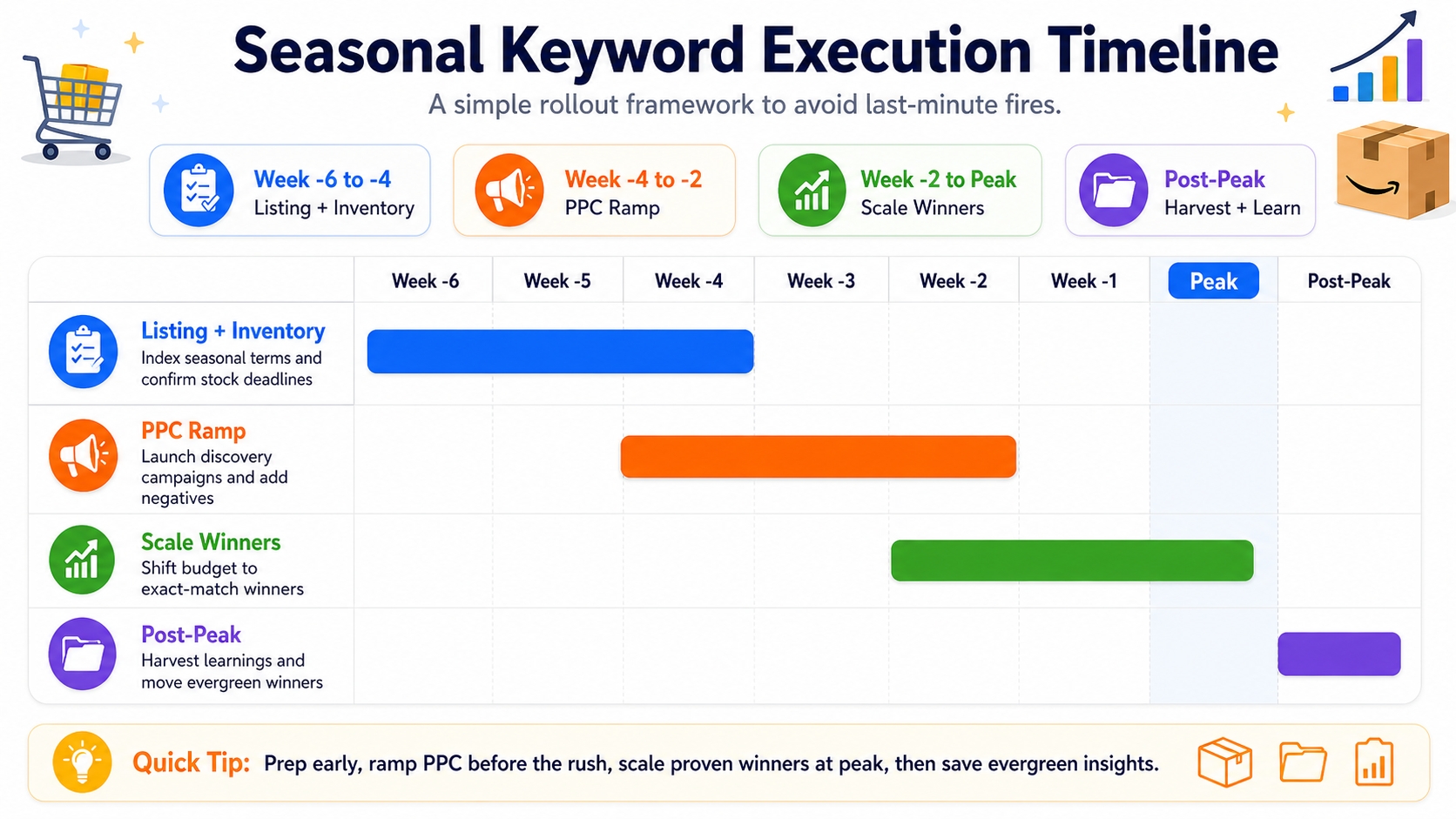
Timing is everything. Follow this timeline to avoid last-minute fires.
Week -6 to -4: Listing Readiness + Inventory Plan
Ensure Indexing for Seasonal Clusters
Update backend search terms and confirm Amazon has indexed your listing for key seasonal phrases.
Confirm Stock Levels and Inbound Deadlines
FBA cutoffs are strict; miss them and you'll miss the season.
Week -4 to -2: PPC Ramp
Discovery Campaigns for Seasonal Long-Tails
Use broad and auto campaigns to find converting search terms.
Tight Negatives to Prevent Waste
Block irrelevant terms early (e.g., "free," "DIY," "tutorial").
Week -2 to Peak: Scale Winners
Exact-Match Scaling + Placement Adjustments
Shift budget to exact-match campaigns with proven ACOS.
Post-Peak: Harvest, Liquidate, and Document Learnings
Move Evergreen Winners into Year-Round Structure
Some seasonal terms convert year-round, so, promote them permanently.
Step 5: Apply Seasonal Keywords to Listing SEO (Without Keyword Stuffing)
Optimize strategically: clarity beats density.
Title: Only If It Reads Naturally and Matches Main Intent
E.g., "Insulated Coffee Mug – Great Christmas Gift for Dad" works if gifting is a core use case.
Bullets: Map Seasonal Use Cases + Benefits (One Theme Per Bullet)
Dedicate one bullet to gifting, another to winter use, etc.
Backend Search Terms: Seasonal Variants and Spelling Options (No Duplication)
Include variations like "Xmas," "X-mas," "Chrismas" (typo), but don't repeat title terms.
A+ and Images: Seasonal Objections + Gifting Cues (If Relevant)
Show gift wrapping, holiday settings, or use-case scenes to boost conversion.
Step 6: Seasonal PPC Playbook (Protect Profit While Riding Demand)
Demand spikes don't guarantee profit, so, make sure to control your costs.
Campaign Architecture by Season
Seasonal Exact (Scale)
High-intent terms with proven conversion.
Seasonal Phrase (Controlled Expansion)
Capture variations without losing control.
Seasonal Broad/Auto (Discovery with Guardrails)
Use with tight budgets and negative keywords.
Bidding and Budget Rules
Expect CPC Inflation Near Peak
Double your usual CPC cap during Black Friday week.
Use Phase Targets (Launch vs. Peak vs. Post-Peak)
Adjust bids weekly based on performance phase.
Harvesting Loop
Pull Converting Search Terms → Promote to Exact
Move high-ACoS terms from broad to exact-match with tighter bids.
Add Negatives Fast to Stop Seasonal Waste
After Christmas, block "2026" terms to avoid irrelevant clicks.
Seasonal Keyword Calendar
Plan ahead with a reusable calendar.
What the Calendar Includes
Peak Weeks by Event
E.g., Black Friday: Week of November 25; Valentine's: Week of February 10.
Recommended Start Dates
Begin research 8-12 weeks prior.
Listing/PPC Tasks Checklist
Pre-load all seasonal optimizations.
How to Customize by Category and Lead Time
Electronics need longer lead times than apparel. Adjust accordingly.
Common Mistakes (And How to Avoid Them)
Treating a Spike as a Season (Inventory Trap)
Use 5-year data to confirm cycles, not one-off spikes.
Updating Listing Too Late (Missed Indexing Window)
Amazon takes 1-2 weeks to index new keywords, so, update early.
Overbidding Early Without Conversion Proof
Start with discovery campaigns before scaling.
Forgetting Post-Peak Cleanup (Wasted Spend + Dead Stock)
Pause seasonal campaigns and remove outdated terms.
FAQ
How early should I start seasonal keyword research?
Begin seasonal keyword research 8-12 weeks before the event. This gives you time to validate demand, optimize listings, and ramp PPC campaigns before peak competition begins.
Should seasonal keywords go in the title or backend?
Use seasonal keywords in the title only if they fit naturally and reflect core customer intent (e.g., "Great Christmas Gift for Mom"). Otherwise, prioritize backend search terms, bullets, and A+ content to avoid keyword stuffing.
What are the best seasonal products to sell on Amazon during the holidays?
Top holiday products include gift sets, personalized items, home decor, toys, electronics, and self-care bundles. Use tools like SellerSprite Keyword Mining to find high-demand, low-competition niches.
How can Amazon sellers prepare for peak season sales?
Prepare by researching seasonal keywords, optimizing listings, securing inventory, launching discovery PPC campaigns, and monitoring competitor activity. Use a 6-week timeline to stay on track.
Next Steps
- Use SellerSprite Keyword Mining to uncover seasonal long-tails for your niche.
- Review the Amazon Keyword Research Guide for foundational SEO tactics.
References
- Trend Research for Long-Term Amazon Product Opportunities View
- Amazon Keyword Research Guide View
- Amazon Product Opportunity: Trend vs. Evergreen View
By SellerSprite Success Team
The SellerSprite Success Team combines data science and Amazon marketplace expertise to deliver actionable insights. With years of experience in Amazon SEO, PPC, and product research, we help sellers turn analytics into profit, backed by real-time tools and proven strategies.


