By SellerSprite Team
SellerSprite supports Amazon sellers with keyword research, listing optimization, ad intelligence, and launch monitoring across major Amazon marketplaces. Our ad workflow recommendations are informed by recurring patterns we see in beginner campaign setup, search term mining, and early manual campaign buildouts from automatic targeting.
Answer first: Your first Sponsored Products auto campaign should be simple, controlled, and built to collect useful search term data. For beginners, automatic targeting is the fastest way to launch, discover converting queries, and learn which products and keywords deserve manual campaigns later. This guide explains a beginner strategy for automatic targeting, shows a recommended first setup, and walks through how to use SellerSprite Ads Insights to turn auto data into tighter manual campaigns.
Key Takeaways
- Start with one ASIN, one auto campaign, one ad group, and a budget you can sustain for at least 7 to 14 days.
- Closest match and loose match are usually the cleanest starting points for beginners. Substitutes and complements can be useful, but often need tighter control.
- Auto campaigns are not the end goal. They are the discovery engine that helps you identify winning search terms and ASIN targets for future manual campaigns.
- Do not optimize too early. Let the campaign gather enough clicks and spend before adding negatives or cutting bids aggressively.
Table of Contents
- What is a Sponsored Products auto campaign?
- How do you set up your first auto campaign?
- What is a recommended first auto campaign configuration?
- Auto vs manual: which should beginners use first?
- What do the four auto-targeting groups mean?
- What should you do in the first 14 days?
- How do you use SellerSprite Ads Insights after your first auto campaign?
- 14-day beginner case study
- FAQ
What is a Sponsored Products auto campaign?
Direct answer: A Sponsored Products auto campaign lets Amazon match your ASIN to shopper searches and product detail page placements automatically, based on your listing content and Amazon's own relevance signals. For beginners, it is the fastest way to collect real search term data before building manual campaigns.
Auto campaigns are useful because they reveal how Amazon interprets your product. If your targeting looks messy, it often means your listing content, category placement, or offer needs work before you scale.
Pro Tip: Treat your first auto campaign as a discovery and learning tool, not as your final ad structure.
How do you set up your first auto campaign?
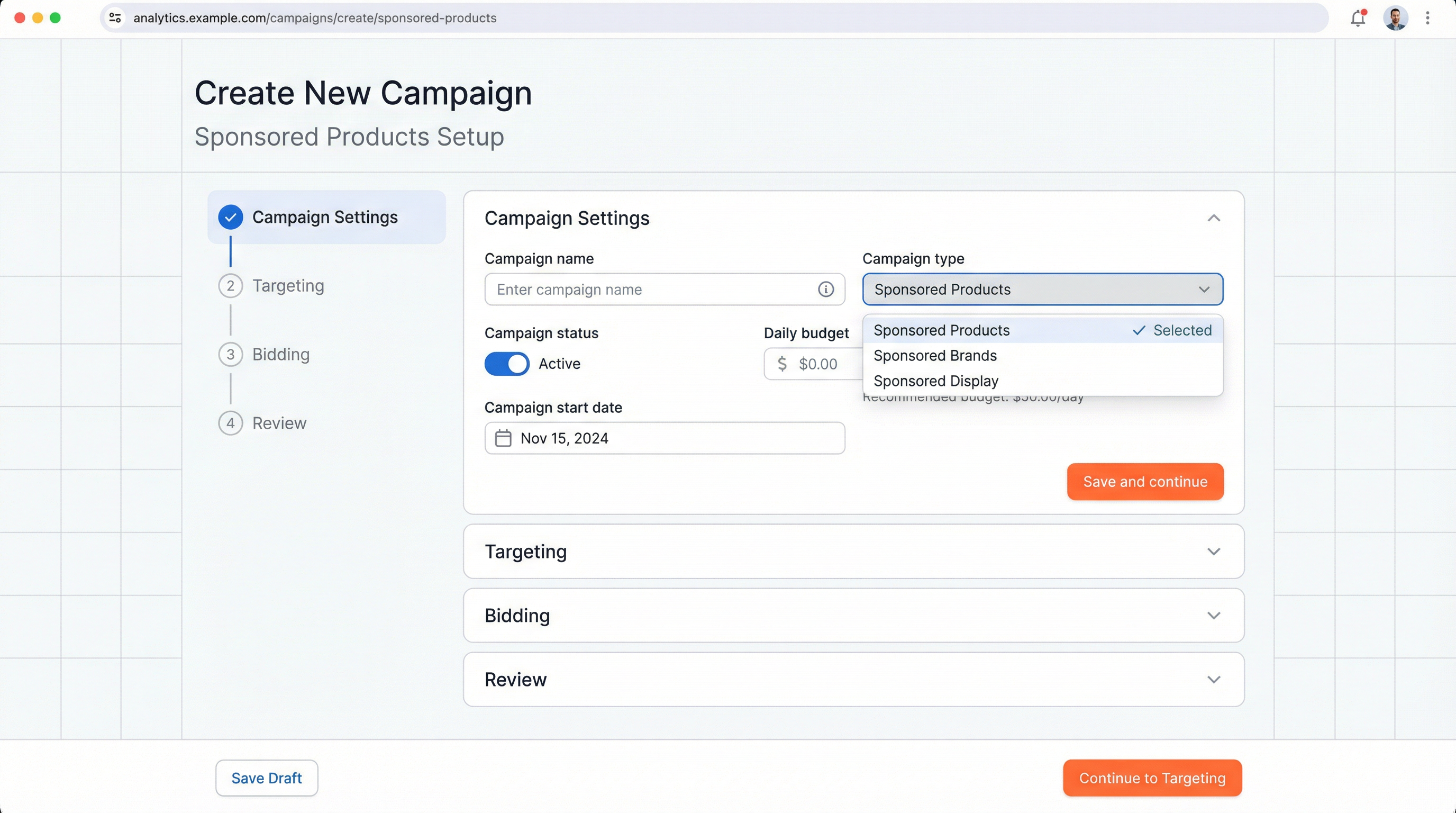
Direct answer: Keep your first setup simple. Use one campaign, one ad group, and one ASIN so the data is easier to read. Avoid bundling multiple products together at the start, because it becomes much harder to see which listing is actually converting.
- Open Campaign Manager in Seller Central and choose Sponsored Products.
- Select one ASIN that is in stock, indexed, and conversion-ready.
- Name clearly, for example: ProductName Auto US Launch.
- Choose automatic targeting and set your default bid logic.
- Set a sustainable daily budget that can run without stopping every afternoon.
- Launch and observe before making major negative targeting decisions.
Before you launch:
- Check your listing keywords with Keyword Mining.
- Confirm your ASIN is indexed for your top terms.
- Only then launch your first auto campaign.
What is a recommended first auto campaign configuration?
Direct answer: Your first auto campaign should be boring and easy to read. Use one ASIN, one market, a moderate daily budget, and conservative bids. The goal is to collect actionable data, not to force scale on day one.
Recommended first auto campaign example
- Campaign type: Sponsored Products, automatic targeting
- ASIN count: 1 ASIN per campaign for clean signals
- Daily budget: start with a budget that can collect 10 to 20 clicks per day on your default bid, often in the 15 to 30 USD range, depending on CPC in your niche
- Bidding strategy: Dynamic bids down only for beginners
- Default bid logic: start near or slightly below Amazon suggested bid, then adjust by placement quality after 7 to 14 days
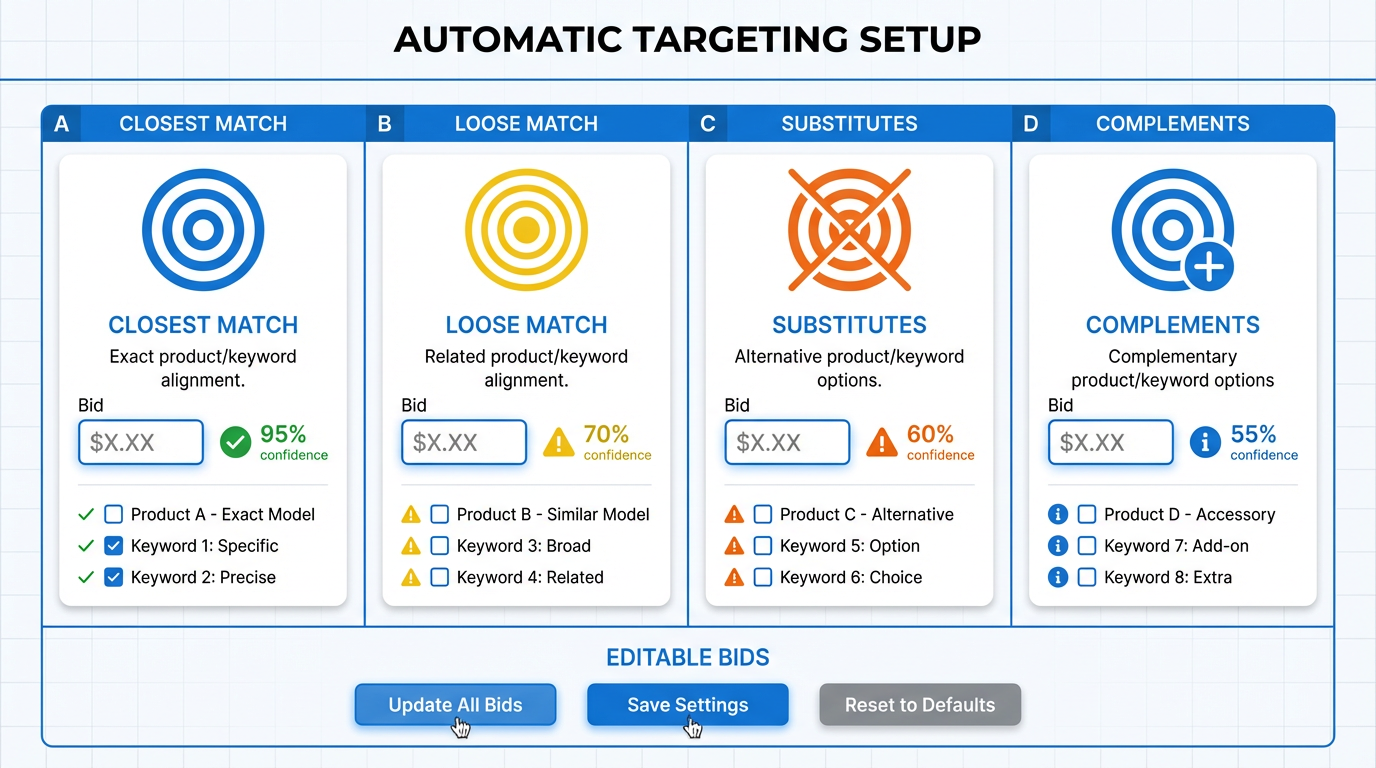
- Closest match: ON, highest bid priority
- Loose match: ON, slightly lower than closest match
- Substitutes: ON if you want product targeting discovery, lower bid than loose match
- Complements: ON with the lowest bid, or OFF if budget is very tight and you want cleaner data
- Negative keywords: none on day 1 unless you already know obvious mismatches
Auto vs manual: which should beginners use first?
Direct answer: Most beginners should start with auto first, because automatic targeting helps reveal real search terms and ASIN placements. Manual campaigns work best after you already know what converts.
What do the four auto-targeting groups mean in practice?
Direct answer: The four auto-targeting groups are not just checkboxes. They represent different relevance and placement behaviors. Closest and loose match help you understand shopper queries, while substitutes and complements help you understand product page opportunities.
- Closest match: best for finding tightly relevant shopper intent. Usually, the strongest starting point.
- Loose match: useful for broader long-tail discovery, but it can be noisier.
- Substitutes: useful when competitor detail pages are important to your strategy.
- Complements: often the weakest signal for beginners, but sometimes useful in accessories and add-on products.
Common Mistake: Giving every auto targeting group the same aggressive bid, then assuming auto campaigns are unprofitable when complements spends first.
What should you do in the first 14 days of your first auto campaign?
Direct answer: In the first 14 days, your job is to gather enough click and search term data to separate promising traffic from waste. The mistake is optimizing too hard before the campaign has enough signal.
Days 1 to 7
- Let the campaign run with minimal interference.
- Check budget exhaustion. If the campaign stops early every day, the data will be incomplete.
- Watch CTR and conversion to see if the listing is ready for paid traffic.
Days 8 to 14
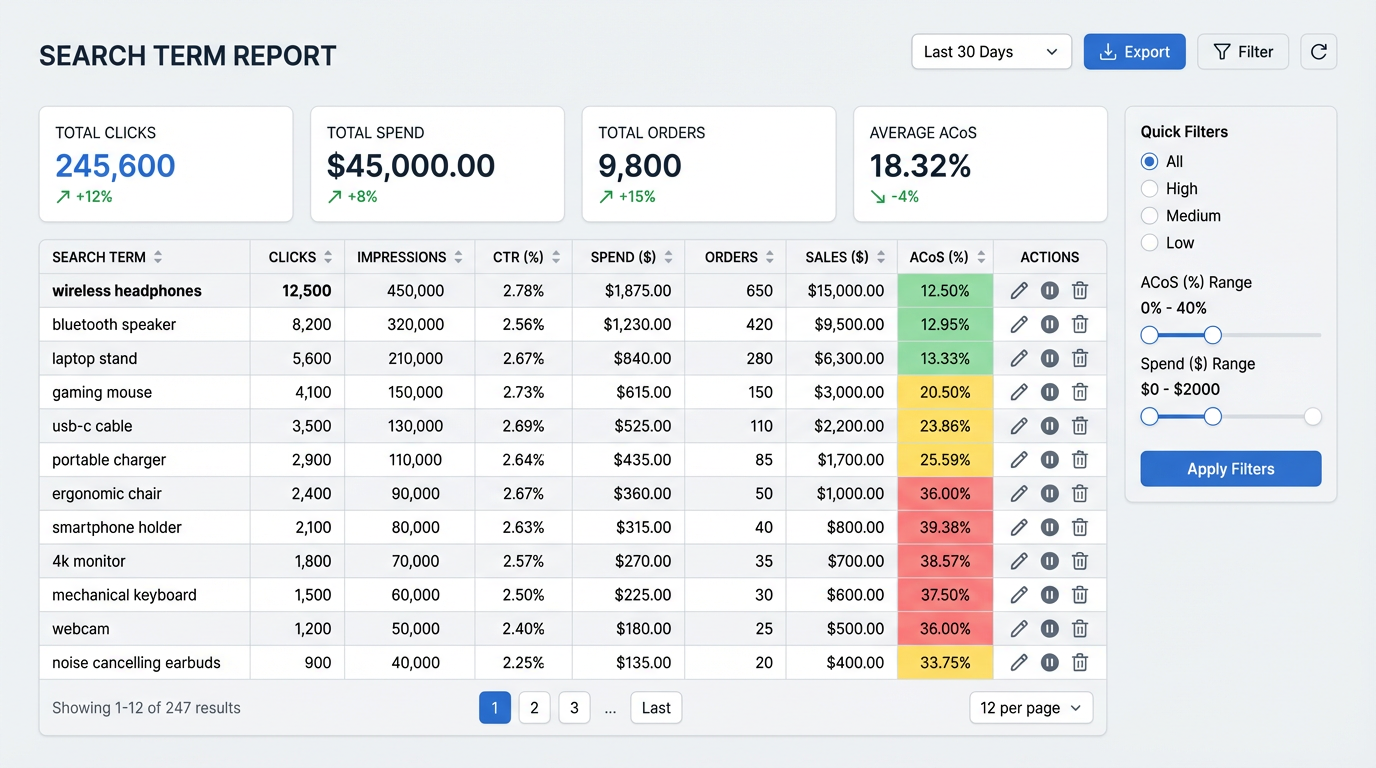
- Review search terms and ASIN placements.
- Identify search terms with clicks and conversions that deserve manual exact or phrase campaigns.
- Add negatives only when a search term or ASIN has proven waste, not just because it looks broad.
After 7 to 14 days
- Export the search terms that drove clicks and orders.
- Promote winners into a manual campaign structure.
- Add waste terms as negatives in the auto campaign.
How do you use SellerSprite Ads Insights after your first auto campaign?
Direct answer: Use Ads Insights to turn raw auto campaign data into structure. The goal is simple: extract winners, build manual campaigns around them, then block waste in auto so it continues discovering without bleeding budget.
- Import or sync ad data into Ads Insights so you can review search terms and placements in one place.
- Filter for winners by looking for search terms or ASINs with clicks plus at least one conversion, or strong CTR that deserves more focused testing.
- Export and build manual campaigns using those terms in exact or phrase targeting.
- Add negatives back into auto for terms and placements that clearly waste spend.
Build your first manual from auto data
- Open Ads Insights and sort by conversions or best click quality.
- Export the winning search terms and ASIN placements.
- Use those winners to create your first exact and phrase campaigns.
What does a beginner auto campaign look like over the first 14 days?
Direct answer: A healthy beginner auto campaign usually starts with broad data collection, then becomes more selective once search term quality becomes visible. The point is not perfect ACoS on day one. The point is useful discovery that leads to a better manual structure.
14-day beginner case
A new kitchen accessory launched one auto campaign with one ASIN. In the first 7 days, closest match and loose match produced most of the useful search term data, while complements spent with no orders.
- Days 1 to 7: Campaign ran mostly untouched while budget and CTR were monitored.
- Day 8 review: 4 search terms and 2 ASIN targets showed clear promise, 1 complement placement wasted spend.
- Decision: Build a small manual exact campaign for the best terms, reduce complement bid, and add one negative after repeated non-converting spend.
- By day 14: The account had cleaner targeting, clearer winners, and a stronger structure for week 3 scaling.
This is an anonymized beginner pattern based on aggregated operational observations. Your category CPC, price point, and listing quality will change the exact numbers.
FAQ
Should beginners start with auto or manual campaigns?
Most beginners should start with auto because automatic targeting helps discover search terms and ASIN placements before manual structure is built. Manual usually works best after you already know what converts.
How long should I let my first auto campaign run before optimizing?
Many sellers review lightly in the first 7 days and make stronger decisions after 7 to 14 days, once enough click and spend data has accumulated to identify patterns.
When should I add negative keywords to an auto campaign?
Add negatives when a search term or ASIN has clearly shown waste over enough spend or clicks. Avoid adding negatives too early, because you may cut off useful discovery before the campaign has learned enough.
How should I evaluate ACoS in my first auto campaign?
Look at ACoS as part of a bigger story. Early ACoS can be high in discovery mode. What matters is whether the campaign is uncovering search terms and placements that later become profitable in manual campaigns.
What if my auto campaign gets clicks but no orders?
That usually points to a conversion problem, weak offer, or weak relevance match. Check your listing quality, main image, reviews, price, and whether the search terms actually match the product's strongest use case.
Get Help From the SellerSprite Community
Share your negotiation situation, get feedback, and learn from other sellers in the SellerSprite Discord and Facebook Group.
View The SellerSprite Course Directory
Ready for the next step? Open the SellerSprite Academy course directory to continue building your Amazon FBA skills chapter by chapter.


