Quick answer: Eligible SellerSprite free users can enter coupon code FPCP30 during checkout to receive 30% off an eligible SellerSprite paid plan. Create or log in to your account, select a plan, apply the code, and confirm that the discounted total appears before completing payment.
Looking for a SellerSprite coupon code before upgrading your account? The official promotional code FPCP30 makes it easier for eligible users to move from a free account to a paid SellerSprite plan.
SellerSprite is an Amazon seller research platform that supports product research, keyword research, competitor analysis, listing optimization, market evaluation, and ongoing product and keyword tracking. A paid plan provides higher usage limits and additional capabilities based on the plan you select.
In this guide
SellerSprite 30% Off Coupon Details
| Coupon code | FPCP30 |
|---|---|
| Discount | 30% off across all SellerSprite paid plans |
| Intended users | Eligible SellerSprite free users upgrading to a paid account |
| Where to apply it | In the coupon or promo code field on the pricing or checkout page |
| How to verify it | Confirm that the discount and updated total appear before submitting payment |
Important: This is a limited-time promotional offer. Availability, account eligibility, plan coverage, and final pricing may change. Always use the total displayed at checkout as the final confirmation of your discount.
How to Use SellerSprite Coupon Code FPCP30
Follow these four steps to create an account, select a plan, and apply the 30% SellerSprite discount correctly.
Step 1: Create or Log In to Your SellerSprite Account
You need a SellerSprite account before you can purchase or upgrade a plan. New users can create a free account, while existing users should log in using the account they want to upgrade.
Create a Free SellerSprite Account
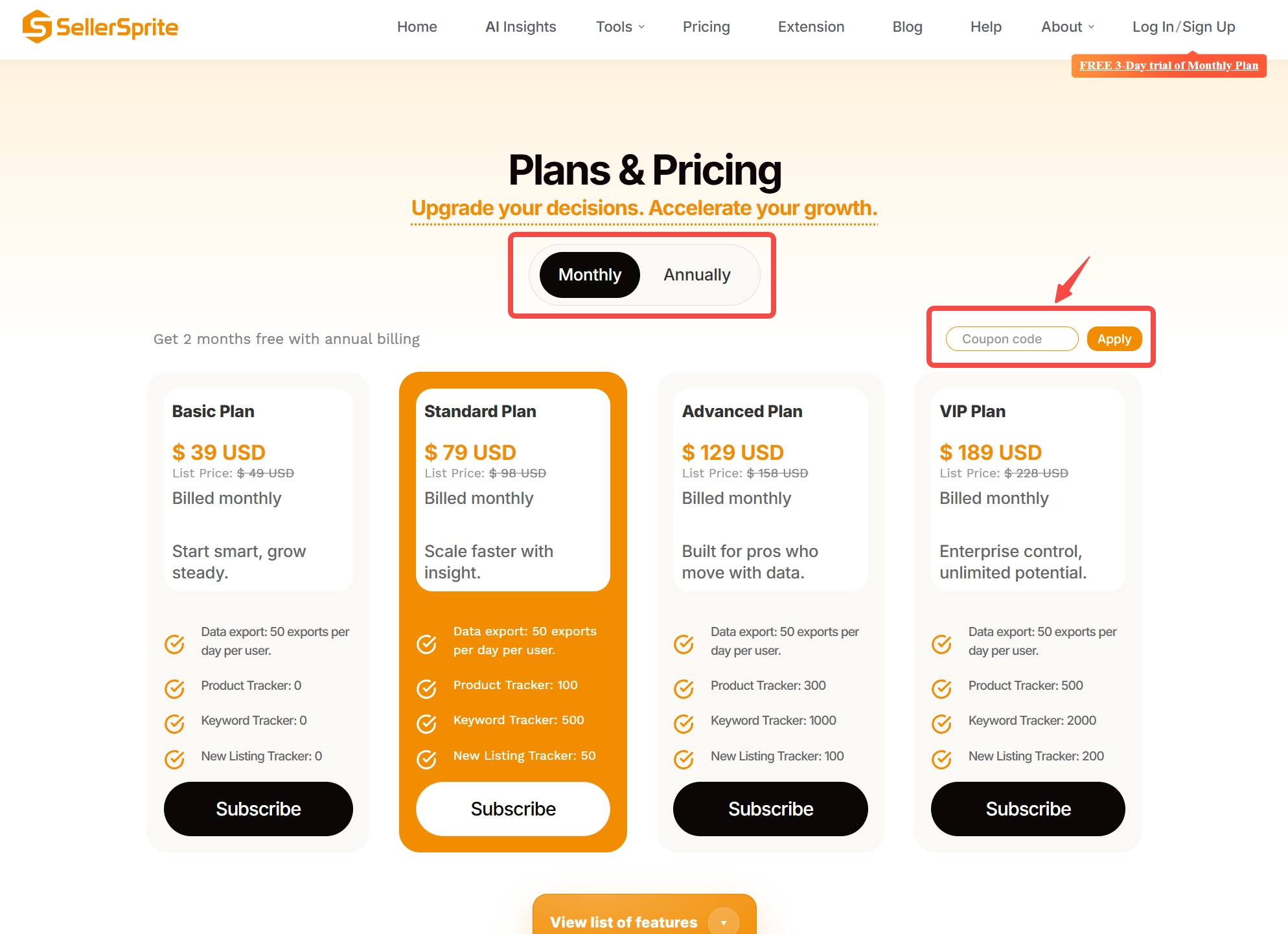
Step 2: Compare SellerSprite Plans
Visit the official pricing page and compare the available plans. Instead of choosing only by price, review the features and usage limits that matter for your workflow, including:
- Product Tracker and Keyword Tracker limits
- New Listing Tracker capacity
- Data export limits
- Main and child account access
- Monthly versus annual billing
Select the plan that matches your current research volume, team size, and Amazon growth stage. You can review the final price and billing cycle again before payment.
Step 3: Enter FPCP30 at Checkout
After selecting a plan, click the Subscribe button to open the checkout page. Locate the coupon or promo code field and complete the following actions:
- Enter FPCP30 exactly as shown.
- Click Apply.
- Wait for the checkout total to update.
- Confirm that the 30% discount is reflected before submitting payment.
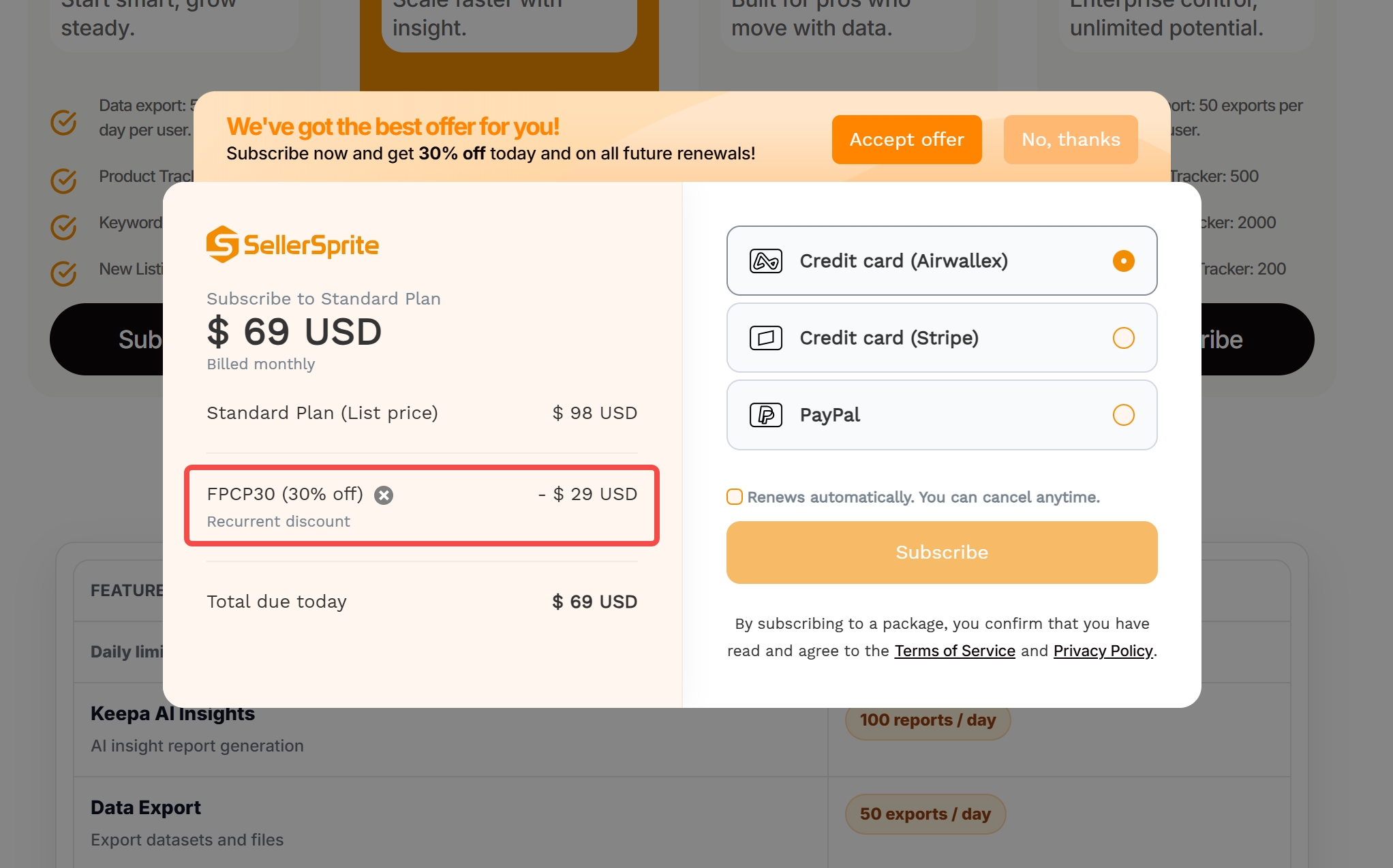
Checkout reminder: Do not complete the transaction until the coupon has been accepted and the discounted total is visible. Entering a code without clicking Apply may not update the order amount.
Step 4: Complete the Upgrade
Review the selected plan, billing cycle, payment method, renewal information, discount, and total amount due. Once everything is correct, complete the payment and log in to confirm that the upgraded plan is active.
You can then begin using the tools most relevant to your Amazon business, such as product opportunity research, competitor analysis, keyword discovery, reverse ASIN research, listing optimization, review analysis, and rank tracking.
Which SellerSprite Plan Should You Choose?
The best plan depends on how frequently you conduct research, how many products or keywords you track, and whether multiple team members need access.
| Your situation | What to compare |
|---|---|
| You are starting Amazon product research | Entry-level pricing, core research access, and basic usage limits |
| You research products and keywords regularly | Research frequency, exports, and product or keyword tracking capacity |
| You manage several listings or marketplaces | Higher tracking limits and broader workflow support |
| You work with a team | Child account allowances and collaboration requirements |
| You operate at a larger scale | Higher data limits, additional accounts, and long-term billing value |
Avoid paying for significantly more capacity than you currently need. At the same time, make sure the plan provides enough tracking, exports, and account access for your normal operating workflow.
What to Do If the SellerSprite Coupon Does Not Work
If FPCP30 is not accepted or the price does not change, check the following before attempting payment:
Check the spelling
Enter FPCP30 without extra spaces or punctuation.
Click the Apply button
The checkout total may not update until the code has been submitted successfully.
Confirm that you are logged in
Make sure you are purchasing through the correct SellerSprite account.
Review account and plan eligibility
Limited-time promotions may be restricted by account status, selected plan, billing cycle, region, or offer availability.
Do not pay if the discount is missing
Return to the pricing page or contact SellerSprite support before completing the transaction.
Frequently Asked Questions
What is the SellerSprite 30% off coupon code?
The promotional code is FPCP30. Eligible users can enter it during checkout to receive 30% off across all SellerSprite paid plans.
Where do I enter the SellerSprite coupon code?
Enter FPCP30 in the coupon or promo code field on the SellerSprite pricing or checkout page, then click Apply.
How do I know whether the discount was applied?
The order summary should display an updated discount and a lower total amount due. Verify both before completing payment.
Can new SellerSprite users use FPCP30?
New users can first create a free SellerSprite account and then check whether the promotional code is available when upgrading to a paid plan.
Does FPCP30 work with monthly and annual plans?
The offer is presented as applying to SellerSprite plans, but promotion terms can change. Select your preferred billing cycle and confirm that the discount appears in checkout before paying.
What should I do if FPCP30 is invalid?
Check the spelling, remove extra spaces, click Apply, and confirm that you are logged in to an eligible account. If the code is still unavailable, contact SellerSprite support before submitting payment.
Ready to Upgrade Your SellerSprite Account?
Create a free account or compare the available plans. Enter FPCP30 at checkout and confirm your 30% discount before completing payment.



hello
Reply
Like 1