By SellerSprite Team
We help Amazon sellers plan and execute launches using marketplace data, keyword intelligence, and rank tracking across major marketplaces. SellerSprite has served 1.6M+ users worldwide since 2017 and supports research and monitoring across multiple Amazon marketplaces. Learn more about SellerSprite
This Amazon product launch formula is a step-by-step launch plan built around one idea: ranking sticks when you connect keywords, sales, and reviews with high conversion quality. In the honeymoon period, Amazon collects early performance signals fast, so your job is to generate real keyword-driven purchases, not random spikes. Below, you will learn how to build a launch keyword map, execute a 30-day plan, and monitor indexing and rankings with SellerSprite tools.
If you want a repeatable workflow for your next launch, follow the phases, use the tables as checklists, and track your results daily in week 1.
Key Takeaways
- Launch is a system: connect keyword relevance, sales from those keywords, and review foundation for stability.
- Shipping plan for growth: your first 30 days need enough inventory and a clear budget so you do not stall from stockouts.
- Choose the right traffic: prioritize keyword-targeted traffic that converts over cheap clicks that hurt conversion.
- Track what Amazon sees: verify indexing, monitor rank movement, and watch competitor changes daily in week 1.
- Use PPC as a lever: Sponsored Products can help you earn initial visibility, but only works long term when the listing converts.
Table of Contents
The Amazon product launch formula
Question: What is the simplest way to think about a sustainable Amazon launch?
Answer: A sustainable launch ties together the keywords customers use, the sales you generate from those keywords, and a review foundation that helps conversion stay strong after the initial push.
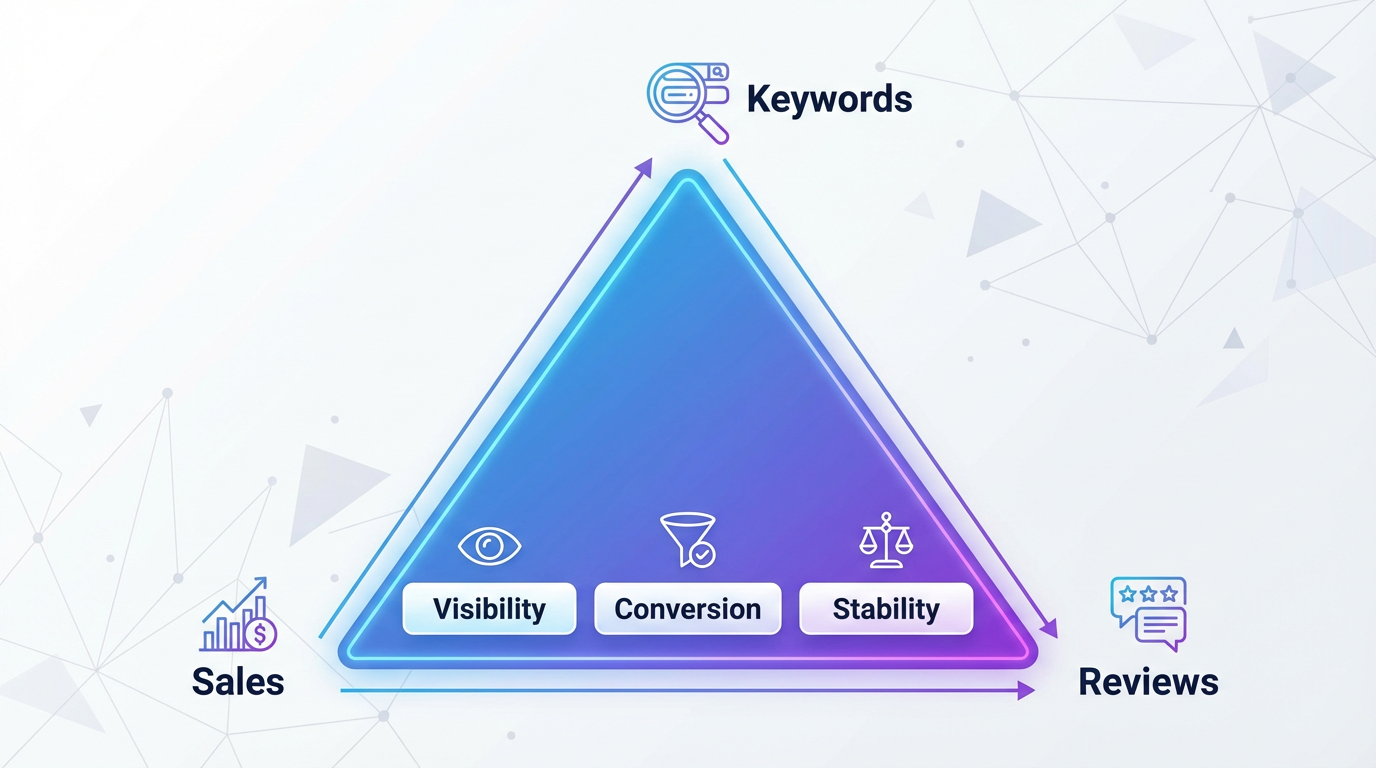
Pro Tip: Treat launch like an experiment. Change one lever at a time: keyword targeting, main image, price, or offer. Then measure impact on CTR, conversion, and rank.
Launch outcomes we commonly see
Below are anonymized, representative launch scenarios based on aggregated SellerSprite customer observations. Results vary by category, pricing, and offer strength.
- Case A, Home and Kitchen, 30 days: after rebuilding the keyword tiers and fixing indexing before ads, the product moved from page 8 plus to page 2 to 3 for 3 primary terms. CTR improved from about 0.35 percent to 0.70 to 0.90 percent range, and conversion improved from about 7 to 9 percent to 12 to 14 percent range in days 8 to 21.
- Case B, Beauty, first 21 days: the seller reduced wasted spend by adding negatives and aligning images to intent. ACoS dropped from about 65 to 80 percent to 30 to 45 percent range, while organic rank stabilized for 2 mid-tail keywords after week 2.
Phase 0: How do you build a launch keyword map that actually ranks?
Question: How do I pick launch keywords without wasting spend?
Answer: Build a three-tier keyword map: primary for your main intent, secondary for adjacent intents, and expansion for long tail use cases. Then validate relevance and indexing before you scale ads.
A keyword map works when every tier is aligned to the listing promise. If your main image and bullets do not match the query intent, the launch will stall because conversion stays low.
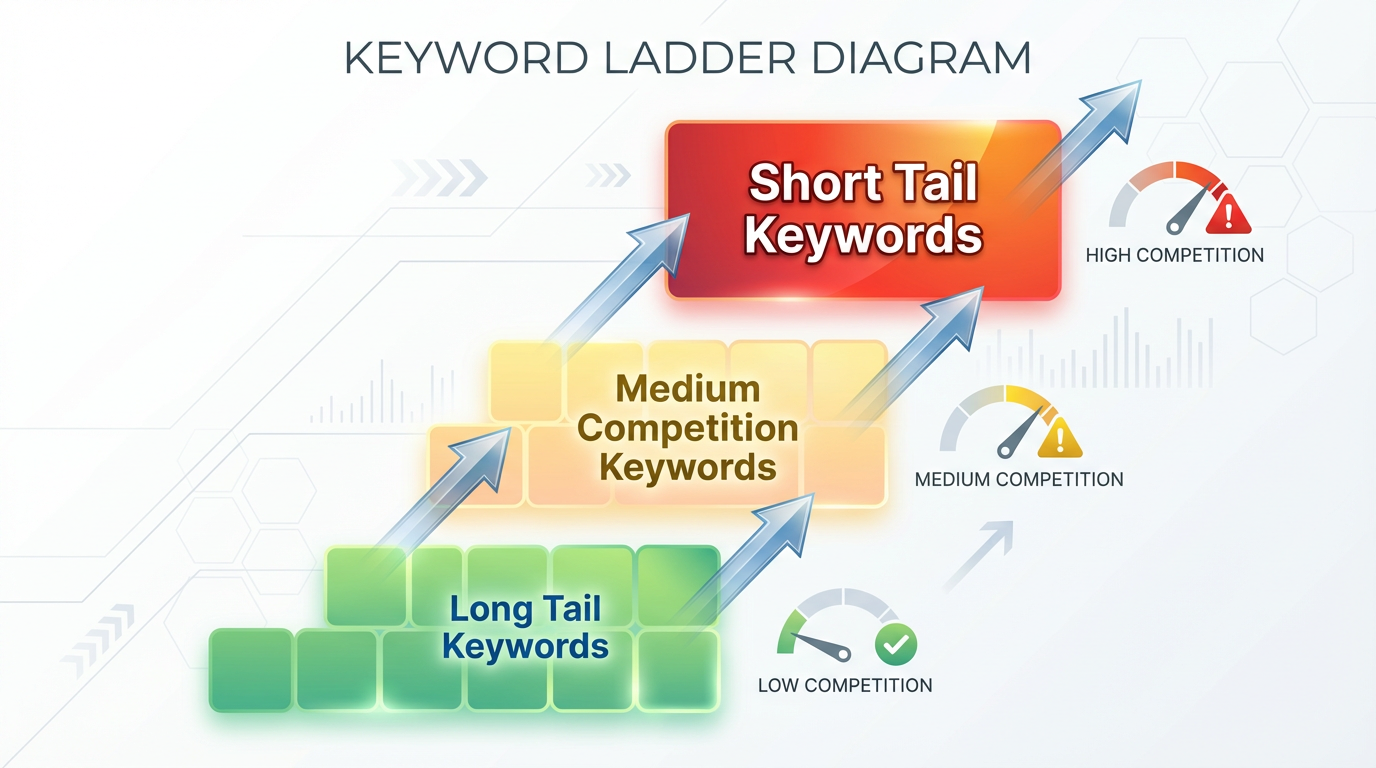
Build the keyword tiers in 20 minutes
- Start with competitors: run Keyword Research and collect seed terms, then validate with competitor pages.
- Reverse ASIN for traffic terms: export the keywords that drive clicks to 3 top competitors, then dedupe and group by intent.
- Validate indexability: once your listing is live, confirm the top 10 terms are indexed using Index Checker.
Common Mistake: launching on the biggest short tail keyword first. If conversion is not proven, you pay for expensive clicks and teach Amazon the listing is a weak match.
30-day launch timeline: What should you do each week?
Question: What does a realistic 30-day launch plan look like?
Answer: Prepare first, push hard in days 1 to 7 with controlled traffic, optimize in days 8 to 21 based on conversion signals, then stabilize in days 22 to 30 by tightening profitability and protecting rank.
Phase 1: How do you launch your Amazon product in the first 7 days?
Question: What matters most in the first week of the honeymoon period?
Answer: Conversion quality. Drive visibility on your primary keyword tier, but pause and fix the listing if conversion is weak. A launch week is a conversion test, not just a traffic event.
Day 0 checklist before you spend
- Your primary keywords appear naturally in title and key features.
- Main image communicates the promise in under 2 seconds on mobile.
- Indexing confirmed for top 10 launch keywords with Index Checker.
- Inventory covers at least 30 days of projected demand to avoid rank disruption from stockouts.
Warning: If you are not indexed, ads can still spend, but organic momentum will be limited for that keyword. Fix indexing first.
Launch week actions that directly move rank
- Start with primary tier ads: use Sponsored Products to earn initial visibility while organic rank develops.
- Watch conversion daily: if sessions rise but orders do not, improve images and offer before raising bids.
- Expand only after stability: once CVR stabilizes, add secondary keywords and long tail use cases.
Amazon explains Sponsored Products as a way to grow visibility and boost sales, which is why it is commonly used for new product discovery. Use it as a controlled lever, not a substitute for listing quality.
SellerSprite launch workflow card: Pre-launch validation
- Estimate demand: run Sales Estimator on 5 competitors to set a realistic first 30-day inventory target.
- Check unit economics: model fees and margin with Profitability Calculator before you lock bids and coupons.
- Confirm indexing: validate top 10 keywords using Index Checker, then finalize the launch keyword tiers.
Phase 2: How do you optimize ads and listing in days 8 to 21?
Question: What should I do once traffic is flowing but performance is uneven?
Answer: Tighten targeting, improve conversion assets, and scale only the keywords that convert. In days 8 to 21, you turn early momentum into stable rank bands.
Optimization checklist
- Cut waste: add negative keywords and pause high spend zero order terms.
- Upgrade visuals: test main image and 1 to 2 in gallery images that match the top keyword intent.
- Expand coverage: add long tail use case keywords to bullets and description so indexing grows safely.
- Review plan: use compliant methods such as Vine when eligible and standard review requests.
Pro Tip: If conversion rate rises after an image refresh, you often see secondary rank gains within the next 7 to 14 days, assuming you maintain steady keyword-relevant traffic.
Scenario: Fixing a stalled launch in week 2
A new Pet Supplies ASIN saw strong click volume but weak conversion in days 5 to 9. The seller rebuilt the image set around the top intent keyword, simplified the first bullet, and removed 12 waste keywords from auto targeting.
- Time range: days 10 to 21
- Change: main image plus negatives plus tighter bids
- Typical result pattern: CTR improved about 20 to 40 percent, CVR improved about 2 to 5 points, ACoS stabilized into a controllable band
Note: this is a representative pattern from launch troubleshooting and will vary by category and price point.
Phase 3: How do you stabilize ranking and profitability in days 22 to 30?
Question: When do I know my launch is working?
Answer: When rankings stop swinging wildly, your best keywords maintain position with lower paid support, and your unit economics remain healthy while inventory stays in stock.
Stabilization actions
- Budget to profitability: move spend toward best converting terms and protect brand terms.
- Expand content coverage: add use case terms you are already winning to the listing so organic visibility grows.
- Protect inventory: plan replenishment so you do not go out of stock during the first 60 days.
Warning: A stockout can reset momentum. Even a short out-of-stock window can disrupt rank because conversion and sales velocity drop abruptly.
Common Amazon launch mistakes and how to fix them
Question: What causes most launches to fail?
Answer: Skipping preparation, buying irrelevant traffic, and refusing to fix conversion problems quickly. Use the table below as a launch troubleshooting guide.
SellerSprite tools to support keyword selection, launch, and monitoring
Question: What should I track during launch so I can react fast?
Answer: Track indexing and rank movement at the keyword level, plus competitor price and rating changes at the product level. Then improve listing coverage based on the keywords you are actually winning.
- Indexing validation: Index Checker to confirm your listing shows for your important keywords and to separate organic and sponsored positions.
- Listing improvements: Listing Builder to refine keyword coverage and create stronger copy in a structured workflow.
- Demand and feasibility: Sales Estimator and Profitability Calculator to avoid launching into weak margins.
Get Help From the SellerSprite Community
Share your negotiation situation, get feedback, and learn from other sellers in the SellerSprite Discord and Facebook Group.
View The SellerSprite Course Directory
Ready for the next step? Open the SellerSprite Academy course directory to continue building your Amazon FBA skills chapter by chapter.
FAQ
These are the most common launch questions sellers ask when building an amazon product launch formula and a step-by-step launch plan.
How long does the honeymoon period last for a new Amazon product?
There is no fixed number of days, but the first few weeks typically matter most because Amazon gathers early conversion and sales signals quickly. Use days 1 to 7 to prove relevance and days 8 to 21 to improve conversion and tighten targeting.
Should I launch with ads or wait for organic?
Most sellers use Sponsored Products to earn initial visibility while organic ranking develops, but only after the listing is indexed and ready to convert. Ads are a lever, not the formula by itself.
How do I know if my keywords are indexed?
Use SellerSprite Index Checker to verify indexing and monitor positions. If you are not indexed, update listing content naturally and recheck before you scale spend.
How many reviews do I need before I start scaling?
There is no universal threshold. Focus on conversion quality first and use compliant review programs where eligible. Amazon Vine is one option for registered brands and eligible products, but always follow current Amazon rules.
What should I do if rank improves then drops after week 2?
This usually means conversion is not holding or your traffic mix shifted to less relevant searches. Tighten keywords, fix images and bullets, and monitor movement with keyword tracking until the ranking band stabilizes.
Further Reading
- Amazon Sponsored Products overview: Sell on Amazon
- Amazon Vine help documentation: Seller Central Help
Next steps
- Pick 10 launch keywords: build primary, secondary, and expansion tiers, then confirm indexing with Index Checker.
- Plan 30 days of inventory: estimate competitor demand with Sales Estimator and sanity check margin with Profitability Calculator.
- Improve listing coverage: update title and bullets using Listing Builder so your top intent keywords are naturally included.
- Launch and measure: run week 1 with controlled Sponsored Products traffic and review results daily, then optimize in days 8 to 21.


