Add a coupon badge, upgrade your Q&A responses, plan your Brand Registry, then use SellerSprite Seller Tools to benchmark competitors and track real progress.
If you want more sales fast, start with what shoppers notice first: a coupon badge and clear answers to common questions. These two updates can boost click-through and conversion rates without rebuilding your entire listing.
Then, when you are ready to scale like a real brand, Brand Registry unlocks richer content and stronger ad options.
Throughout this chapter, you will use SellerSprite Seller Tools to validate what works, not guess.
Policy and risk notice:
Amazon policies and eligibility rules change over time. Use this chapter as an execution playbook, but always verify the latest requirements in Amazon's official documentation before launching promotions or changing customer-facing messaging.
Conclusion:
A visible coupon badge helps you win attention, a strong Q&A system helps you win trust, and Brand Registry helps you build durable differentiation at scale. Validate every step with SellerSprite Seller Tools so you keep what works and stop what does not.
Applicable scenarios:
- You have impressions, but your listing is not getting enough clicks.
- You get clicks, but shoppers hesitate because key questions are unanswered.
- You want a measurable optimization you can roll out across multiple ASINs.
- You are planning a long-term brand and want access to premium listing assets.
Not suitable for or limitations:
- Coupons can reduce margin if your pricing cannot absorb the discount and Amazon fees.
- Q&A must remain honest and shopper-focused and should follow Amazon policies.
- Brand Registry requires time and filing costs, so validate demand before investing heavily.
If you only remember one thing:
Make one shopper visible improvement at a time, then use SellerSprite to confirm the impact and scale the winners.
Key Takeaways
- A coupon badge is a fast way to stand out in search results and lift click-through rate.
- Choose percent off versus money off based on price point and on-screen clarity.
- A well-run Q&A system removes objections and improves conversion confidence.
- Use keywords naturally only when they improve clarity for real shoppers.
- Brand Registry unlocks premium assets like A+ Content and more brand tools.
- SellerSprite Seller Tools help you benchmark competitors and track progress after each change.
Table of Contents
- Background and definitions
- Step 1: How to launch an Amazon coupon badge in Seller Central
- Step 2: Percent off vs. money off Amazon coupons
- Step 3: Use Amazon listing Q&A to increase conversions
- Step 4: How to answer Amazon Q&A professionally
- Step 5: When to apply for Amazon Brand Registry (requirements and benefits)
- Comparison and selection
- Examples and copyable templates
- FAQs
- Summary and next steps
- About the author
- References
Background and definitions
This section defines the three levers in this chapter so you can implement them quickly and measure impact consistently with SellerSprite.
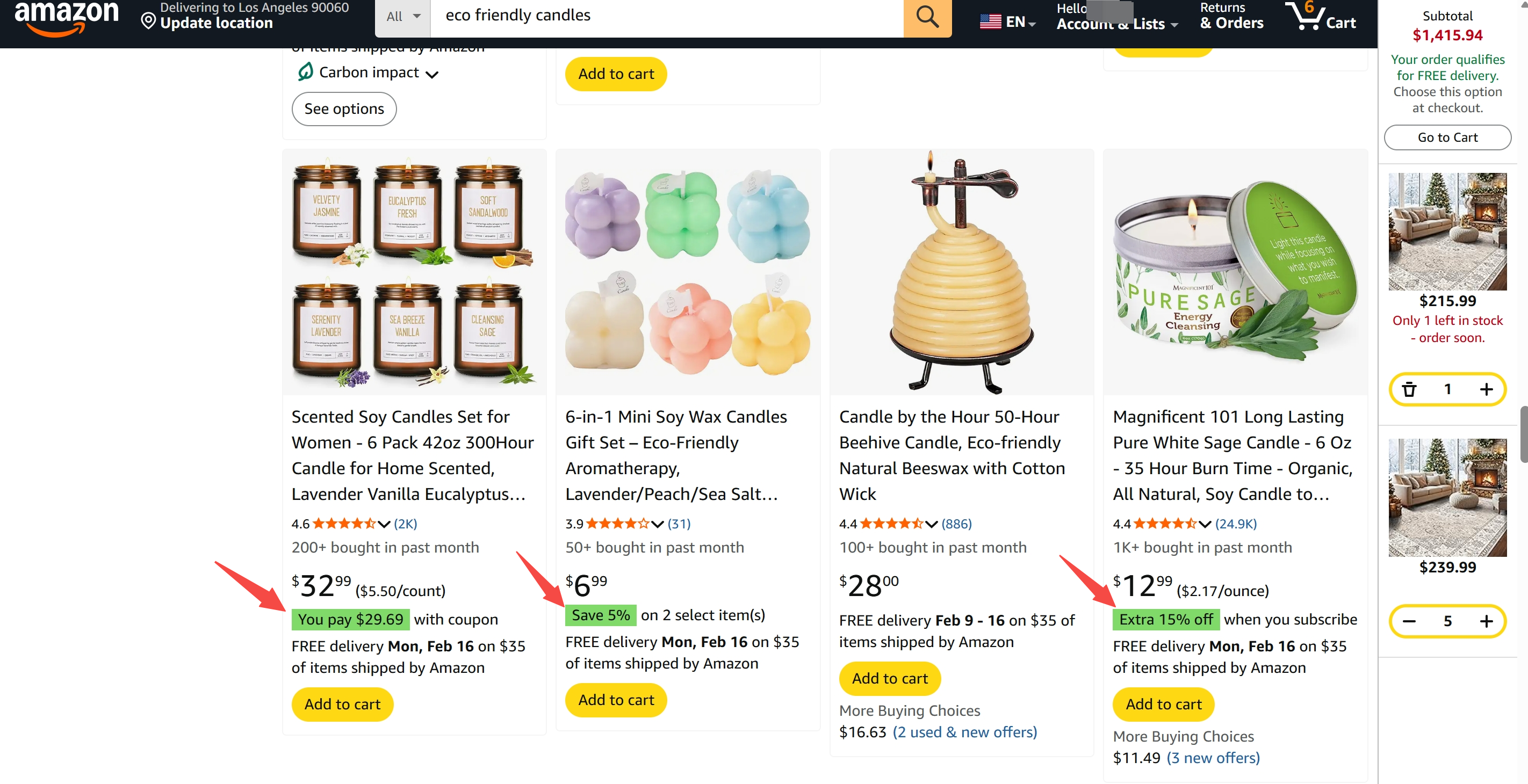
What is an Amazon coupon badge?
An Amazon coupon badge is the visual promotion label shoppers see in search results and on product pages when you run a coupon. It is designed to signal savings instantly and can improve click-through rate when your offer looks credible in your niche.
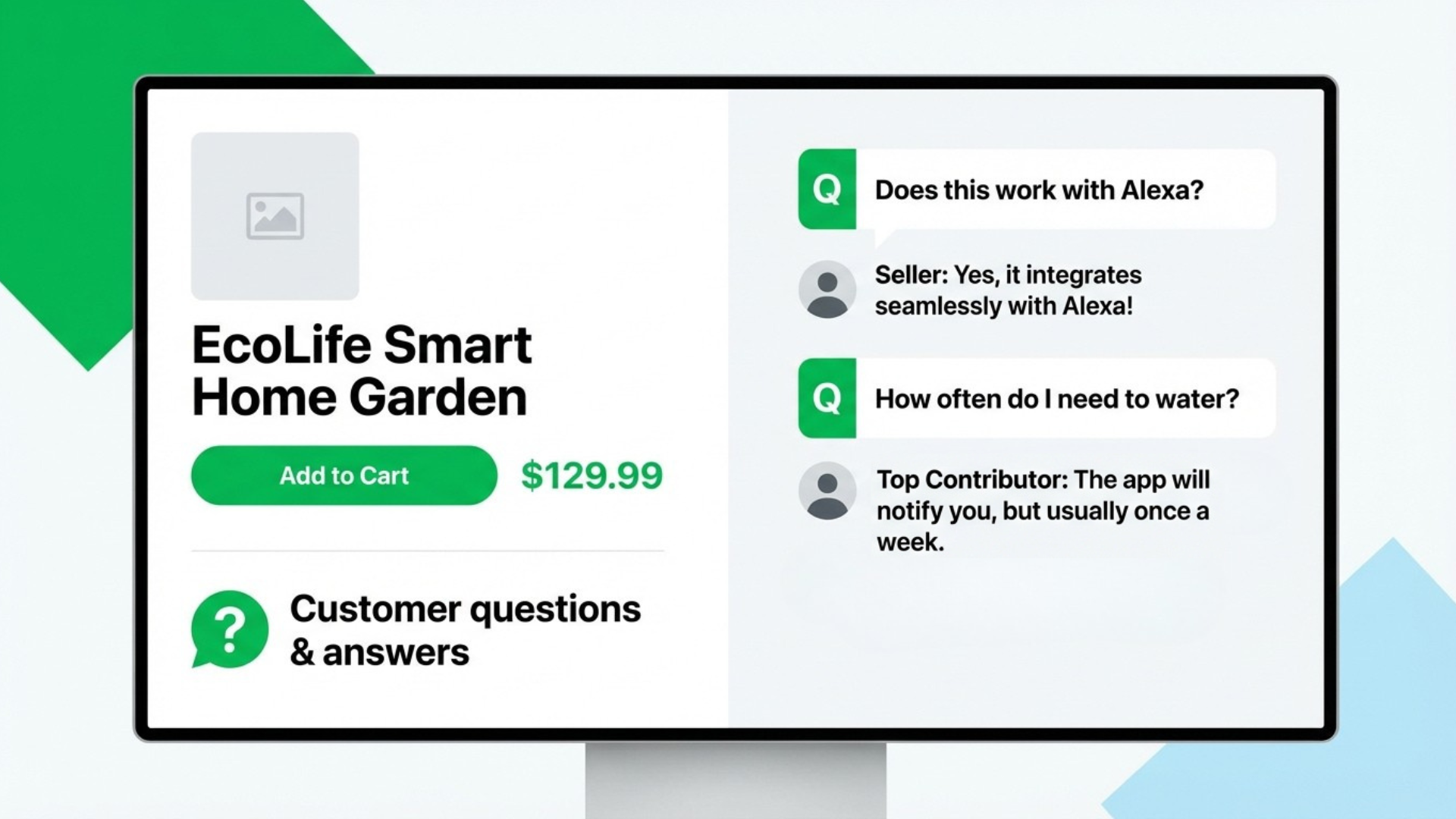
What is Amazon listing Q&A?
The Amazon listing Q&A is the customer question section on your product detail page, where shoppers ask product-specific questions and sellers or other customers answer them. It can reduce hesitation right before purchase when your answers are fast, clear, and professional.
What is Amazon Brand Registry?
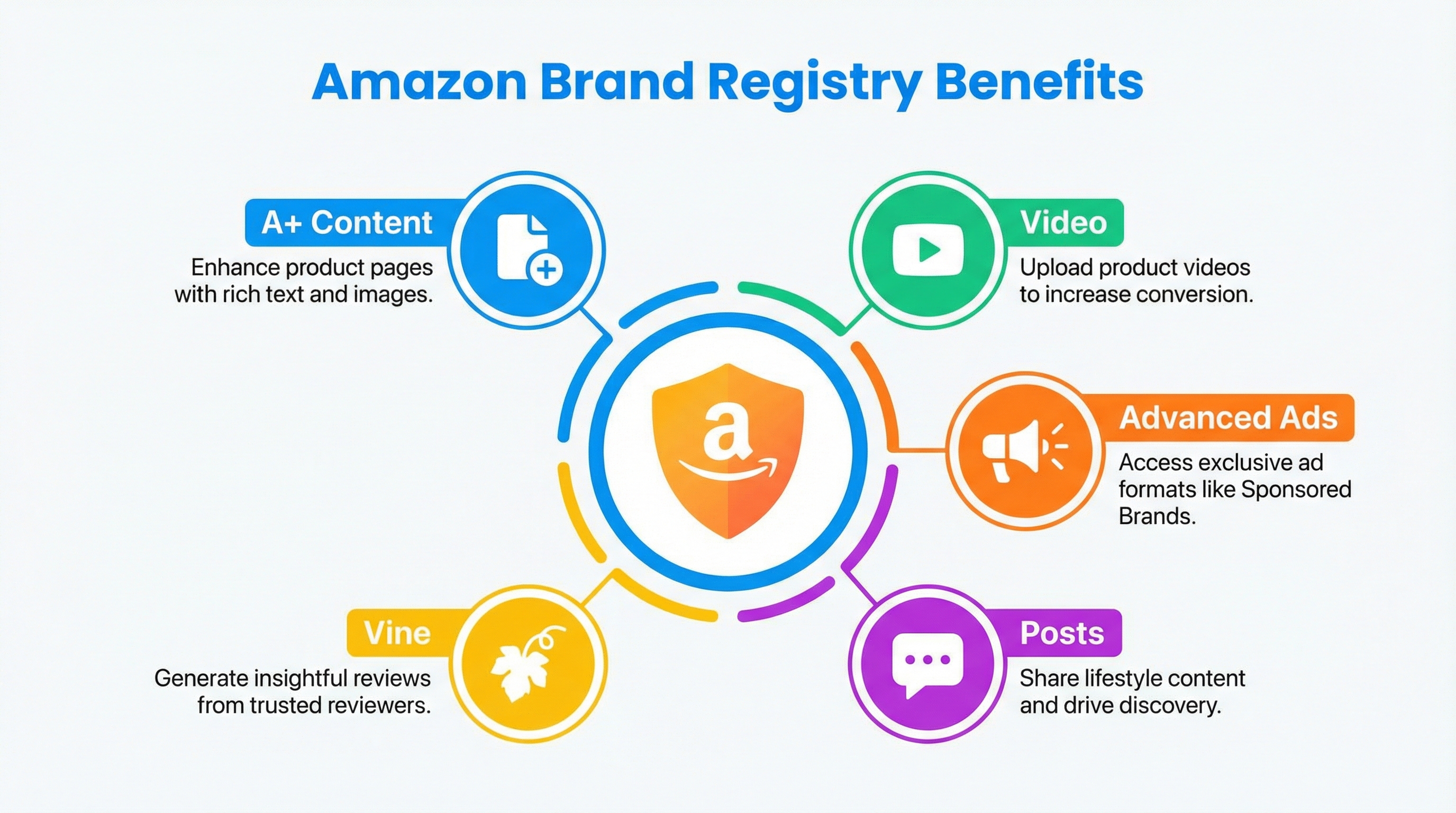
Amazon Brand Registry is an Amazon program designed to help brand owners protect intellectual property and unlock brand-building tools.
- It helps protect your brand from unauthorized changes and certain types of abuse.
- It unlocks premium content options, such as A+ Content and other brand features.
- It supports a more scalable brand approach when you manage multiple ASINs.
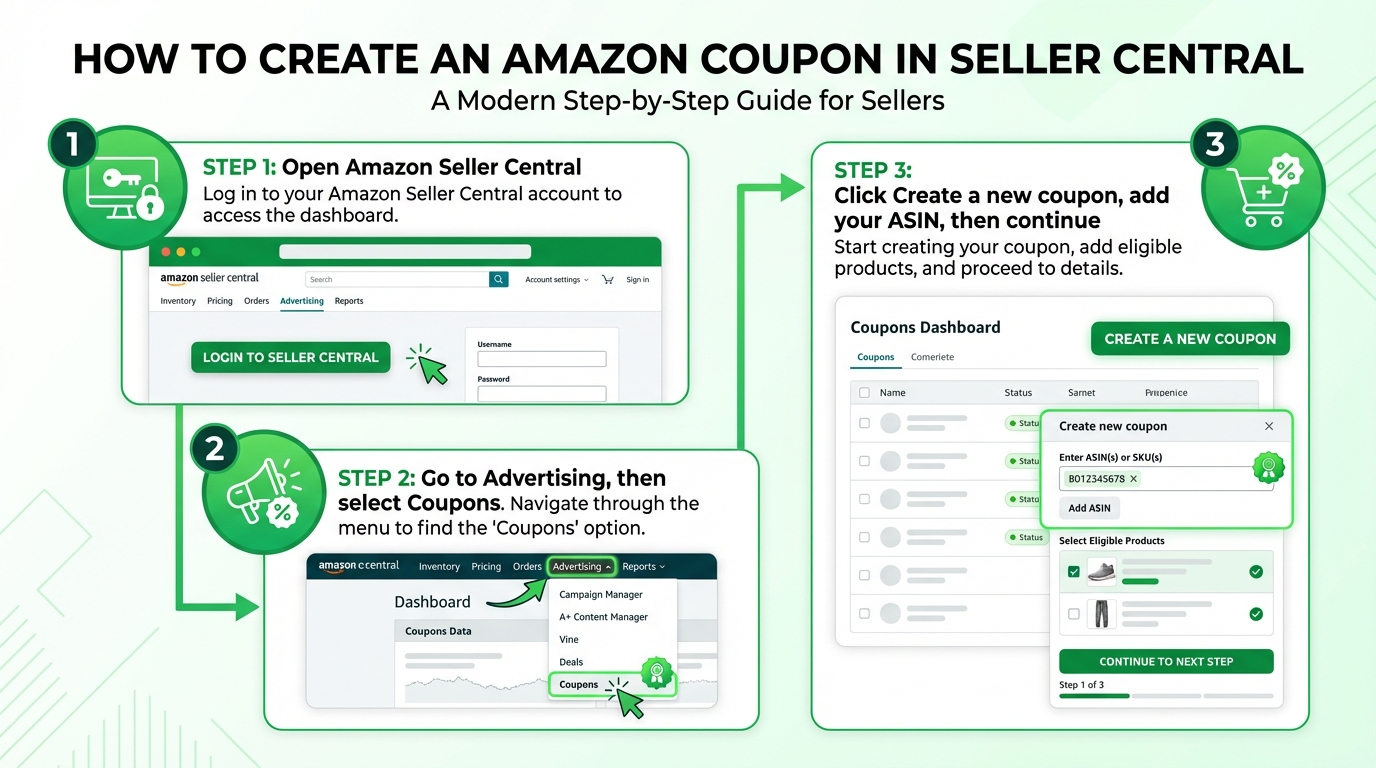
Step 1: How to launch an Amazon coupon badge in Seller Central
If you need a fast visibility lever, launch a coupon first. The badge can lift clicks quickly, but only when the discount is realistic for your category and your margins.
Steps
- Open Amazon Seller Central.
- Go to Advertising, then select Coupons.
- Click Create a new coupon, add your ASIN, then continue.
- Set your discount type and value, then choose your date range and budget.
- Submit and verify that the coupon appears on your listing after it is processed.
Compliance and limitations
- Use coupons as a legitimate promotional tool, not as a workaround for ranking manipulation.
- Avoid misleading pricing patterns where the apparent savings do not reflect a genuine, consistent price history.
- Do not make claims that imply guaranteed ranking outcomes from running a coupon.
✅ Pro Tip:
If your niche is price-sensitive, test a small coupon that creates a visible badge, then reinvest what works into better images and stronger Q&A. Small wins stack.
⚠️ Common Pitfall: Setting the coupon too high can spike ad costs and reduce profitability. If your coupon increases click volume but conversion stays flat, your ACoS may rise quickly.
Micro case: coupon badge impact (anonymized example)
In listing audits, we often see the biggest short-term lift when the badge increases clicks, and the listing already converts reasonably well. Below is an anonymized example of a 19.99 kitchen item running a 10 percent coupon for 7 days.
📊 Data Check with SellerSprite
Before launching the coupon, open SellerSprite Competitor Research to benchmark price positioning. After launch, track keyword movement and stability with your monitoring workflows, then decide whether to scale, reduce, or stop the coupon.
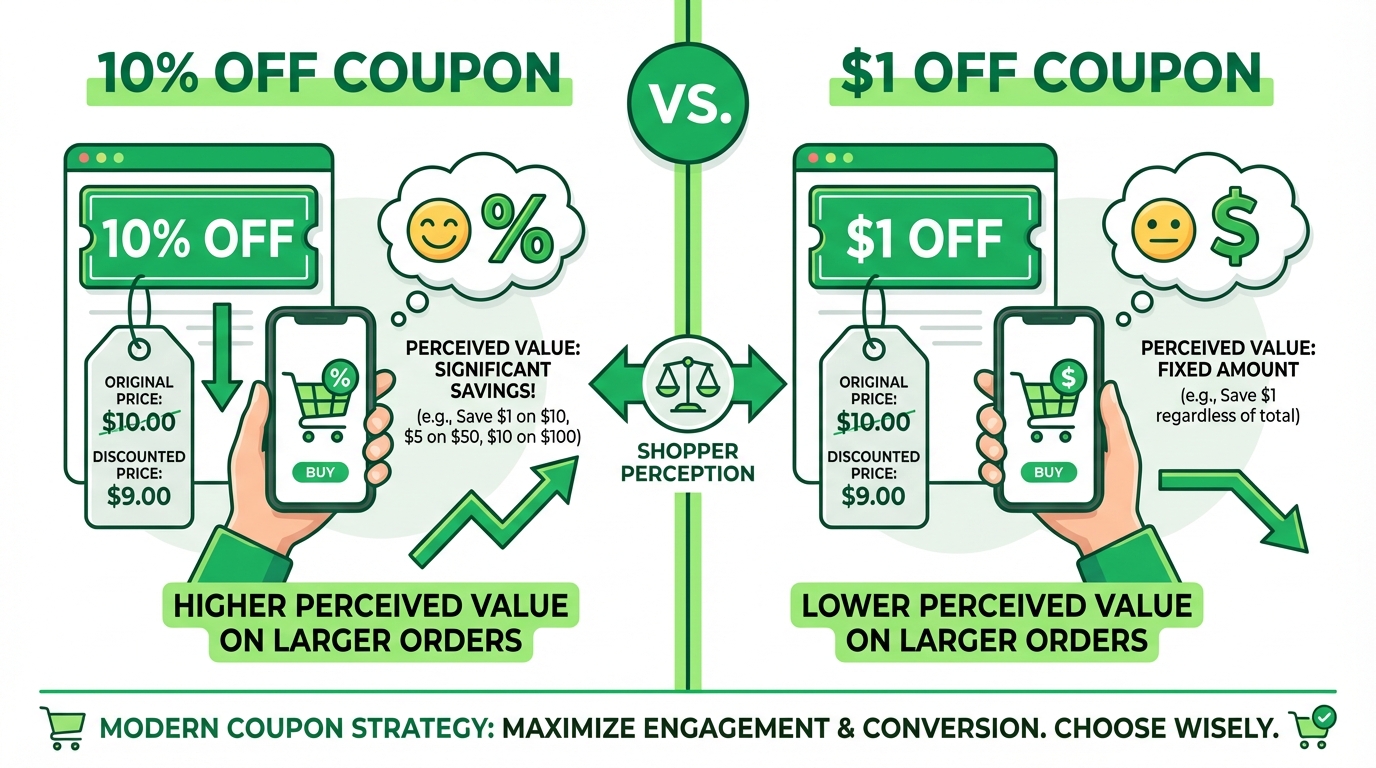
Step 2: Percent-off vs. money-off Amazon coupons
Percent off and money off can be mathematically equal but psychologically different. Choose the format that reads fastest on screen for your price range, then confirm with a short test.
Steps
- Estimate your max discount per order after all fees and shipping costs.
- Pick percent off or money off based on clarity and category norms.
- Run a structured test, then compare results using consistent metrics.
Table 1: Percent off vs money off
⚠️ Common Pitfall: Raising price only to offset a coupon can backfire if the offer looks misleading or if conversion drops. Keep your pricing story consistent and customer-friendly.
Use SellerSprite to implement this step
- Use Competitor Research to spot common coupon ranges in your niche.
- Use Keyword Mining to confirm which search terms drive the most relevant traffic before you judge performance.
- Log a simple change record so you can attribute shifts to the right action.
Step 3: Use Amazon listing Q&A to increase conversions
Q&A is a conversion asset, not just support. When you answer the questions that block purchase decisions, you reduce hesitation and increase buyer confidence at checkout.
Steps
- Use SellerSprite to identify your true competitor set for your primary keywords.
- Collect the top 10 to 20 repeated questions shoppers ask in your category.
- Prioritize questions that affect safety, compatibility, sizing, durability, and returns.
- Answer quickly and professionally, then monitor whether related objections decline over time.
✅ Pro Tip:
If the same question appears repeatedly, do not rely solely on Q&A. Add the answer to your images or bullets so shoppers learn it before they scroll.
What not to answer or how to answer carefully
- Do not encourage off-Amazon purchases or share external links that bypass Amazon checkout.
- Do not suggest review manipulation or coordinated review activity.
- Do not promise outcomes you cannot control, such as delivery guarantees outside Amazon fulfillment commitments.
- When asked about prohibited uses, state the safe use case and recommend that customers follow the instructions and local regulations.
Micro case: Q&A cleanup reduces hesitation (anonymized example)
In several audits, we see conversion lift after sellers replace vague answers with clear coverage of the top objections. Below is an anonymized example after adding 12 high-intent Q&A answers and updating one image to match.
Use SellerSprite to implement this step
- Use Competitor Research to select the real top listings that shoppers compare you against.
- Use Keyword Mining to mirror shopper language in a natural way when it improves clarity.
- Use Review Analysis to identify repeated pain points that warrant a Q&A and an image callout.
Step 4: How to answer Amazon Q&A professionally
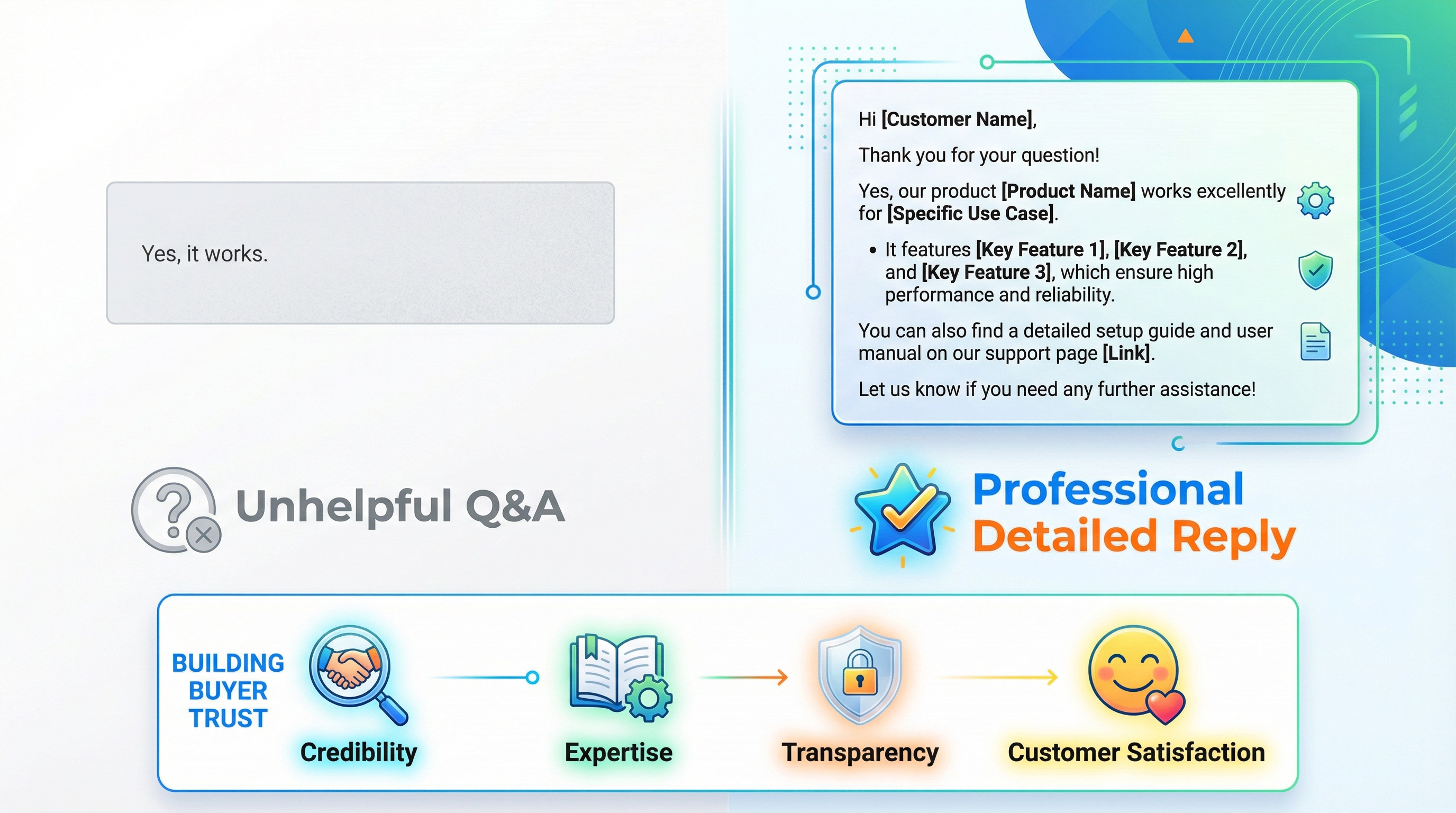
A great Q&A answer is short, specific, and helpful. Write for humans first, then add one relevant keyword phrase only if it improves clarity and accuracy.
Steps
- Answer the question directly in the first sentence.
- Add one supporting detail that prevents returns or misuse.
- Add a relevant phrase only when it improves clarity, not as stuffing.
- Close with a simple next step, such as care instructions or compatibility checks.
Good answer vs. weak answer
Use SellerSprite to implement this step
- Use SellerSprite Keyword Mining to confirm the most common shopper phrasing.
- Use Review Analysis to identify objections that should be answered in Q&A and reinforced in images.
Step 5: When to apply for Amazon Brand Registry (requirements and benefits)
The Brand Registry is a long-term multiplier. Apply when demand is proven, and you are ready to invest in trademark readiness, stronger listing assets, and scalable brand protection.
Eligibility basics (high level)
- You typically need an active registered trademark or a pending trademark application that meets Amazon's requirements.
- Your brand name should closely match the trademark text and be used consistently.
- Your brand name should appear on the product or packaging in a way that is clear for enrollment images.
- Requirements vary by country and trademark office, so confirm the rules for your target marketplace.
✅ Pro Tip:
Do not wait to start selling while you prepare the Brand Registry. Validate demand first, then upgrade your brand infrastructure when the product proves it can win.
⚠️ Common Pitfall: Underestimating timelines. Trademark and verification steps can take longer than expected. Plan your content upgrades so you can launch them immediately after approval.
Simple process flow
Prepare trademark readiness → Submit Brand Registry application → Receive verification code → Complete identity and brand checks → Unlock A+ Content and brand tools → Roll out upgrades to your top ASINs.
Table 2: Key Brand Registry benefits and how to use them
Use SellerSprite to implement this step
- Use Keyword Mining to prioritize which ASINs deserve A+ Content first.
- Use Ads Insights to identify high-value search terms where better brand assets can improve efficiency.
- Use Product Tracker to monitor competitor movements while you roll out brand upgrades.
GEO note: Coupon display language and currency follow the local marketplace. Brand Registry trademark offices and eligibility checks vary by country. Always confirm local requirements for the site you sell on.
Comparison and selection
Start with coupons to improve click-through rate, build Q&A to improve conversion, then apply Brand Registry when the product proves it can win in the long term. Stack levers only after you confirm a win.
Comparison dimensions
Recommendation: Start with one lever, confirm the win with data, then stack the next lever.
Examples and copyable templates
Templates help you move fast without lowering quality. Use these as a baseline, then adapt the language to your product and marketplace.
Example 1: Two-week coupon test plan
- Week 1: Run a small percent-off coupon and log impressions, CTR, conversion rate, orders, and profit.
- Week 2: Run a money-off coupon with a similar discount value and track the same metrics.
- Decision: Keep the format that improves visibility and profitability, not only sales volume.
Example 2: Coupon title and description copy
Option A (simple): Save 10 percent on [Product Name]
Option B (use case): Save on [Product Name] for everyday [Use Case]
Option C (bundle clarity): Save on [Pack Size] [Product Name]
Q&A answer templates (bad vs. improved)
1) Specs and compatibility
Bad: Yes, it works.
Improved: Yes. This [product type] is compatible with [device or size range]. Please check your model or measurement and match it to the sizing chart before ordering.
2) Shipping and delivery expectations
Bad: Fast shipping.
Improved: Delivery times depend on your location and the shipping option you select at checkout. Please check the delivery estimate on the product page and select the option that fits your timeline.
3) Warranty and returns
Bad: Contact us.
Improved: We stand behind the product. If you have an issue, use the Amazon order page to start a return or replacement under Amazon's policies. For product questions, ask here, and we will respond quickly.
4) How to use
Bad: Just use it normally.
Improved: For best results, [step one], then [step two]. Avoid [common mistake]. If you are using it for [alternate use], follow the care instructions in the package insert.
5) Safety and compliance
Bad: Yes, it is safe for anything.
Improved: Use only as described in the instructions. If you have a specific medical or regulated use case, consult a qualified professional and follow local regulations.
Copyable template: Change log for SellerSprite tracking
- Date and time: [ ]
- Change type: Coupon, Q&A, or Brand content
- Details: Discount format, budget, dates, or Q&A topic
- Keywords to monitor in SellerSprite: [ ]
- Competitors to monitor in SellerSprite: [ ]
- Review date: [ ]
FAQs
These questions align with common search intent and help you identify the right lever first, without confusion.
Q1: Do I need Amazon Brand Registry to run coupons?
A: In many cases, no. Coupon availability depends on your seller account status, product eligibility, and marketplace rules, not only Brand Registry. Verify eligibility in Seller Central before planning your promotion calendar.
Q2: What is the difference between Amazon coupons and Lightning Deals?
A: Coupons usually show a badge shoppers can clip and apply, while Lightning Deals are time-limited deal placements with different visibility mechanics. Choose based on your budget, your margin, and whether you want continuous visibility or short burst urgency.
Q3: Can I use Amazon coupons without FBA?
A: Coupon eligibility varies by marketplace and product status, and can depend on factors like account health, reviews, and performance. Check your coupon dashboard in Seller Central to confirm whether your ASIN is eligible for your fulfillment method.
Q4: Does Amazon listing Q&A help SEO or rankings?
A: The primary benefit is conversion: better answers reduce hesitation. Any keyword effect should be treated as secondary, and you should avoid keyword stuffing. Write to help the shopper and track results over time.
Summary and next steps
You do not need endless tactics. You need a repeatable system: win attention with a coupon badge, win trust with Q&A, and scale like a brand with Brand Registry when the data supports it.
Next step action checklist
- Benchmark competitor pricing and promotions in SellerSprite before you create a coupon.
- Run one coupon test and keep ads stable so your data is readable.
- Collect top competitor Q&A questions and prepare strong answers.
- Update one image or bullet to answer the most repeated objection.
- If demand is proven, plan for Brand Registry readiness and prioritize premium assets for your highest-impact ASINs.
- Ask the SellerSprite community for feedback on your coupon and Q&A strategy.
Implementation checklist
- ☐ Identify top competitors with SellerSprite Competitor Research
- ☐ Pick one coupon format and define a 7 to 14 days test window
- ☐ Track impressions, CTR, conversion rate, orders, and profit per order
- ☐ Compile top 10-20 Q&A questions from competitor listings
- ☐ Publish professional answers and update one image to match
- ☐ Review results and keep only the changes that improve performance
- ☐ If demand is proven, prepare Brand Registry readiness and timeline
- ☐ Share progress and questions in SellerSprite Discord and Facebook Group
Share Your Sourcing Journey With SellerSprite Community
Join the SellerSprite community on the Facebook Group to share your sourcing journey, ask questions, and get support from fellow Amazon sellers.
View The SellerSprite Course Directory
Ready for the next step? Open the SellerSprite Academy course directory to continue building your Amazon FBA skills chapter by chapter.
About the author
SellerSprite Team helps Amazon sellers build repeatable growth systems with SellerSprite Seller Tools, combining competitor benchmarking with practical listing execution and measurable iteration.