By SellerSprite Team
SellerSprite helps Amazon sellers monitor product performance, track competitor changes, organize listing evidence, and make operational decisions with data. This guide turns brand protection, seller support, returns, and tax organization into practical workflows that sellers can follow when account risks, customer issues, or compliance questions appear.
Answer first: Amazon sellers should manage brand protection, seller support cases, returns, and tax records as four separate operating workflows. The fastest way to reduce risk is to identify the issue type, collect evidence, take the correct Seller Central action, and document the result. SellerSprite can support monitoring, evidence collection, competitor tracking, and data organization so you act faster and avoid guessing.
Key Takeaways
- Brand protection starts with monitoring and evidence, not emotion. Record the ASIN, seller, screenshot, time, and suspected violation.
- Seller support cases work best when the issue is narrow, the evidence is complete, and the requested action is specific.
- Returns should be treated as both customer service and product feedback. High return reasons can signal listing, sizing, packaging, or quality problems.
- Tax work is not only a year-end task. Sellers should download reports, organize documents, and consult a qualified tax professional when obligations are unclear.
Table of Contents
- Which Amazon seller issue should you handle first?
- How do you handle Amazon brand protection issues?
- How do you open better Seller Support cases?
- How should you manage Amazon returns without hurting account health?
- How should Amazon sellers organize tax data and reports?
- Workflow cases: what does this look like in practice?
- How SellerSprite supports monitoring and evidence collection
- Operational checklist and CTA
- FAQ
- References
Which Amazon seller issue should you handle first?
Quick Answer: Handle the highest-risk issue first. Brand violations, account health warnings, and tax or compliance notices usually require immediate documentation and action. Returns and customer service patterns should be reviewed weekly so small problems do not become listing or account risks.
How do you handle Amazon brand protection issues?
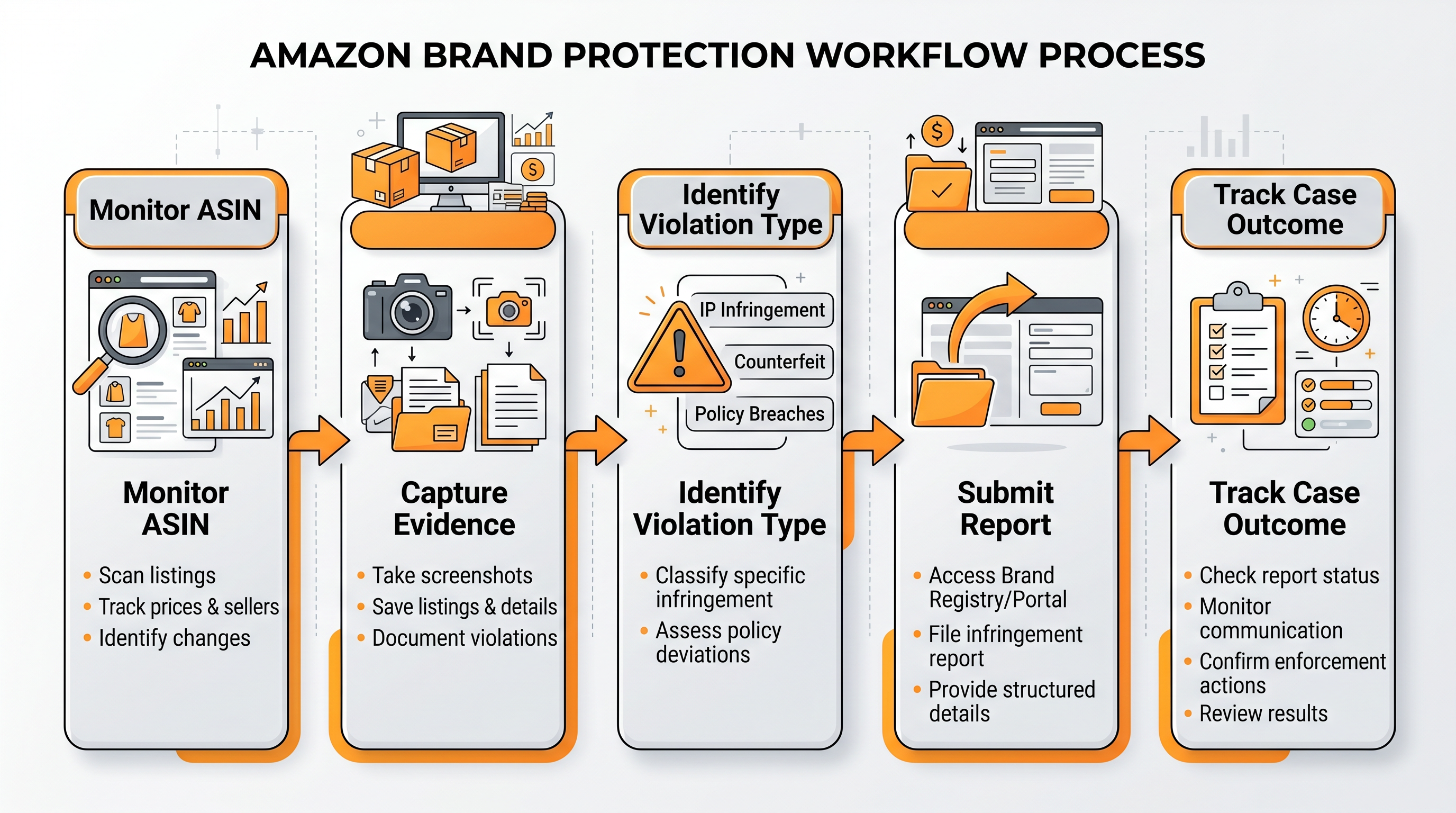
Quick Answer: Treat brand protection as an evidence workflow. Identify the problem, capture proof, choose the correct reporting path, and document the outcome. If you are enrolled in Brand Registry, Amazon provides tools such as Report a Violation for intellectual property issues.
Problem
A seller notices a suspicious offer, incorrect brand content, copied images, or a possible infringement on a listing.
Process
- Save the ASIN, URL, seller name, screenshots, timestamps, and the suspected violation type.
- Compare the listing against your own product, packaging, trademark, copyrighted material, or brand assets.
- Use Brand Registry Report a Violation or the appropriate Seller Central support path if you have access.
- Track case IDs and outcomes in a simple evidence log.
Result
A complete, specific report gives Amazon a clearer enforcement path and helps your team respond faster if the same issue returns.
How do you open better Seller Support cases?
Quick Answer: A strong Seller Support case is narrow, evidence-based, and action-oriented. Avoid mixing multiple problems in one case. State what happened, provide proof, and ask for one specific action.
Problem
A listing is suppressed, an attribute cannot be edited, a return or reimbursement issue is unresolved, or an account issue needs Amazon review.
Process
- Use one case for one issue.
- Include ASIN, SKU, order ID, shipment ID, or case ID where relevant.
- Attach screenshots, reports, invoices, or timestamps when they support the request.
- Write the requested action clearly, such as "Please review and restore the correct attribute value."
Result
Cleaner cases reduce back-and-forth, make escalation easier, and create a searchable support history for your team.
How should you manage Amazon returns without hurting account health?
Quick Answer: Returns should be handled through the correct Seller Central return process, but the bigger opportunity is diagnosis. Every return reason is a clue about listing accuracy, product quality, packaging, sizing, or buyer expectations.
Problem
A product starts receiving returns, refunds, or customer claims that may affect profit, customer experience, or account health.
Process
- Check whether the order is FBA or seller-fulfilled, because the return workflow differs.
- Review the return reason and buyer comments where available.
- Group returns by cause: wrong expectation, quality defect, damaged packaging, sizing issue, or listing clarity gap.
- Fix the root cause. That may mean better images, clearer bullets, packaging updates, or supplier correction.
Result
A return workflow protects customer experience and turns return reasons into product and listing improvements.
How should Amazon sellers organize tax data and reports?
Quick Answer: Tax organization is a records workflow. Download reports regularly, separate data by marketplace and period, save invoices and fee reports, and consult a qualified tax adviser when obligations are unclear. Amazon notes that sellers should maintain tax reporting documents safely and seek tax adviser support when needed.
Problem
A seller waits until tax season, then discovers missing reports, unclear fees, incomplete marketplace data, or questions about tax calculation settings.
Process
- Download tax, transaction, settlement, fee, and inventory-related reports on a fixed monthly schedule.
- Organize files by marketplace, year, month, and report type.
- Keep supplier invoices, freight invoices, ad spend records, returns data, and reimbursements in the same accounting archive.
- Review Amazon tax calculation settings and consult a tax professional for jurisdiction-specific questions.
Result
Good tax data organization reduces filing stress, supports clean bookkeeping, and helps your adviser answer questions faster.
Workflow cases: what does this look like in practice?
Quick Answer: In practice, the best teams do not wait for problems to become emergencies. They monitor signals, collect proof early, and use repeatable workflows.
Case 1: suspected listing hijacker and brand evidence log
A private-label brand noticed a new seller appearing on a high-performing ASIN. Instead of opening a vague complaint, the team created an evidence log with screenshots, seller details, packaging differences, timestamps, and Buy Box changes. The case was then submitted with one clear issue and one requested action.
- Problem: suspicious offer appeared on brand-owned listing.
- Process: monitor, capture, compare, submit, log outcome.
- Result: team had a reusable brand protection workflow instead of starting from scratch each time.
Case 2: return spike caused by listing mismatch
A seller saw returns rise after a packaging change. The team grouped return reasons and found that several buyers misunderstood the size from the main image and bullet copy. After updating the image callout and first bullet, the return reason mix became easier to interpret and customer confusion dropped in the following review cycle.
- Problem: returns increased after listing and packaging changes.
- Process: group return reasons, identify expectation gap, update listing clarity.
- Result: fewer avoidable expectation-based returns and better customer understanding.
How SellerSprite supports monitoring and evidence collection
Quick Answer: SellerSprite does not replace Seller Central workflows, legal advice, or tax advice. It helps you notice changes faster, collect market evidence, and organize the data behind operational decisions.
Build your evidence workflow
- Track key ASINs and competitor changes before problems become urgent.
- Save screenshots and exports when a brand, listing, or pricing issue appears.
- Use Seller Central for the official action path and SellerSprite for monitoring and context.
Operational checklist and CTA
Quick Answer: Use this checklist weekly. It keeps small operational problems from becoming account, customer, or compliance risks.
Weekly seller operations checklist
- Check brand-owned ASINs for suspicious offers, content changes, and competitor movement.
- Review open Seller Support cases and update your evidence log.
- Review return reasons and group them by root cause.
- Download and archive key Seller Central reports on schedule.
- Use SellerSprite to monitor product and competitor changes that may explain sudden operational issues.
FAQ
How do I protect my Amazon brand from suspicious sellers?
Monitor your key ASINs, collect evidence, and use the correct Brand Registry or Seller Central reporting path. Keep screenshots, URLs, timestamps, and seller details in a case log.
What makes a strong Seller Support case?
A strong case covers one issue, includes relevant identifiers such as ASIN or order ID, attaches evidence, and asks for one clear action. Avoid mixing multiple unrelated problems in one case.
How often should I review Amazon return reasons?
Review return reasons at least weekly for active products, and more often after a launch, packaging change, or listing update. Return patterns often reveal listing or product problems early.
Does Amazon handle all sales tax for sellers?
Not always. Amazon may calculate tax in certain settings and marketplace facilitator situations, but sellers should still maintain records and consult a qualified tax adviser for their obligations.
Can SellerSprite replace Seller Central or tax software?
No. SellerSprite supports monitoring, research, and evidence organization. Official actions still happen in Seller Central, and tax filing should be handled with proper accounting tools and professional advice.
Get Help From the SellerSprite Community
Share your negotiation situation, get feedback, and learn from other sellers in the SellerSprite Discord and Facebook Group.
View The SellerSprite Course Directory
Ready for the next step? Open the SellerSprite Academy course directory to continue building your Amazon FBA skills chapter by chapter.
References
- Amazon Seller Central: Seller-fulfilled returns, refunds, cancellations, and claims
- Amazon Seller Central: Manage seller-fulfilled returns
- Amazon Seller Central: Tax calculation services
- Amazon Seller Central: Set up tax calculation services
- Amazon Seller Central: Buyer-Seller Messaging Service overview
Disclaimer: This article is for operational education only and is not legal, tax, or accounting advice. Amazon policies and tax obligations can change. Always confirm current Seller Central rules and consult qualified professionals when needed.


