By SellerSprite Team
SellerSprite helps Amazon sellers build PPC workflows across keyword research, campaign structure, and performance analysis. This guide follows the same practical style used in our other PPC training content and is designed for sellers who want to understand when Sponsored Brands should support Sponsored Products, how to choose keywords and creatives, and how to read performance data with SellerSprite.
Answer first: Amazon Sponsored Brands ads are a brand-focused ad format that can place your logo, custom headline, and products or videos in prominent search placements. For beginners, the best use case is to layer Sponsored Brands on top of an existing Sponsored Products foundation, then use SellerSprite to plan keywords and creatives, separate brand terms from category terms, and monitor CTR, ACOS, and conversion by ad type.
Key Takeaways
- Sponsored Brands is usually most effective after Sponsored Products already gives you basic keyword and conversion proof.
- Brand Registry is typically required for professional sellers who want to run Sponsored Brands.
- The strongest beginner structure is often brand terms, category terms, and competitor terms split into separate campaigns or ad groups.
- SellerSprite helps with keyword selection, creative planning, and ad analysis so Sponsored Brands does not become a disconnected experiment.
Table of Contents
- What are Sponsored Brands ads and who can use them?
- Sponsored Brands vs Sponsored Products: what is the difference?
- When should you use Sponsored Brands in your PPC mix?
- How do you set up your first Sponsored Brands campaign?
- How do you choose Sponsored Brands keywords with SellerSprite?
- How do you analyze Sponsored Brands performance with SellerSprite Ads Insights?
- Case study: what changed after adding Sponsored Brands?
- Next Steps
- FAQ
- References
What are Sponsored Brands ads and who can use them?
Direct answer: Sponsored Brands is an Amazon Ads format designed to help shoppers discover a brand through custom creatives such as a brand logo, headline, multiple products, or video. For most sellers, it is available to professional sellers enrolled in Brand Registry, along with vendors and eligible agencies.
Sponsored Brands is useful because it lets you direct shoppers to a product page, a Brand Store, or a custom landing page, depending on the creative format and goal. It is best understood as a brand discovery and mid-funnel reinforcement format, not just another keyword click generator.
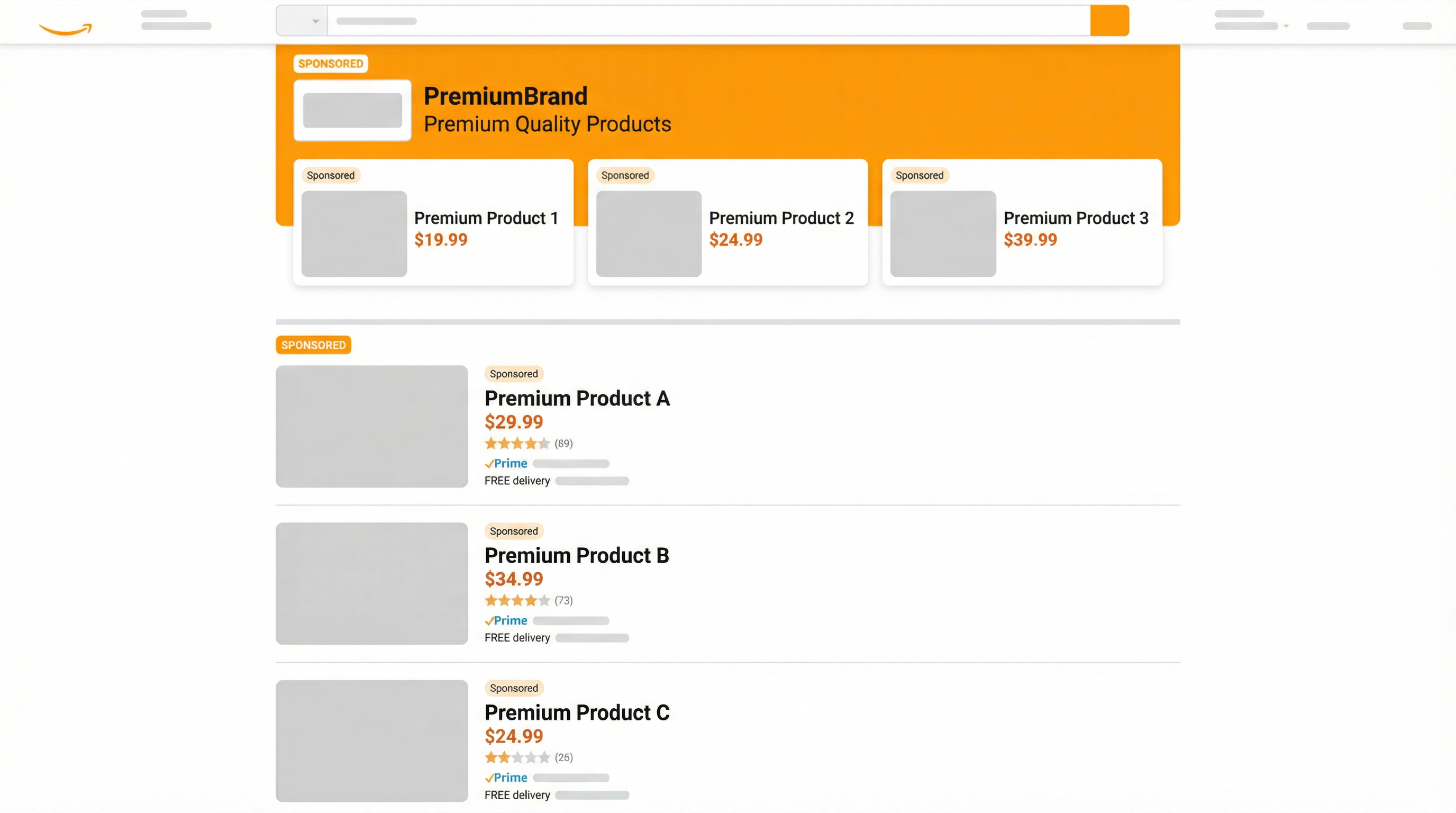
Takeaway: Sponsored Brands is strongest when your brand message matters, not just your single product click.
Sponsored Brands vs Sponsored Products: what is the difference?
Direct answer: Sponsored Products is usually the direct response workhorse for individual ASIN sales, while Sponsored Brands is more brand-forward and better for discovery, multi-product promotion, and stronger top-of-results visibility.
When should you use Sponsored Brands in your PPC mix?
Direct answer: Sponsored Brands usually works best after Sponsored Products has already helped you identify relevant search terms, validate conversion, and build some product-level momentum. For most sellers, it is a support layer, not the first PPC step.
Use Sponsored Brands when you want to protect brand queries, dominate top search placements for core category terms, or route shoppers into a broader branded experience such as a Brand Store.
- Good timing: after Sponsored Products shows which terms deserve more visibility.
- Good use case: when you want to showcase multiple SKUs or tell a clearer brand story.
- Poor timing: when the listing itself is not converting and the account still lacks keyword proof.
Case snapshot: adding Sponsored Brands after Sponsored Products
In one anonymized brand account, Sponsored Products had already established basic keyword traction on category terms. After adding Sponsored Brands with a Brand Store destination and better brand keyword protection, the account typically saw a lift in overall branded impression share, a healthier click distribution across more SKUs, and a more stable ACOS trend compared with relying on Sponsored Products alone.
This is a representative trend pattern, not a guaranteed result. Exact outcomes depend on category competition, store quality, creatives, and budget.
How do you set up your first Sponsored Brands campaign?
Direct answer: Your first Sponsored Brands campaign should stay simple. Choose one clear objective, one destination type, one clean keyword set, and one creative message that matches shopper intent.
- Choose the format: collection, Brand Store spotlight, or video.
- Select the landing page: Brand Store when you want multi-SKU exploration, or product page when the goal is narrower conversion.
- Write the headline: keep it short, brand-safe, and aligned with the keyword intent.
- Choose your keyword cluster: do not mix brand, category, and competitor terms in one messy structure.
- Set a moderate daily budget: enough to produce learning, but not so large that you overspend before creative or keyword quality is validated.
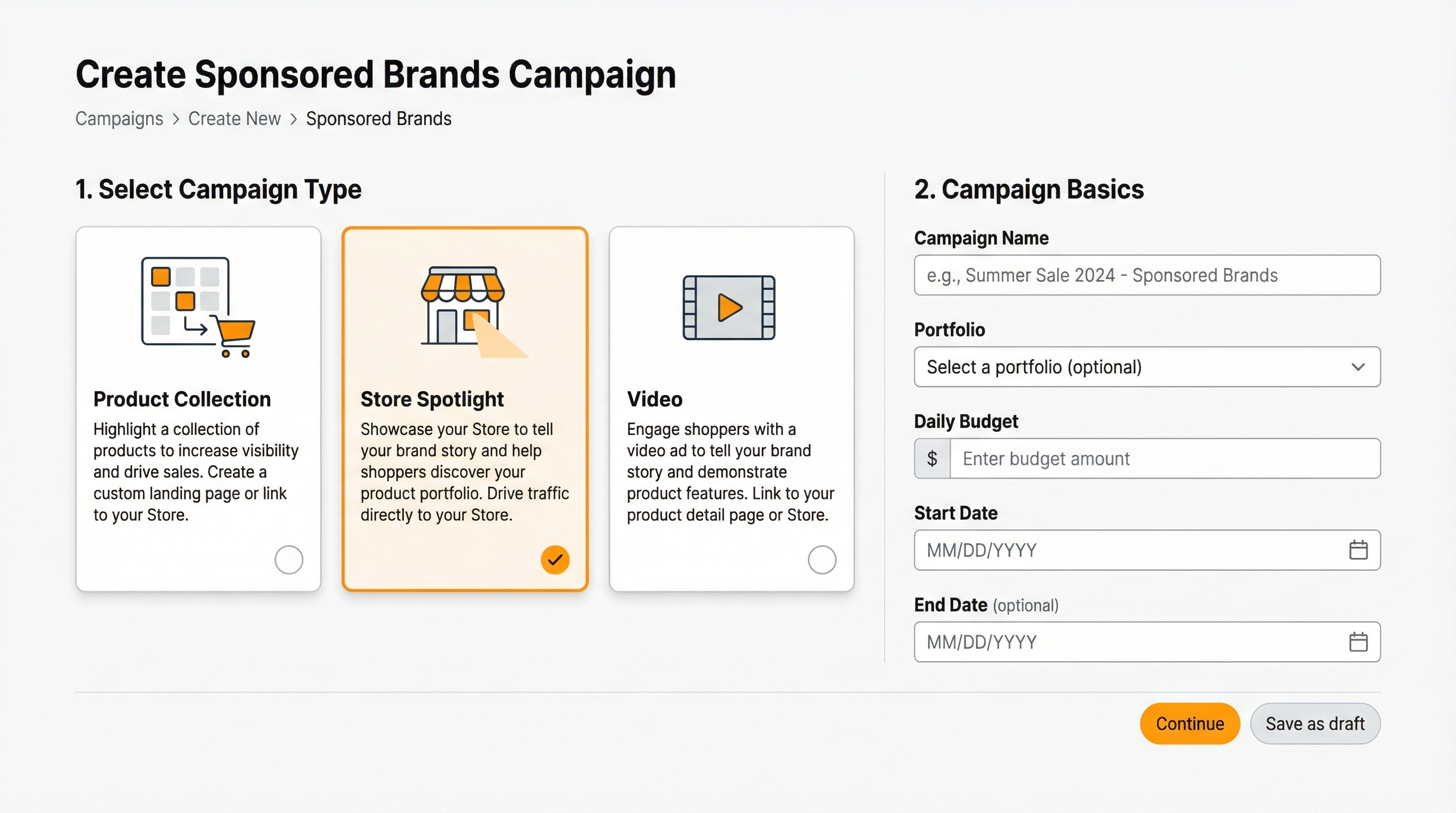
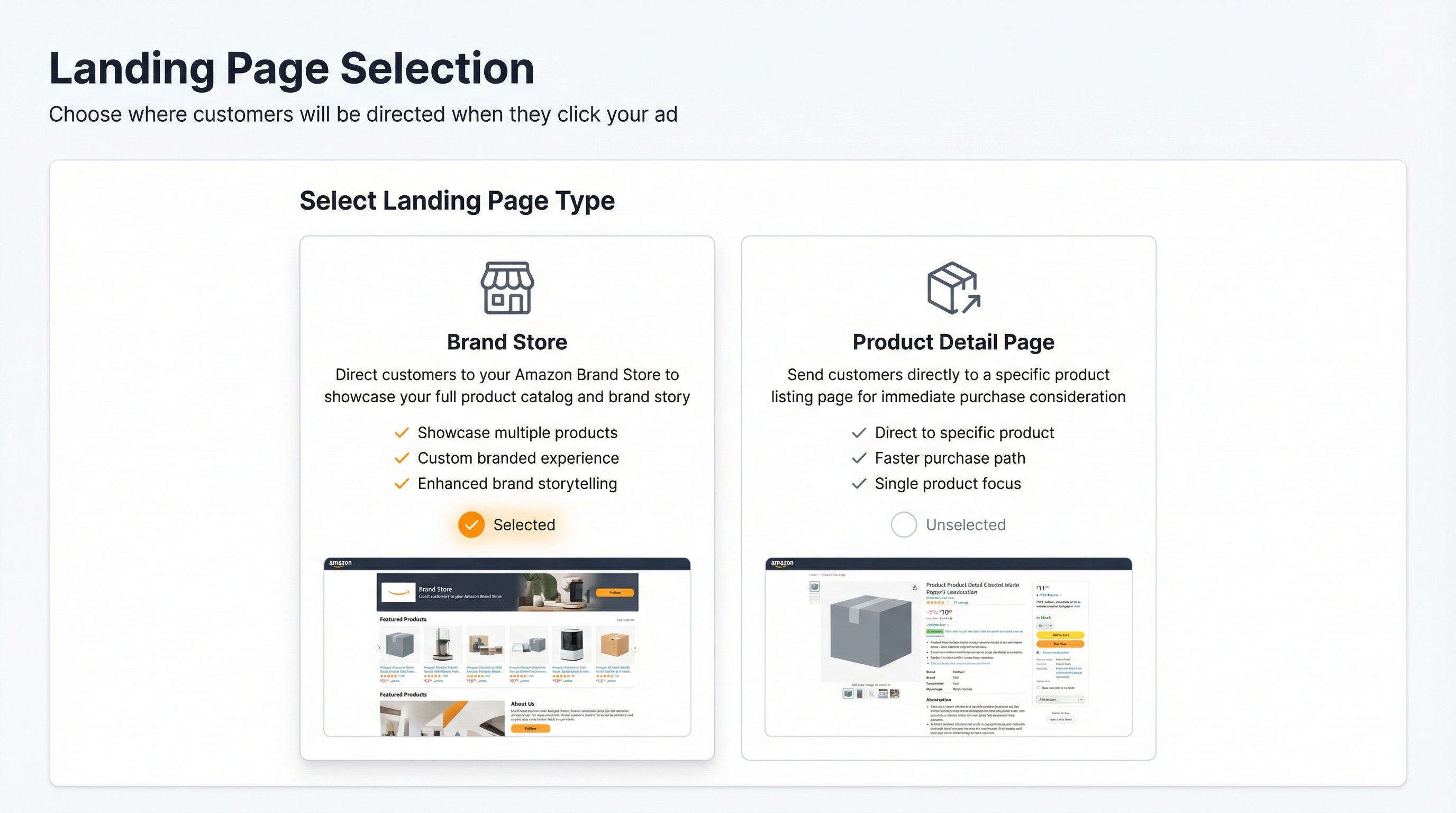
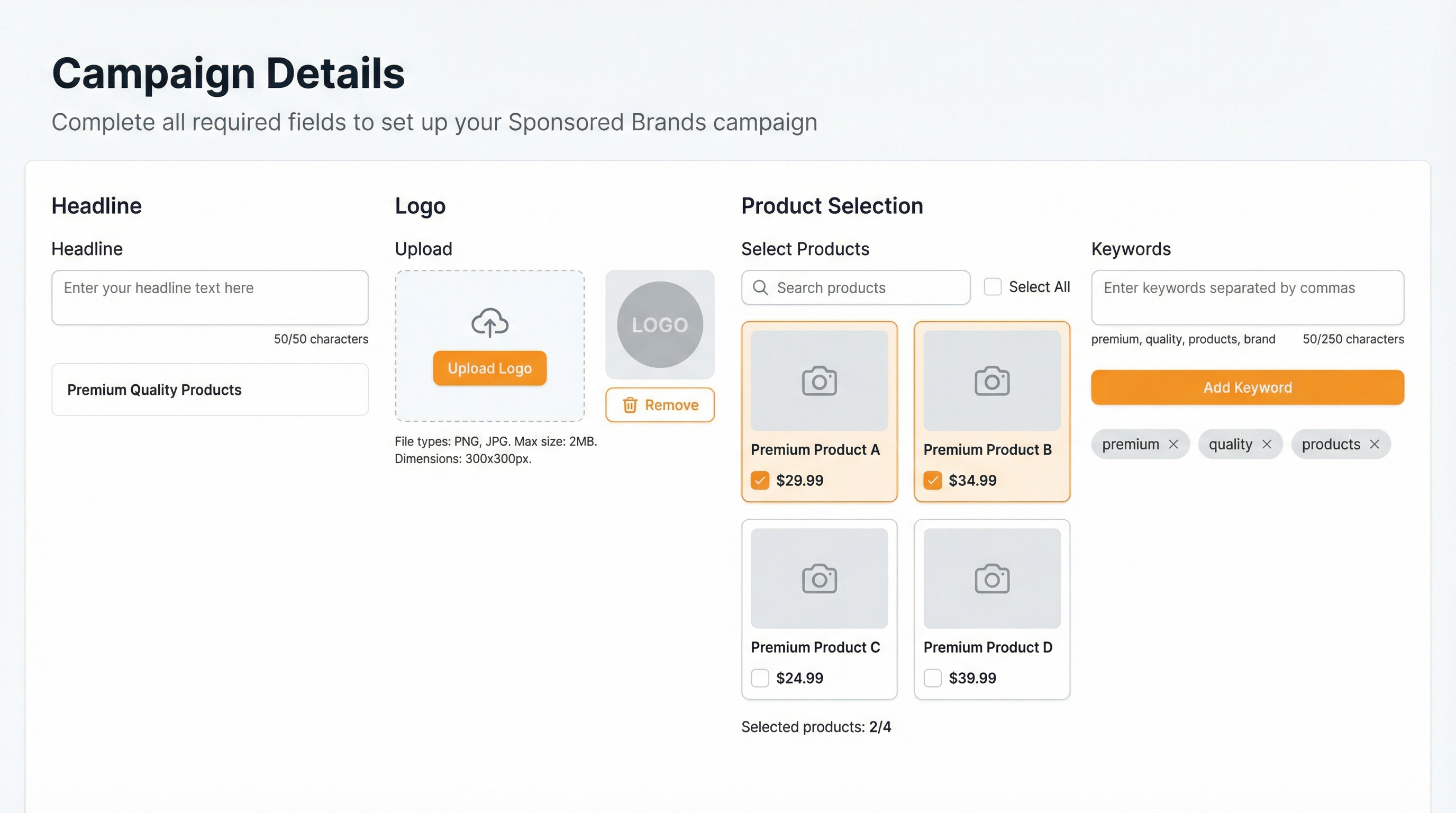
Takeaway: The first Sponsored Brands campaign should be cleaner than your first Sponsored Products campaign, because creatives and destination choices add more ways to lose relevance.
How do you choose Sponsored Brands keywords with SellerSprite?
Direct answer: Sponsored Brands keywords usually work best when they are split by intent: brand keywords, category keywords, and competitor keywords. SellerSprite helps you find and separate those groups before you build the campaign.
Simple SellerSprite workflow for Sponsored Brands keyword selection
- Use Keyword Research to find category and brand terms that matter in your market.
- Use Reverse ASIN to see what top competitors rank for and where their keyword footprint is strongest.
- Split the final list into brand, category, and competitor buckets, then build cleaner Sponsored Brands targeting.
Build your Sponsored Brands keyword buckets
- Open Keyword Research to identify your category terms.
- Use Reverse ASIN to collect competitor footprints.
- Export the final buckets and build separate Sponsored Brands structures.
How do you analyze Sponsored Brands performance with SellerSprite Ads Insights?
Direct answer: Review Sponsored Brands performance separately from Sponsored Products. The click behavior, destination logic, and role in the funnel are different, so mixing the two too early can hide useful optimization signals.
- Open Ads Insights and filter by ad type so only Sponsored Brands data is visible.
- Review CTR first to judge whether the creative and keyword intent are aligned.
- Review ACOS and conversion to see whether the chosen landing page supports purchase or only awareness.
- Optimize one lever at a time: keyword quality, creative message, or landing destination.
- If CTR is weak: rewrite the headline, tighten keywords, or test a more relevant product set.
- If CTR is fine but ACOS is weak: the landing page or product mix may not be converting.
Review Sponsored Brands cleanly
- Filter Ads Insights by Sponsored Brands only.
- Sort by CTR, ACOS, and conversion to find creative or landing mismatches.
- Adjust the weakest variable first, then measure the next cycle.
Next Steps
Direct answer: If you are ready to move from theory to setup, follow these three steps in order so your first Sponsored Brands campaign is based on evidence, not guesswork.
- Step 1: Use SellerSprite to identify your brand terms, category terms, and competitor terms.
- Step 2: Build your first Sponsored Brands campaign with one clear goal and one clean destination.
- Step 3: Use Ads Insights to monitor CTR, ACOS, and conversion by ad type, then optimize one variable at a time.
Start your Sponsored Brands workflow
FAQ
Do I need Brand Registry to run Sponsored Brands?
For most sellers, yes. Sponsored Brands is generally available to professional sellers enrolled in Brand Registry, as well as vendors and eligible agencies.
What is a reasonable starting budget for Sponsored Brands?
Start with a budget that can produce enough clicks to evaluate creative and keyword intent without exhausting too early in the day. The exact number depends on CPC in your market and the competitiveness of your targeting.
Should I send Sponsored Brands traffic to a Brand Store or a product page?
Use a Brand Store when you want to showcase multiple products or tell a broader brand story. Use a product page when the ad has a narrower conversion goal and one product should carry the click.
Should I run Sponsored Products before Sponsored Brands?
In many cases, yes. Sponsored Products often gives you the first reliable keyword and conversion proof. Sponsored Brands becomes more useful when it layers on top of that evidence.
How do I know if my Sponsored Brands campaign is weak because of keywords or creatives?
If CTR is weak, the keyword to creative match may be poor. If CTR is fine but ACOS or conversion is weak, the landing destination or product mix may be the bottleneck. Filter by ad type in Ads Insights so you can isolate the cause more clearly.
Get Help From the SellerSprite Community
Share your negotiation situation, get feedback, and learn from other sellers in the SellerSprite Discord and Facebook Group.
View The SellerSprite Course Directory
Ready for the next step? Open the SellerSprite Academy course directory to continue building your Amazon FBA skills chapter by chapter.