TL;DR: Reverse ASIN analysis helps Amazon sellers uncover top-performing PPC keywords from competitors' listings, enabling smarter keyword targeting, improved ad relevance, and higher ROI. With tools like SellerSprite, this process becomes fast, accurate, and scalable.
Key Takeaways
- Reverse ASIN analysis reveals the most profitable keywords driving traffic to competitor product pages.
- By identifying hidden long-tail and high-converting search terms, sellers can expand their PPC keyword list with precision.
- SellerSprite's Amazon reverse ASIN tool automates keyword extraction and provides performance metrics like search volume and competition level.
- Integrating reverse ASIN data into campaign structuring and bid strategies leads to better ACOS and conversion rates.
- Advanced users can scale reverse ASIN research across multiple ASINs for ongoing competitive intelligence and portfolio optimization.
Table of Contents
Note on marketplaces: This guide is specifically optimized for the US market.
What Is Reverse ASIN for Amazon PPC Keyword Research?
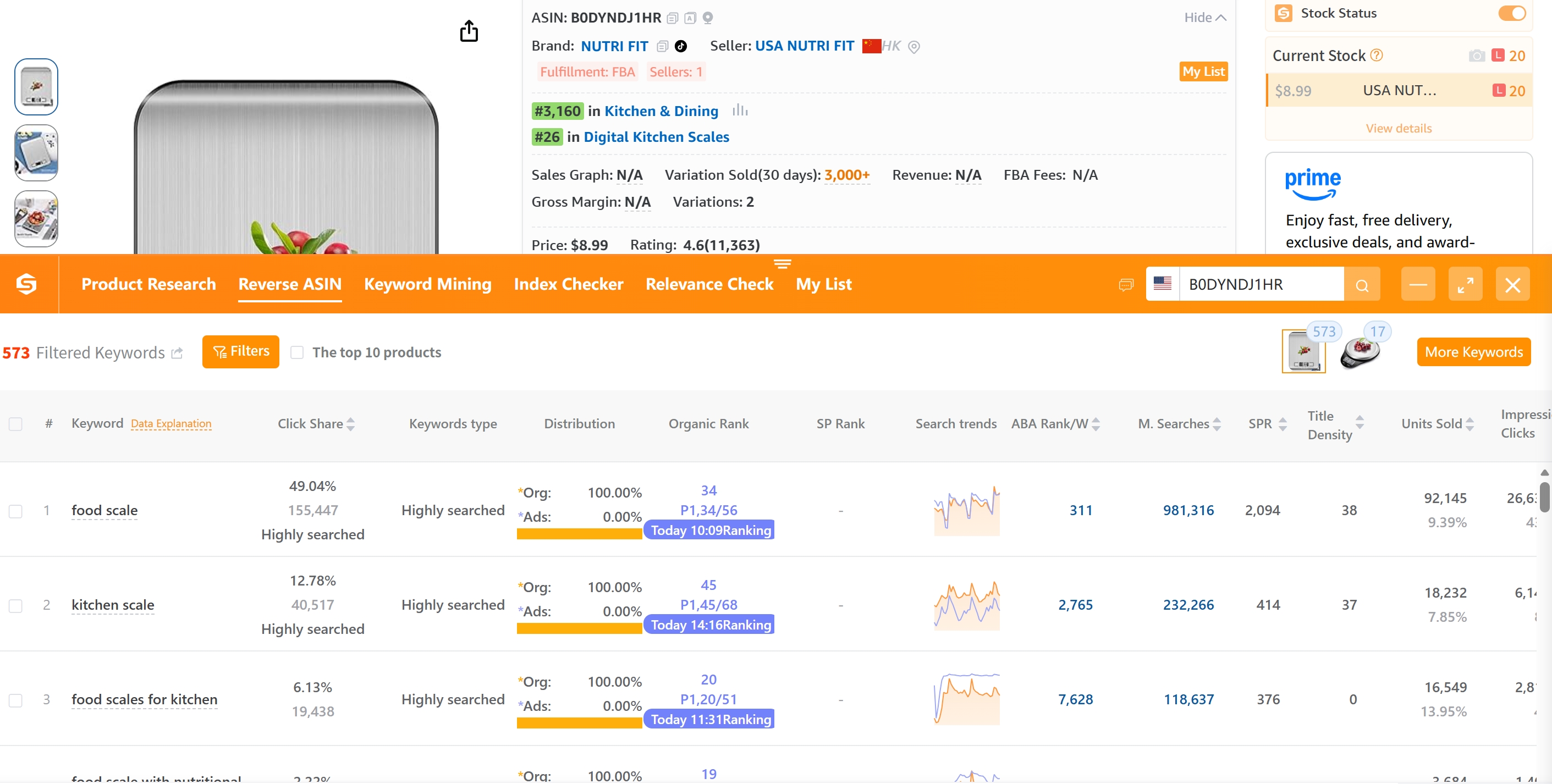
Reverse ASIN analysis is a strategic method used by Amazon sellers to extract the keywords that drive traffic to a specific product listing, revealing the exact search terms competitors are ranking for organically and through paid ads. By entering a competitor's ASIN into a reverse ASIN tool, you gain access to a wealth of keyword data, including customer search behavior, search volume, and keyword performance indicators.
This approach is especially powerful for PPC keyword research because it uncovers real-world, customer-validated search terms that convert. Unlike generic keyword tools that rely on broad estimates, reverse ASIN data reflects actual buying intent tied to specific products. For example, if a top-selling yoga mat ranks for "non-slip eco-friendly yoga mat for hot yoga", that keyword likely converts well and should be part of your Sponsored Products campaign.
Why Reverse ASIN Matters for Your Amazon PPC Strategy
Running Amazon PPC without competitor keyword intelligence is like flying blind. Reverse ASIN analysis fills critical gaps in your keyword discovery process by exposing:
- Hidden long-tail keywords – Specific, low-competition phrases that shoppers actually use.
- Top converting search terms – Keywords driving traffic to best-selling listings.
- Brand-specific opportunities – Competitor-branded searches you can bid on (e.g., "alternative to Lululemon mat").
- Gaps in your own keyword coverage – Areas where your current campaigns are missing high-intent traffic.
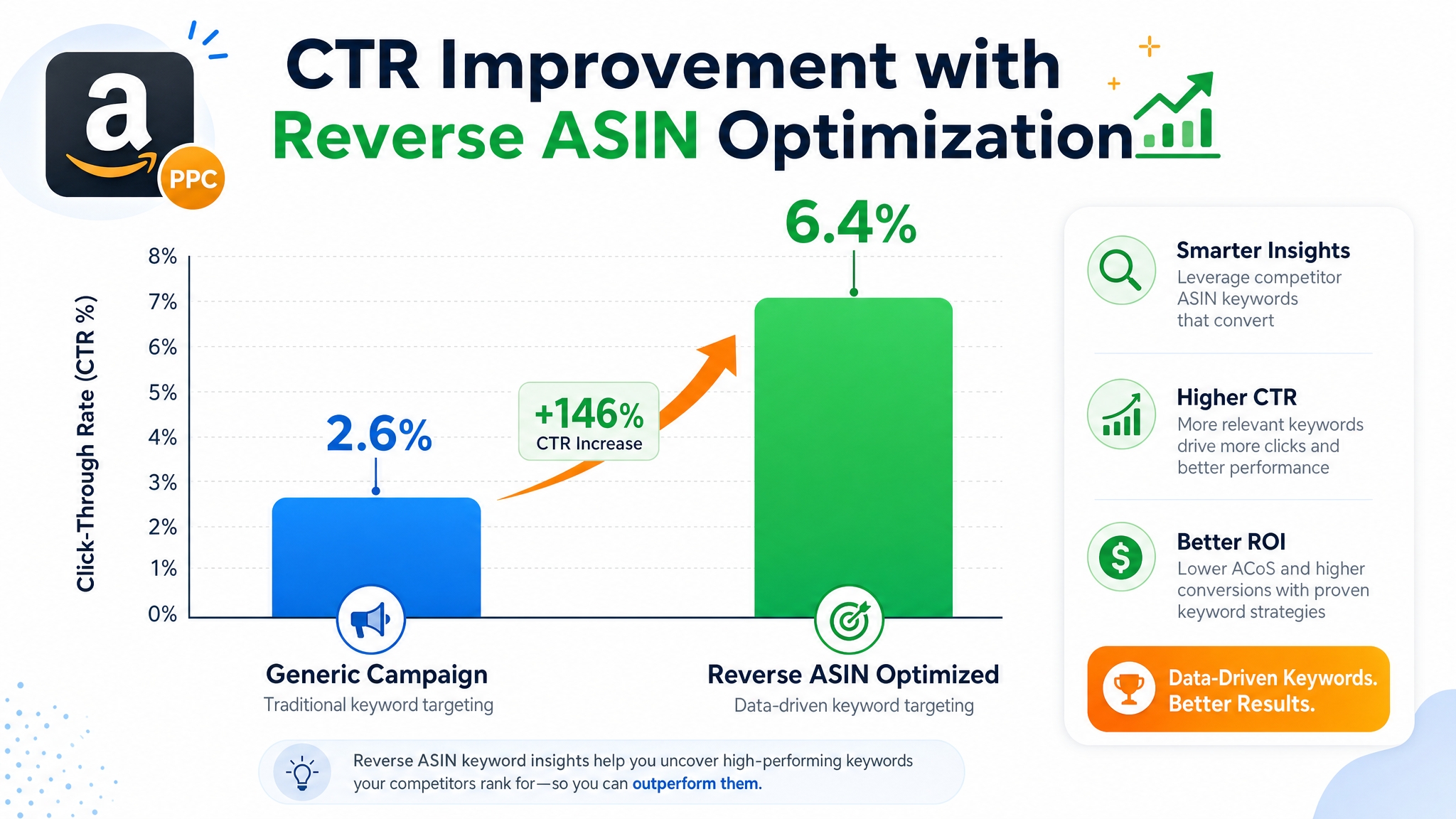
According to Amazon's internal data, Sponsored Products ads capture over 60% of conversion share during the discovery phase. If your campaigns aren't targeting the same high-intent keywords as market leaders, you're leaving sales on the table. By reverse-engineering successful ASINs, you align your bids with proven demand.
Step-by-Step Guide to Performing Reverse ASIN Analysis
Here's how to conduct reverse ASIN analysis using tools like SellerSprite, which is ideal for new, growing, and enterprise-level sellers alike:
Step 1: Identify Competitor ASINs Worth Analyzing
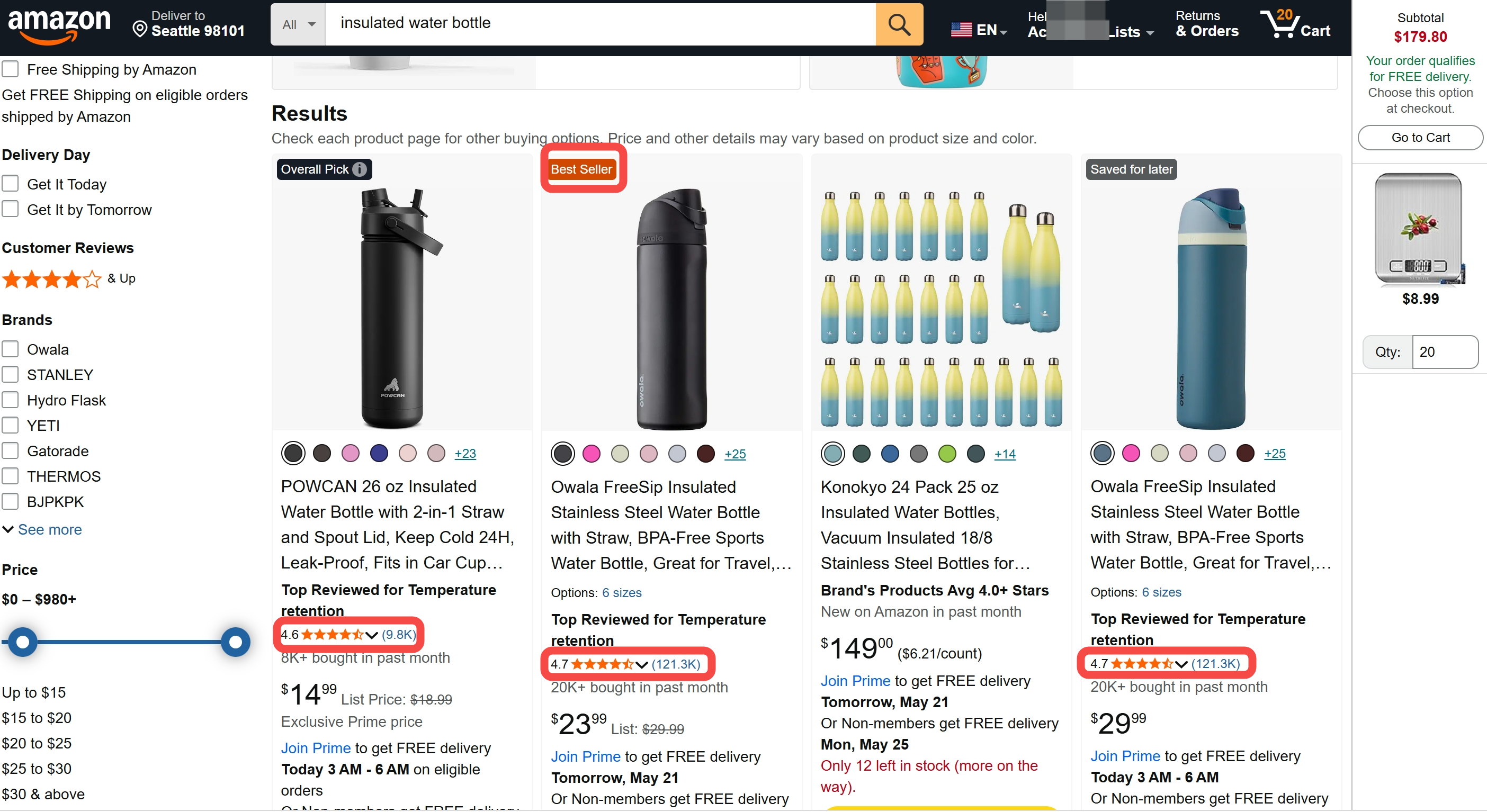
Start by compiling a list of top-performing competitors in your niche. Look for listings with:
- High Best Seller Rank (BSR) in relevant categories
- 4.5+ star ratings with 100+ reviews
- Strong image quality and conversion-optimized copy
Step 2: Use a Reverse ASIN Tool to Extract Keywords
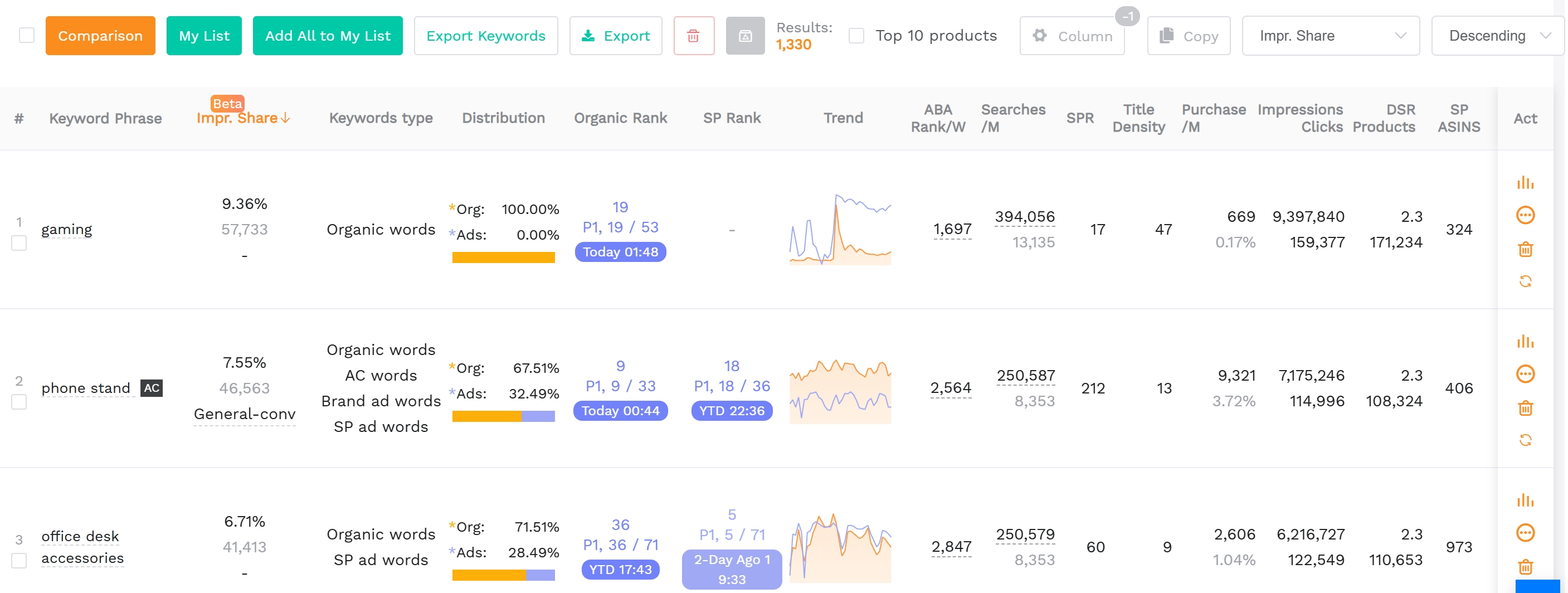
Head over to SellerSprite's Amazon reverse ASIN tool, enter the target ASIN, and run the analysis. Within seconds, you'll receive a comprehensive list of keywords the product ranks for, segmented by:
- Search volume
- Impression share
- Conversion likelihood
- Organic vs. PPC ranking position
Step 3: Filter and Prioritize Actionable Keywords
Not all extracted keywords are worth targeting. Use filters to focus on:
- High search volume + low competition – Easy wins for new campaigns.
- Exact match relevance – Keywords that directly describe your product.
- Long-tail phrases – Lower cost per click, higher intent (e.g., "ergonomic office chair for tall people").
Export the final list to Excel for use in bulk uploading to Amazon Advertising.
How to Use Reverse ASIN Data to Optimize Amazon PPC Campaigns
Now that you've extracted valuable keywords, it's time to deploy them strategically across your Sponsored Products, Sponsored Brands, and Sponsored Display campaigns.
1. Build Hyper-Targeted Campaign Structures
Group keywords by intent and product fit. For example:
- Top-of-funnel: "best wireless earbuds under $50" → Broad match, awareness stage
- Mid-funnel: "noise cancelling earbuds for running" → Phrase match, consideration
- Bottom-of-funnel: "Apple AirPods Pro replacement case" → Exact match, conversion
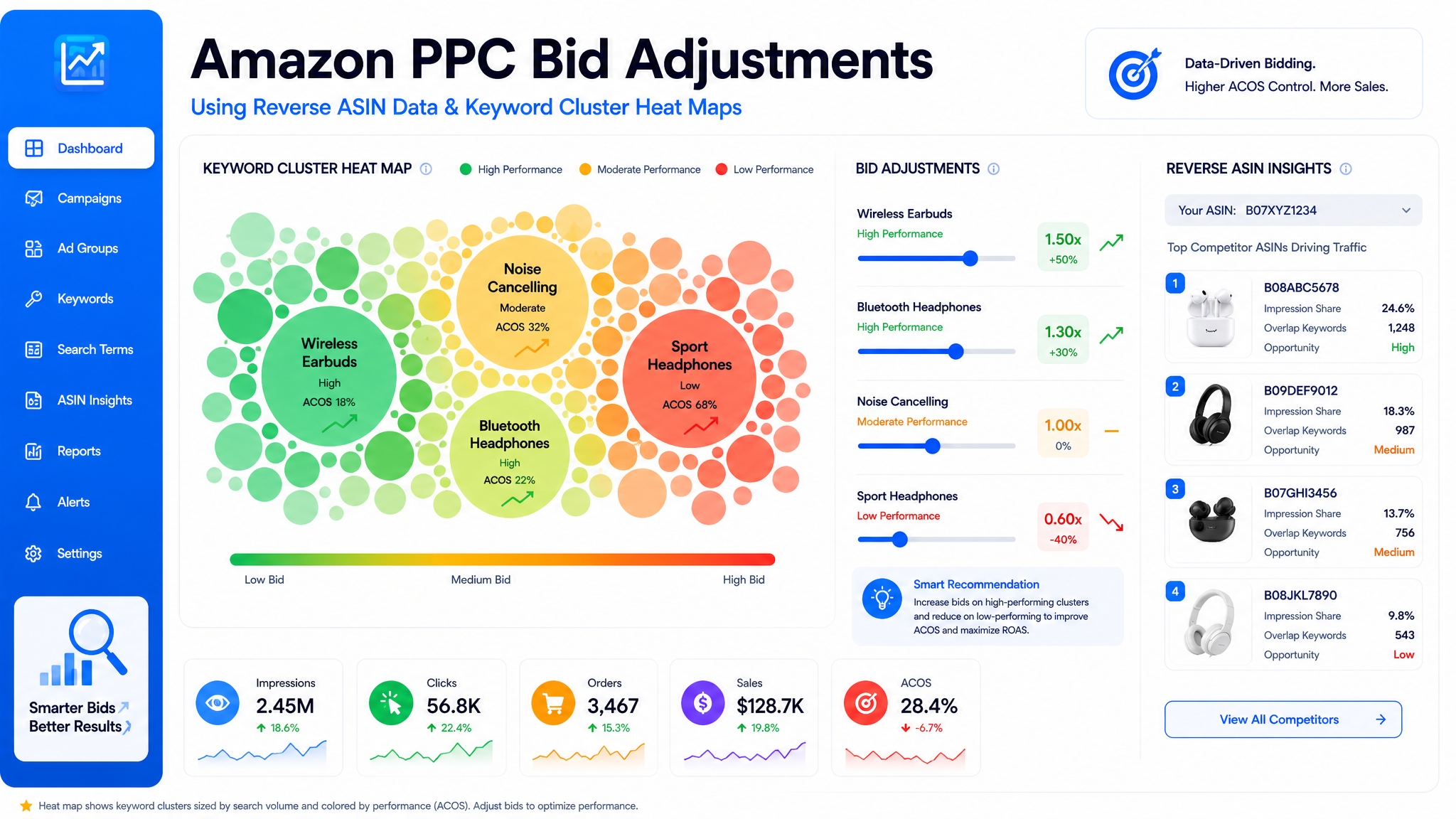
2. Set Competitive Bids Based on Keyword Value
Use reverse ASIN insights to inform your bid strategy:
- Boost bids on keywords where competitors rank highly but your product is competitive in specs and price.
- Use dynamic bidding — up and down — for high-value keywords identified through reverse ASIN analysis.
- Lower bids or pause keywords already saturated by dominant players unless you have a unique value proposition.
3. Refine Negative Keywords
Reverse ASIN data also reveals irrelevant or overly broad search terms that trigger impressions but don't convert. Add these as negative keywords to improve relevance and reduce wasted spend.
4. Monitor and Iterate
Amazon's algorithm evolves constantly. Re-run reverse ASIN analyses quarterly or whenever launching a new product to stay ahead. Compare keyword shifts over time to detect emerging trends.
Scaling & Automating Reverse ASIN Workflows for Teams
For brand owners and operations managers overseeing multiple SKUs or brands, manual reverse ASIN analysis isn't sustainable. That's where automation comes in.
SellerSprite allows you to:
- Run reverse ASIN reports for multiple ASINs at once
- Compare keyword overlap between your listings and competitors (useful for gap analysis)
- Integrate findings directly into your Amazon Advertising Console via exported target keywords
Marketing teams can create standardized reverse ASIN audit templates and assign them to different product lines, ensuring consistent intelligence-gathering across portfolios. This systematic approach fuels data-driven decisions and keeps PPC strategies agile.
FAQ
How does reverse ASIN help improve Amazon PPC campaigns?
Reverse ASIN analysis reveals the actual keywords driving traffic to top-performing competitor listings. By incorporating these proven, high-converting search terms into your own campaigns, you increase relevance, click-through rates, and conversion rates, leading to lower ACOS and higher ROI.
What tools can I use to perform a reverse ASIN search for keyword discovery?
SellerSprite's Amazon reverse ASIN tool is one of the most accurate and user-friendly options available. It delivers real-time keyword data, search volume estimates, and performance metrics. Other tools include Helium 10 Cerebro and Jungle Scout Keyword Scout, but SellerSprite offers superior filtering and export capabilities for PPC teams.
Can I automate reverse ASIN analysis for multiple products on Amazon?
Yes. SellerSprite enables batch reverse ASIN lookups for ongoing competitor monitoring. This automation is ideal for enterprise sellers, agencies, and brand managers who need consistent intelligence across large catalogs without manual intervention.
Next Steps
- Start with the Reverse ASIN Strategy Guide to master competitive keyword spying.
- Try SellerSprite’s reverse ASIN tool to extract keywords from your top competitors today.
- Download the Amazon PPC Keyword Expansion Playbook for advanced campaign structuring tactics.
References
By SellerSprite Success Team
The SellerSprite Success Team combines deep expertise in Amazon marketplace dynamics, data analytics, and paid advertising optimization. With years of experience empowering thousands of sellers across the global, we deliver battle-tested strategies grounded in real-world performance. Our mission is to help sellers turn competitive intelligence into profitability through transparent, actionable tools and insights.


