TL;DR: Learn how to leverage Google Trends to identify high-growth niches, master seasonality, and choose the most effective buyer-centric keywords for your Amazon listings and PPC campaigns.
Key Takeaways
- Google Trends identifies search direction and seasonality rather than absolute search volume.
- Distinguishing between "Topics" and "Search Terms" is critical for accurate Amazon keyword mapping.
- Always cross-validate Google data with Amazon-specific tools to ensure high buyer intent.
Table of Contents
- Why Amazon Sellers Should Use Google Trends
- Understand Google Trends Data
- Step 1: Build a Clean Seed Keyword List
- Step 2: Validate Demand & Seasonality
- Step 3: Compare Synonyms & Naming Variants
- Step 4: Discover New Keyword Opportunities
- Step 5: Use Regional Interest for Targeting
- Step 6: Cross-Validate With Amazon Data
- Step 7: Turn Keywords Into Execution
- Common Mistakes to Avoid
- FAQ
- References
Note on marketplaces: This guide is specifically optimized for the US market.
Why Amazon Sellers Should Use Google Trends (And What It Can't Tell You)
Google Trends is a powerful, free tool that provides a window into the world's search behavior. For Amazon sellers, it serves as an early warning system for emerging products and a compass for seasonal planning. While Amazon-specific tools tell you what is happening inside the store, Google Trends shows you the external forces driving traffic to the store.
What Google Trends is good for: direction, seasonality, rising interest
Google Trends excels at showing trajectory. Is the interest in "collagen powder" growing year-over-year, or is it a fading fad? It allows you to anticipate spikes in demand weeks before they hit Amazon's internal search reports.
What it is NOT: absolute search volume
A score of "100" in Google Trends does not mean 100 searches. It represents peak popularity for that term in the selected time range. It is a relative metric, not a count. Sellers must use it to compare the popularity of terms, not to estimate exact sales units.
Understand Google Trends Data So You Don't Misread It
To master Google Trends for e-commerce, you must understand how the data is filtered. The default settings often include "Web Search" and "Worldwide," which might not be relevant if you only sell in the US Amazon marketplace.
Topic vs. Search Term
When you enter a keyword, Google often offers two choices. A Topic covers a concept across multiple languages and similar phrases (e.g., "Coffee" as a beverage). A Search Term matches the exact string of characters. Use Topics for high-level market research and Search Terms for specific Amazon keyword research.
Trends Setup Checklist:
- Set Location to "United States"
- Set Time Range to "Past 5 Years" for seasonality
- Set Category to "Shopping" for better intent matching
- Switch between "Web Search" and "YouTube Search" to see social buzz
Step 1: Build a Clean Amazon Seed Keyword List
Before opening Trends, you need a list of potential keywords. Don't guess; use buyer-centric language. Analyze Amazon autocomplete and study your competitors' titles to see which modifiers they prioritize.
For deeper analysis, use a Reverse ASIN tool to find which keywords are already driving traffic for top-ranking competitors in your niche. Organize these into four buckets: Core terms, Attribute modifiers (e.g., "silicone"), Use-case modifiers (e.g., "for hiking"), and Problem/Solution phrases.
Step 2: Validate Demand & Seasonality With "Interest Over Time"
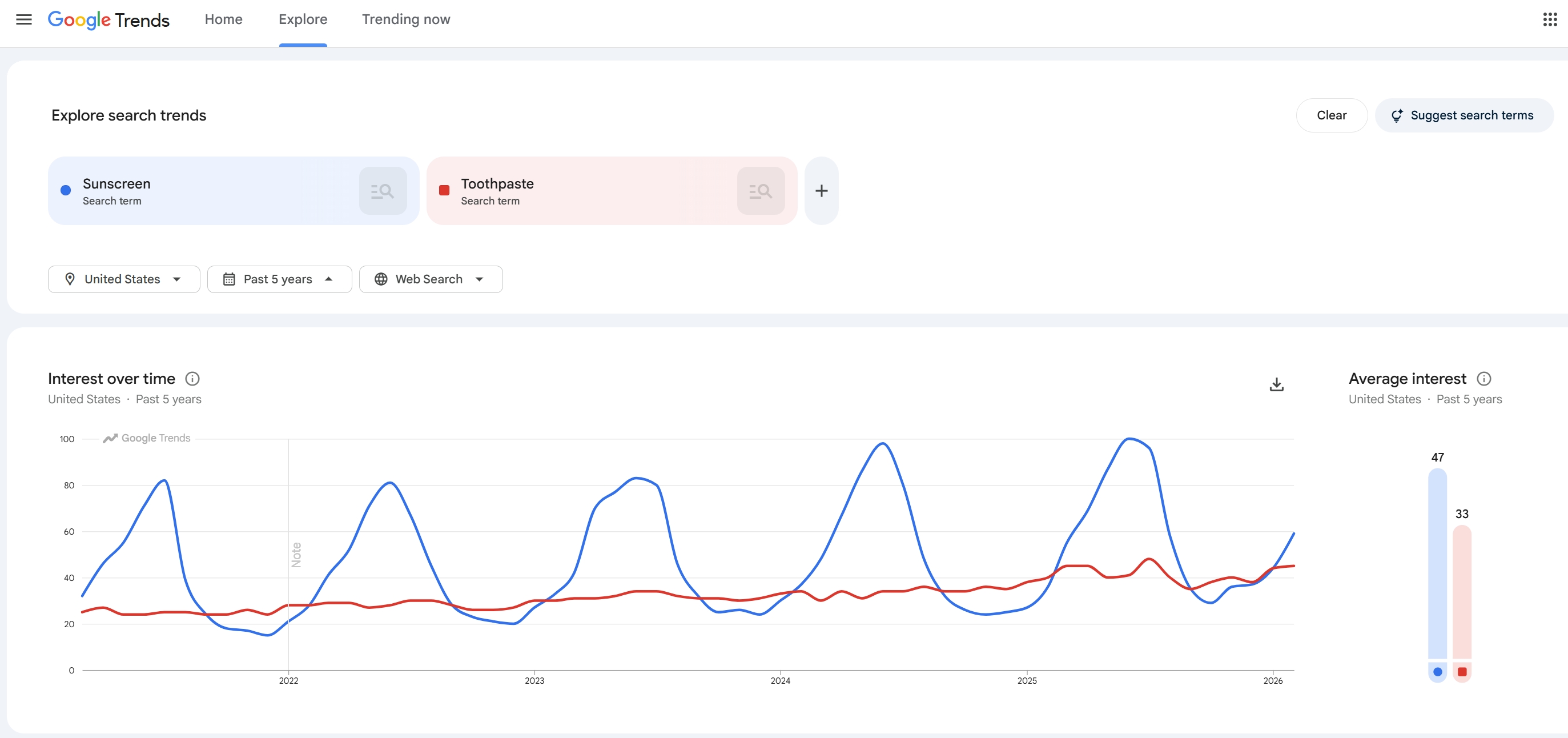
Enter your seed keywords and look at the "Interest over time" graph. This is where you separate long-term opportunities from short-lived spikes.
Identify Patterns That Matter
Look for Evergreen patterns (steady lines), Seasonal peaks (recurring mountains every year), and Declining trends. If you see a "Breakout" spike that hasn't repeated, it might be a fad like fidget spinners. Use the 5-year view to ensure the trend is stable.
Decision Tree:
- If Seasonal: Time your inventory arrival 4 weeks before the upward curve starts.
- If Declining: Avoid launching new products; focus on liquidating current stock.
- If Spiking (New): Investigate if it's a new sub-category or just a viral moment.
Step 3: Compare Synonyms, Naming Variants, and Modifiers
One of the best ways to find trending keywords for Amazon is to see which names buyers prefer. Should you call your product a "Laptop Case" or a "Laptop Sleeve"? Google Trends will show you which term has higher relative volume.
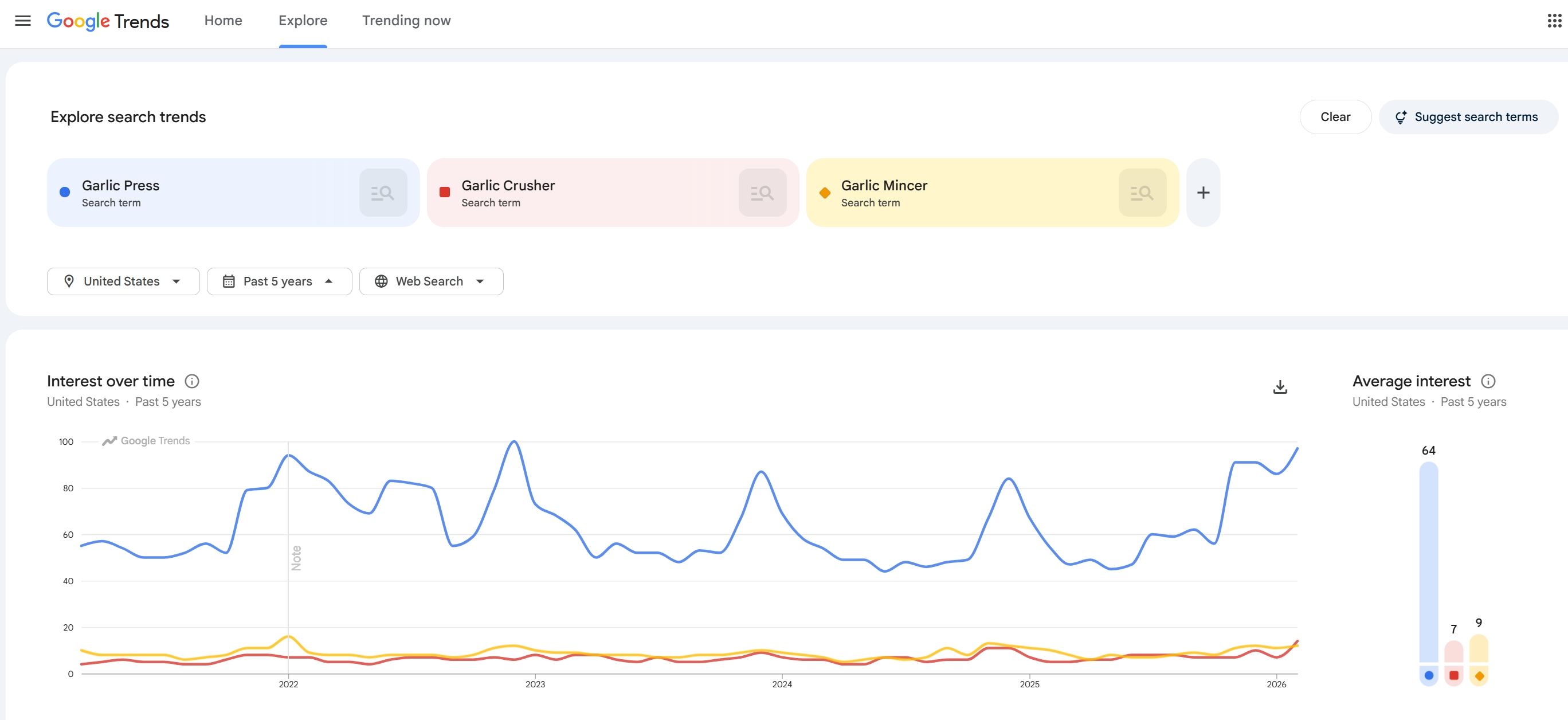
Rule of Thumb: Put the term with the highest consistent trend line in your Amazon Title. Use the secondary and tertiary variants in your Bullet Points and Backend Keywords.
Step 4: Discover New Keyword Opportunities Using Related Topics/Queries
Scroll down to the "Related Queries" section. This is a goldmine for expanding your keyword universe. Switch the filter from "Top" to "Rising" to find terms that are gaining traction right now.
Understanding "Breakout"
A "Breakout" term means the search volume grew by more than 5,000% in the given timeframe. These are often the seeds of new niches. However, always qualify these by checking if they are relevant to your product constraints and if you can fulfill them profitably before chasing the trend.
Step 5: Use Regional Interest to Guide Marketplace Targeting
The "Interest by subregion" map shows where demand is concentrated. For US sellers, this can guide your PPC geo-targeting. If "snow shovels" are trending in the Northeast but not the South, you can adjust your advertising spend accordingly.
Furthermore, if you are expanding internationally, compare the trend for a term in the UK vs. the US. You might find that "Flashlight" is a dead end in the UK, where "Torch" is the dominant search term.
Step 6: Cross-Validate Trends Insights With Amazon Data
Never rely solely on Google Trends. Google data reflects "informational intent," while Amazon data reflects "transactional intent." Once you find a trend, verify it on Amazon by checking the number of competitors and the actual search volume using trend research strategies.
If you have existing products, check your PPC Search Term Report. If a "Rising" term from Google Trends also shows an increasing click-through rate in your Amazon ads, it’s time to move it to an Exact Match campaign.
Step 7: Turn Keywords Into Execution: Listing SEO & PPC
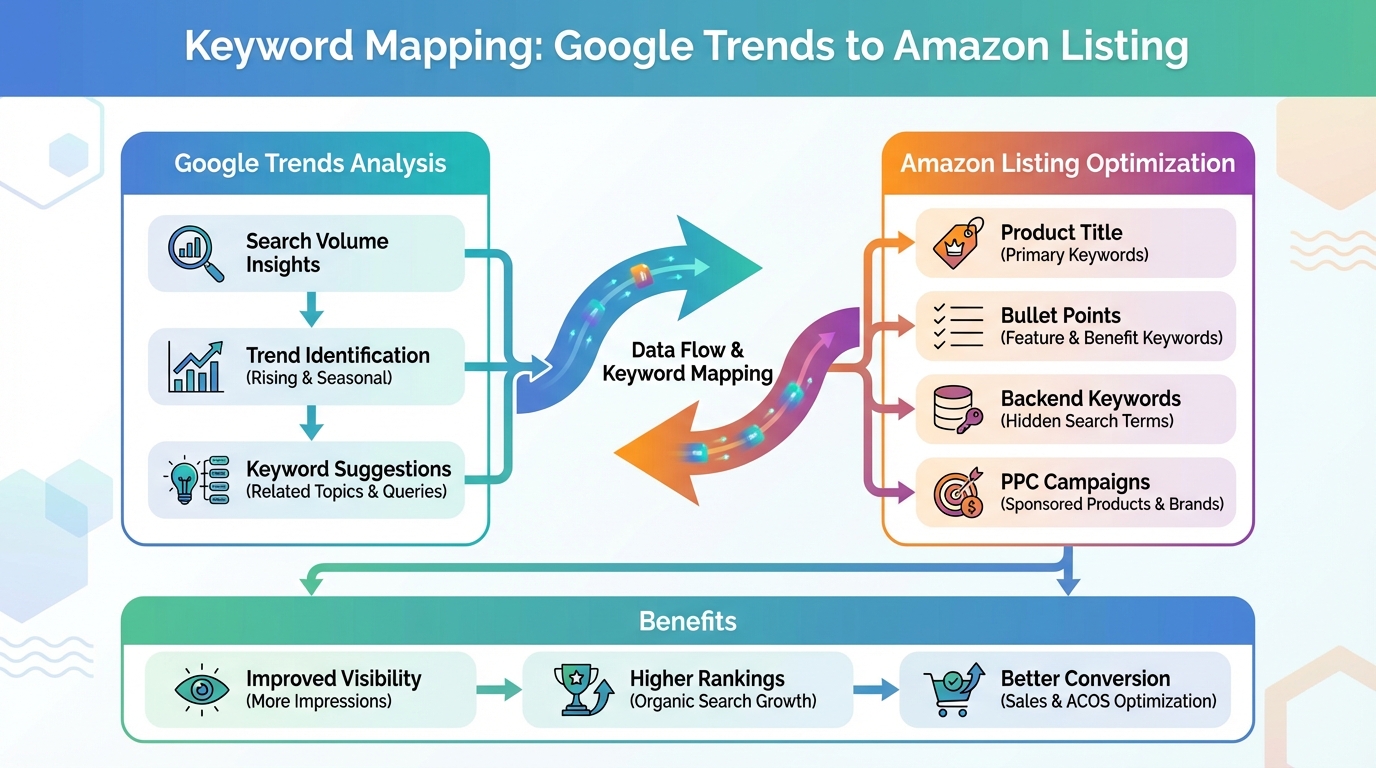
After validating your list, it's time to implement. Map your "Preferred Naming" keywords to your Title and first two Bullets. Use the emerging and breakout keywords in your Amazon PPC discovery campaigns (Broad Match) to capture early traffic at a lower cost.
Common Mistakes When Using Google Trends for Amazon Keywords
- Treating 0-100 as absolute volume: Thinking 100 means millions of searches.
- Comparing unrelated categories: Comparing "iPhone" with "spatula" flattens the spatula's trend line, making it unreadable.
- Ignoring the "Shopping" filter: General web search includes news and gossip, which doesn't translate to sales.
FAQ
How can I compare Google Trends data with Amazon search volume to find profitable niches?
Look for terms with a steady upward trend on Google but low search volume or high "relevance gaps" on Amazon. This indicates a niche that is about to explode on Amazon but hasn't yet been saturated by sellers.
What are the best ways to identify seasonal product trends on Google Trends for my Amazon FBA business?
Set your time range to 5 years. Look for consistent, repeatable peaks. Note the exact week the trend starts to climb; this is your deadline for having inventory checked into FBA and your PPC campaigns launched.
Can Google Trends help me find low-competition keywords for my Amazon PPC campaigns?
Yes. By using the "Rising" and "Breakout" related queries, you can find new ways people are describing products before these terms become common knowledge among Amazon sellers, allowing you to bid on them cheaply.
Should I use "Topic" or "Search term" for Amazon keywords?
Use "Topic" to understand general market health and "Search Term" to find specific phrases for your Amazon Title and Backend keywords. Topics help with concept research, while Search Terms help with exact SEO phrasing.
Can Google Trends predict Amazon sales?
It cannot predict exact sales numbers, but it predicts demand shifts. If Google search interest for a niche drops 30%, expect your Amazon sales to follow shortly after. Use it as a directional indicator for inventory replenishment.
Next Steps
- Sign up for SellerSprite to cross-validate your Google Trends findings with real Amazon search volume.
- Run your top 5 keywords through Google Trends today to check their 12-month trajectory.
References
By SellerSprite Success Team
The SellerSprite Success Team consists of seasoned Amazon SEO experts and data analysts dedicated to helping FBA sellers scale through data-driven keyword research and market intelligence.


