TL;DR: A reverse ASIN search reveals the keywords a competitor's Amazon product ranks for, helping you optimize your own listings and ads. This step-by-step guide walks you through the entire process, from selecting ASINs to applying insights in SEO and PPC.
Key Takeaways
- A reverse ASIN search uncovers the keywords driving traffic to a competitor's Amazon listing.
- Select 3-10 relevant competitor ASINs in the same category, price range, and use case to avoid skewed data.
- Use reverse ASIN insights to build keyword maps, improve SEO, and expand high-performing PPC campaigns.
Table of Contents
- What a Reverse ASIN Search Is (And Why Sellers Use It)
- What You Need Before You Start
- Step-by-Step: How to Run a Reverse ASIN Search in SellerSprite
- How to Read Reverse ASIN Results (So You Don't Chase Bad Keywords)
- Step-by-Step: Turn Reverse ASIN Data Into an Actionable Keyword List
- Apply Reverse ASIN Keywords to Listing SEO (Keyword Mapping)
- Apply Reverse ASIN Keywords to PPC (Harvest, Test, Scale)
- Common Mistakes (And How to Avoid Them)
- FAQ
- References
Note on marketplaces: This guide is specifically optimized for the US market.
What a Reverse ASIN Search Is (And Why Sellers Use It)
A reverse ASIN search is a powerful Amazon research technique that reveals the keywords a specific product ranks for organically and through paid ads. Instead of guessing what terms customers use, you reverse-engineer the search traffic of top-performing competitors.
Reverse ASIN = "keywords a product ranks/gets traffic from"
Every Amazon listing gets discovered through search. A reverse ASIN tool decodes that discovery path by showing you the actual search terms customers use to find a product. This includes high-volume head terms, long-tail phrases, and even misspellings that drive real traffic.
Reverse ASIN vs. Regular Keyword Research (When Each Is Better)
Traditional keyword research starts with a seed term and expands outward. Reverse ASIN flips the script: you start with a product and extract its keywords. Use reverse ASIN when you want competitor intelligence; use regular research when exploring new markets or validating product ideas.
Best Use Cases: Launching, Competitor Teardown, PPC Expansion, Listing Refresh
Definition:
Reverse ASIN Search = The process of analyzing a competitor's ASIN to extract the keywords they rank for on Amazon, including both organic and sponsored placements.
Use it when:
- You're launching a new product and need keyword inspiration
- You want to audit a competitor's SEO or PPC strategy
- You're finding new match types and negative keywords
- You want to update underperforming content with high-intent terms
What You Need Before You Start
Choose the Right Marketplace (US vs. UK vs. DE Matters)
Amazon operates differently across regions. The US marketplace has the largest volume and most competitive data. Always ensure your reverse ASIN tool is set to the correct marketplace, especially if you're selling in multiple countries. For this guide, we focus on the Amazon US marketplace.
Pick 3-10 Competitor ASINs (Selection Rules)
Same Product Type + Same Use Case + Similar Price Band
Choose ASINs that represent true competitors: products that solve the same customer problem at a similar price point. For example, if you sell a $25 stainless steel water bottle, don't analyze a $10 plastic version or a $100 smart bottle.
Avoid "Category Giants" That Distort the Dataset
Brands like Amazon Basics or Anker dominate search results due to brand strength, not just keyword relevance. Including them can flood your data with branded terms you can't realistically compete for. Focus on mid-tier competitors with strong but not dominant rankings.
Create a Simple Output Goal
Before running the report, define your goal:
- SEO Keyword Map: Identify primary and secondary terms for listing optimization.
- PPC Expansion List: Find new keywords for Sponsored Products campaigns.
- Gap Analysis List: Compare your current keywords against competitors to find missing opportunities.
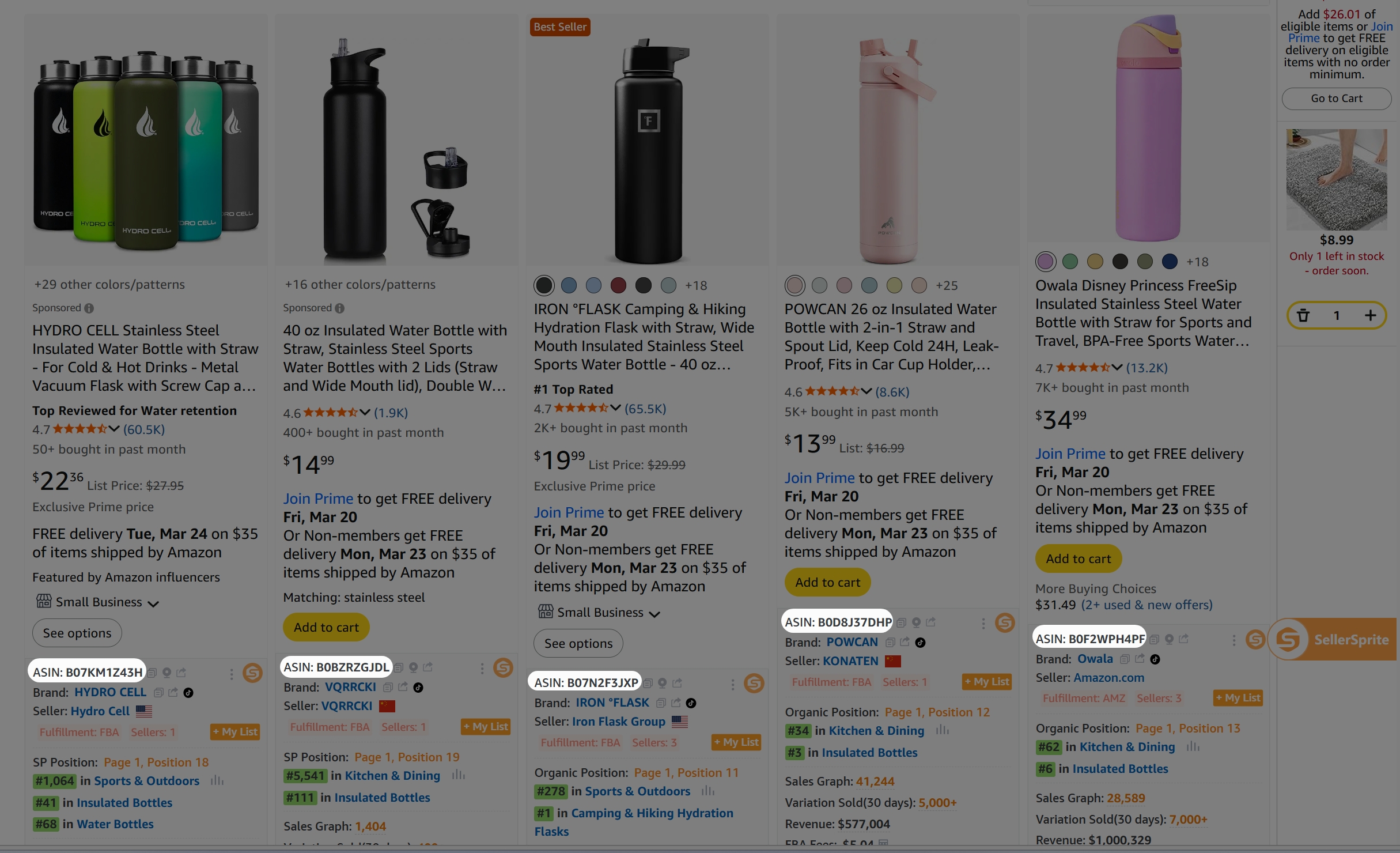
Step-by-Step: How to Run a Reverse ASIN Search in SellerSprite
Step 1: Copy the ASIN(s) and Confirm Variations
Parent vs. Child ASIN: Which One to Reverse and Why
Parent ASINs represent the product family, while child ASINs are individual variations (e.g., size, color). For reverse ASIN research, use child ASINs because they have more specific ranking data. If you reverse a parent ASIN, you may get diluted or aggregated results.
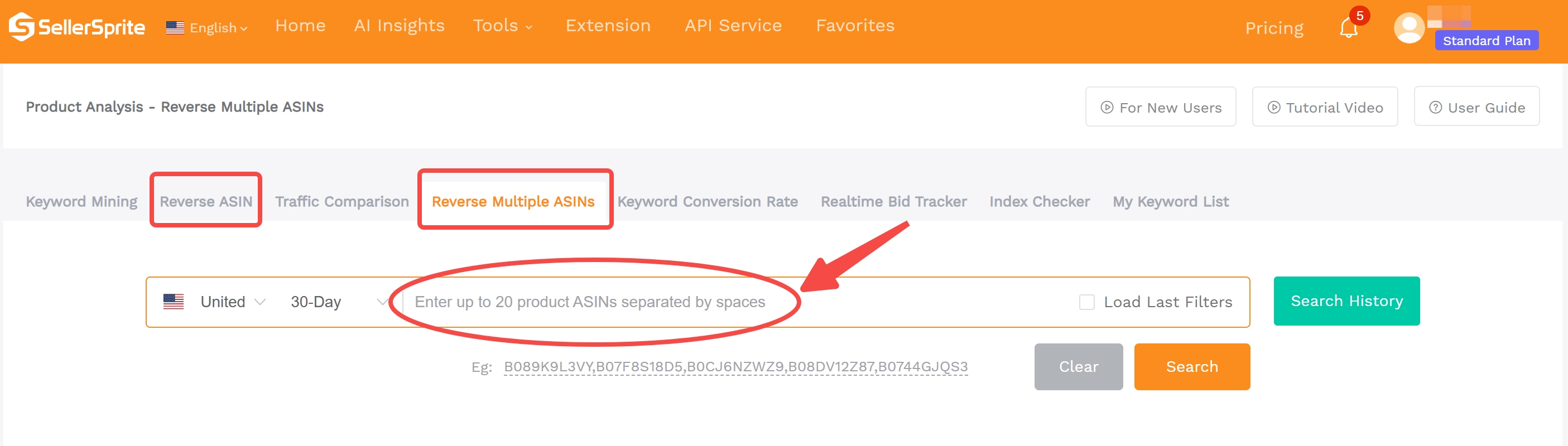
Step 2: Paste ASIN(s) into the Reverse ASIN Tool
“Where to paste ASIN”
Step 3: Set Key Filters (Marketplace & Time Window)
"Filters panel" + recommended defaults
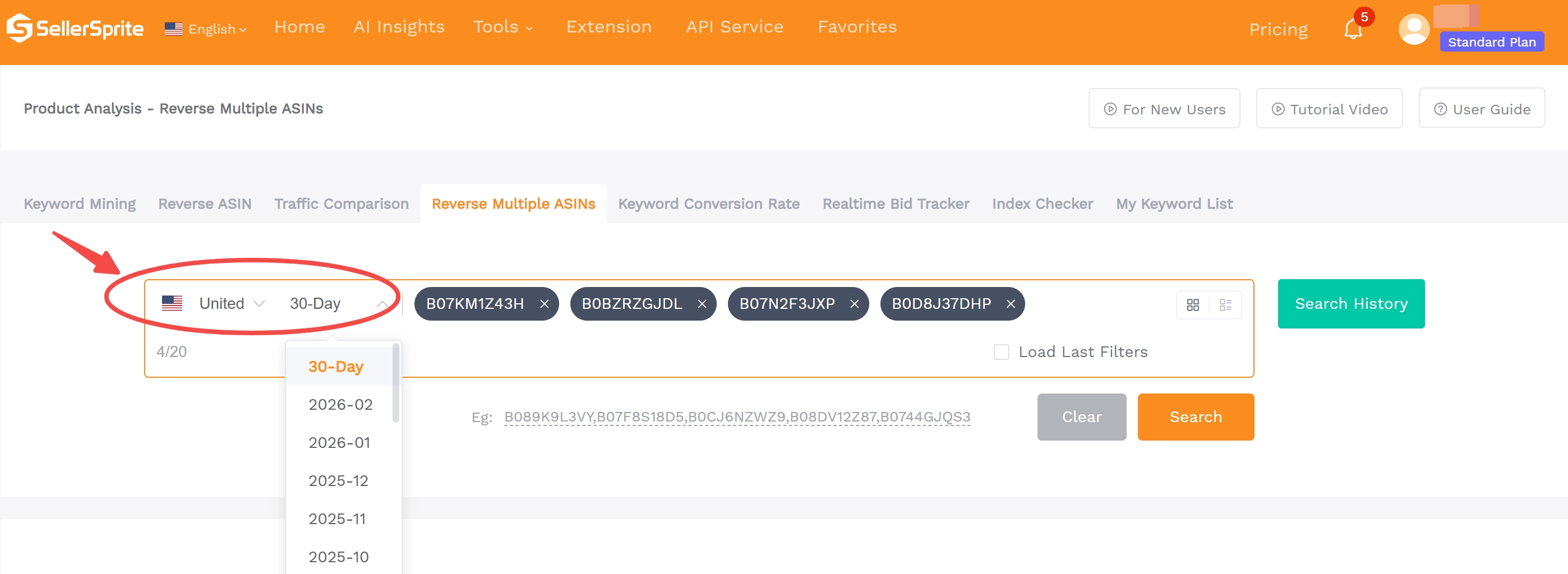
Recommended defaults:
- Marketplace: US
- Time Window: Last 30 days
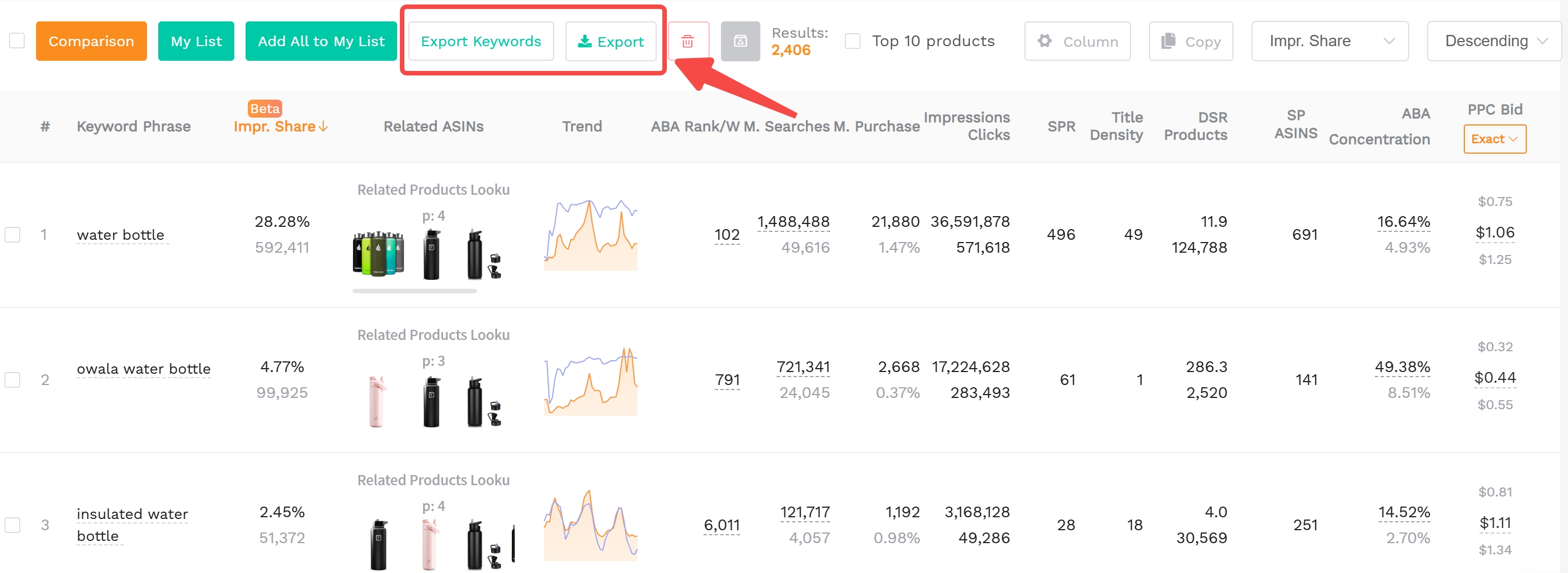
Step 4: Run the Report and Export Results
"How to export the Reverse ASIN(s) results"
4-Step Reverse ASIN Workflow Checklist
- ✅ Copy 3-10 competitor child ASINs
- ✅ Paste into SellerSprite's reverse ASIN tool
- ✅ Set filters: US marketplace & 30-day window
- ✅ Run and export results (Excel)
How to Read Reverse ASIN Results (So You Don't Chase Bad Keywords)
The Key Columns to Look For (Typical Metrics)
Relevance Signals (keyword-product fit, category alignment)
Look for keywords that match your product's core function. A "stainless steel water bottle" should rank for "insulated water bottle," not "plastic kids cup."
Demand Signals (search volume / trend)
Higher search volume indicates more traffic potential. Use trend data to avoid declining terms.
Competition Signals (impression share, ABA rank, PPC bid)
High PPC bid means you may have to spend more budget on ads to rank for the keyword. Evaluate whether you can compete.
Identify "Money Keywords" vs. "Noise Keywords"
Money = high intent + strong fit + realistic ability to win
Example: "leak-proof stainless steel water bottle" is specific, high-intent, and relevant.
Noise = ambiguous intent, wrong subcategory, branded terms you can't compete on
Example: "Amazon Basics water bottle" is branded, not targetable.
Quick Keyword Scoring (Copy/Paste Framework)
Use this simple formula to score keywords:
Score = Relevance (1-5) × Intent (1-5) × Opportunity (1-5)
Prioritize keywords with a score of 60+.
Step-by-Step: Turn Reverse ASIN Data Into an Actionable Keyword List
Step 1: Remove Irrelevant Terms (Hard Filter Rules)
Wrong product type / wrong audience / incompatible attributes
Filter out terms like "baby bottle" if you sell adult water bottles. Remove keywords with incompatible features (e.g., "collapsible" if your product is rigid).
Step 2: Cluster Keywords by Intent (Not Just Synonyms)
Core Category Terms
e.g., "water bottle," "stainless steel bottle"
Attribute Modifiers (size, material, pack, feature)
e.g., "32 oz," "double wall," "2-pack"
Use-case Terms ("for…", "with…", "compatible with…")
e.g., "for hiking," "with car cup holder"
Problem/Solution Terms
e.g., "leak-proof," "keeps cold 24 hours"
Step 3: Build a Keyword Gap View (You vs. Competitor)
Use a spreadsheet to compare your current keywords against the reverse ASIN results. Highlight gaps: these are your low-hanging opportunities.
Apply Reverse ASIN Keywords to Listing SEO (Keyword Mapping)
Where Keywords Should Go: Title vs. Bullets vs. Backend
Title: Primary + Key Differentiator (Readability First)
Include your top 1-2 keywords naturally. Example: "Insulated Stainless Steel Water Bottle - 32 oz, Leak-Proof, Keeps Cold 24 Hours"
Bullets: Intent Clusters per Bullet (Benefits + Proof)
Group keywords by benefit. Example: "Leak-proof design with locking lid - perfect for gym, travel, and kids."
Backend: Variants, Misspellings, Leftover Long-Tails (No Repetition)
Use backend search terms for synonyms and variations. Avoid repeating title/bullet keywords.
Indexing Sanity Checks (Before/After Mapping)
After updating your listing, use a brand analytics tool or rank tracker to confirm keywords are being indexed.
What Not to Do (Keyword Stuffing, Irrelevant Head Terms)
Amazon penalizes keyword stuffing. Keep titles readable and avoid forcing in irrelevant high-volume terms.
Apply Reverse ASIN Keywords to PPC (Harvest, Test, Scale)
Turn Keywords into Match-Type Strategy
Exact = Proven High Intent
Use exact match for high-converting terms like "insulated water bottle 32 oz."
Phrase = Controlled Expansion
Use phrase match to capture variations like "best insulated water bottle."
Broad = Discovery (With Negatives)
Use broad match cautiously. Add negatives to block irrelevant traffic (e.g., "plastic," "baby").
Build a PPC Testing Plan (7-14 Day Learning Window)
Define Thresholds: Clicks, Orders, ACoS/ROAS Guardrails
Set performance goals. Example: "If a keyword gets 10+ clicks with no conversion in 14 days, pause it."
Add Negatives to Prevent Budget Waste (Especially for Broad Terms)
Regularly review search term reports and add negative keywords to protect your budget.
Common Mistakes (And How to Avoid Them)
Choosing the Wrong Competitors (Data Contamination)
Avoid including products that aren't direct competitors. This skews your keyword list with irrelevant terms.
Overvaluing Volume and Ignoring Relevance/Intent
High-volume keywords aren't always high-converting. Focus on intent and fit.
Copying Competitor Keywords Without Offer Alignment (CVR Drops)
If your product doesn't deliver on the promise (e.g., "dishwasher safe"), using that keyword will hurt conversion.
Forgetting Marketplace Differences and Localization
US vs. UK English, regional preferences, and compliance rules vary. Always localize your keyword strategy.
Troubleshooting: If Results Look Wrong
- ✅ Check marketplace setting (US vs. others)
- ✅ Confirm you used child ASINs, not parent
- ✅ Verify filters (time window, etc.)
- ✅ Ensure the ASIN is active and in catalog
FAQ
How can I find competitors using a reverse ASIN search on Amazon?
You don't use reverse ASIN to find competitors; you use competitors to run a reverse ASIN search. First, identify top-ranking products in your niche manually or with a product research tool. Then, use their ASINs in a reverse ASIN tool to uncover their keywords.
What are the best tools for performing a reverse ASIN search?
SellerSprite's Reverse ASIN tool is one of the most accurate and user-friendly options. Other tools include Helium 10, Jungle Scout, etc. Look for features like search volume estimates, rank tracking, and gap analysis.
How does a reverse ASIN search help improve my Amazon FBA strategy?
It reveals the exact keywords driving traffic to top sellers, allowing you to optimize your listing and ads. This leads to better visibility, higher conversion rates, and improved ACoS, all of which are key metrics for FBA success.
How many ASINs should I reverse at once?
Start with 3-10 competitor ASINs. Too few limits data diversity; too many can introduce noise. Focus on quality over quantity.
How often should I rerun reverse ASIN research?
Every 60-90 days, or after major marketplace changes. Consumer behavior and keyword trends shift, so regular updates keep your strategy competitive.
Next Steps
- Try SellerSprite's Reverse ASIN Tool to uncover competitor keywords.
- Read our Reverse ASIN Strategy Guide for advanced tactics.
- Sign up for SellerSprite and start optimizing your Amazon listings today.
References
- Reverse ASIN Strategy Guide View
- Reverse ASIN Tool for Beginners View
- Complete Reverse ASIN Guide View
By SellerSprite Success Team
The SellerSprite Success Team combines deep Amazon marketplace expertise with data science to help sellers grow profitably. We've analyzed millions of ASINs and trained thousands of sellers in keyword strategy, PPC optimization, and listing SEO.


