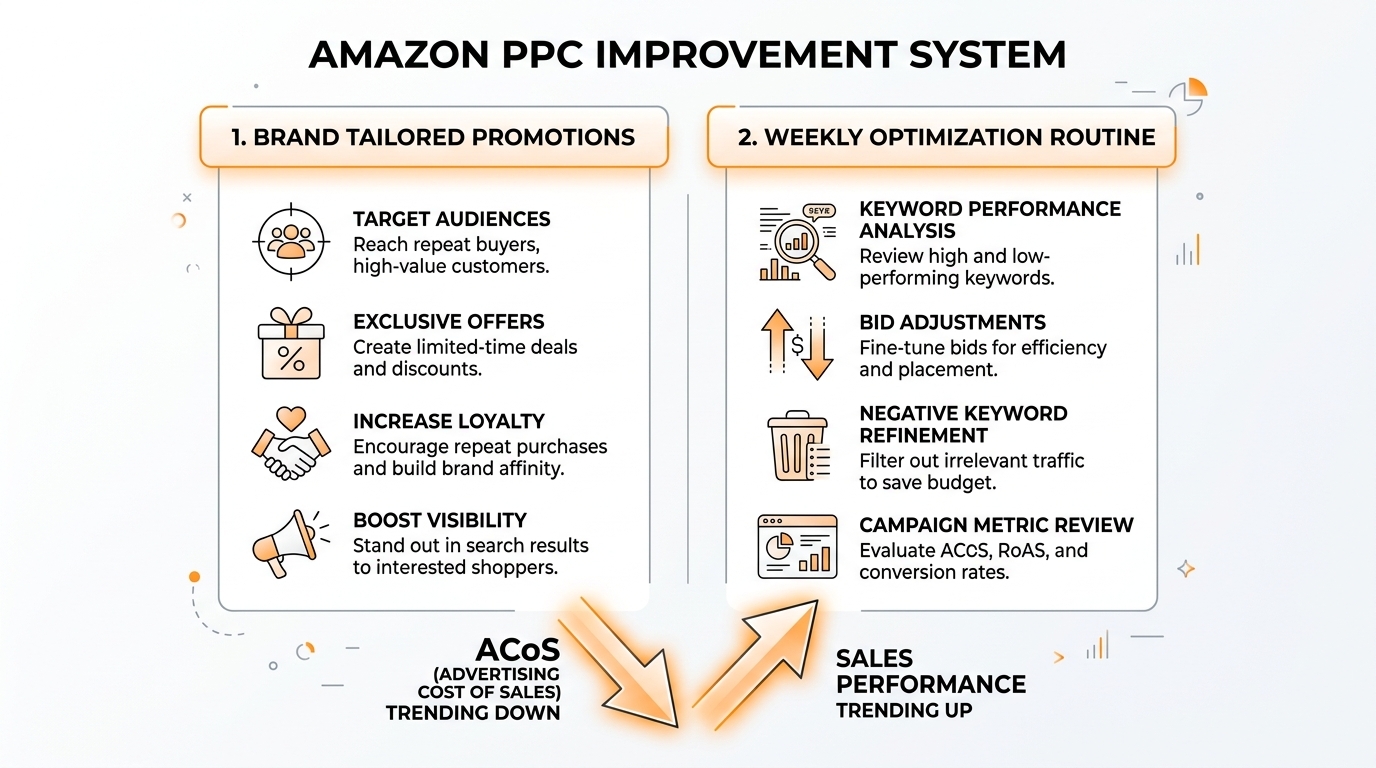
For lower ACoS and steadier sales, avoid extra complexity. You need two things: efficient retargeting running in the background and a repeatable weekly bid routine.
In this chapter, you will set up Brand Tailored Promotions in minutes, then follow a simple five-step weekly process that reduces wasted clicks and shifts budget toward winners.
Maintain calm, act consistently, and allow the system to operate. Incremental gains compound rapidly in Amazon PPC.
Key Takeaways
- Brand Tailored Promotions can be set up fast and run with low effort for brand-registered sellers.
- Treat promotion ACoS and discount cost together so you understand true profitability.
- Reduce wasted spend by lowering bids on targets with clicks but no sales.
- Scale winners by increasing bids on targets performing better than your target ACoS.
- A weekly routine beats occasional deep dives because it keeps PPC stable and predictable.
- Use SellerSprite Seller Tools to refine targeting inputs so your PPC learns faster and wastes fewer clicks.
Table of Contents
Brand Tailored Promotions Setup
Brand Tailored Promotions let brand-registered sellers retarget shoppers with discounts. Efficiency is high because the audience is already warm.
Before you start
- Verify your brand's registration and eligibility for Brand Tailored Promotions.
- Determine a discount that preserves long-term positioning and financial stability.
- Consider both ad efficiency and discount cost when reviewing promotion performance.
Steps inside Seller Central
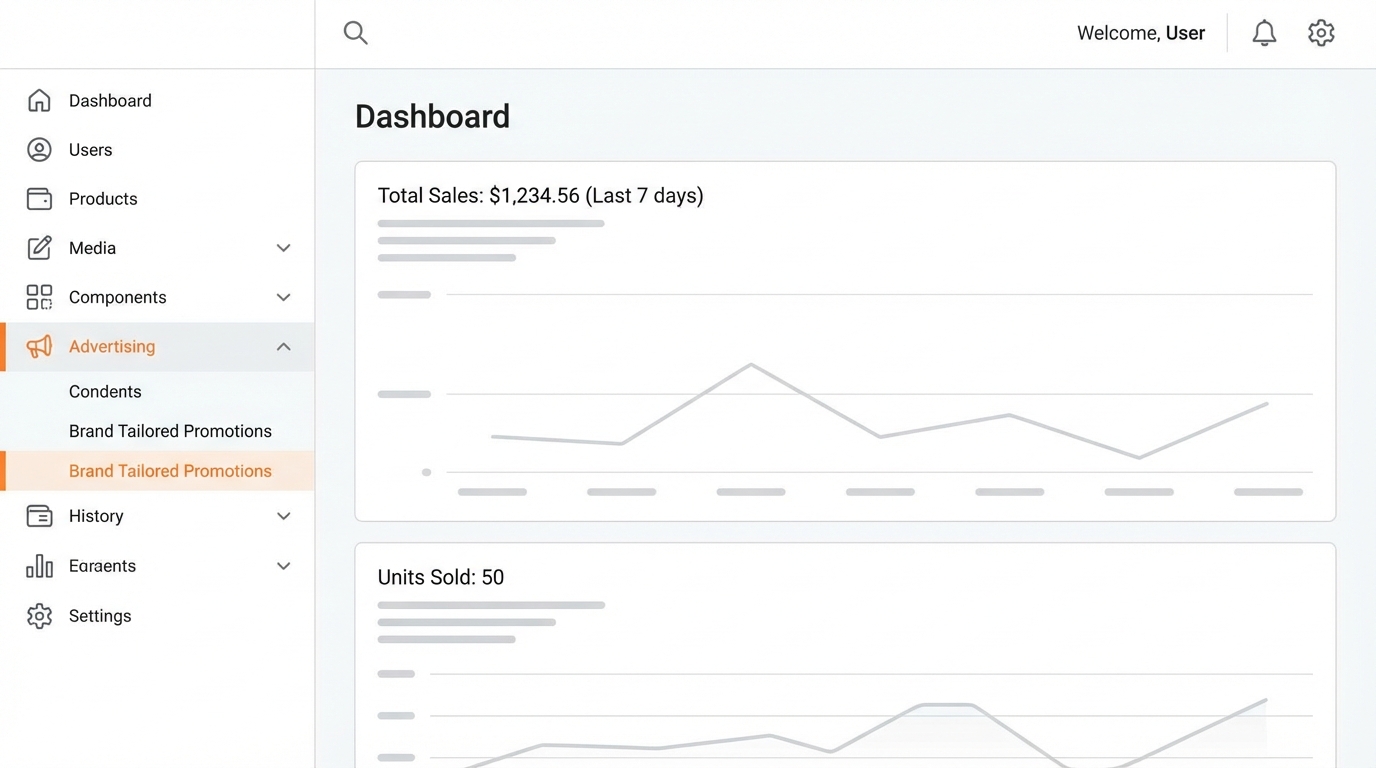
- Open Seller Central. Navigate to the Advertising menu.
- Find Brand Tailored Promotions. Open the dashboard for promotions.
- Create a promotion. Choose Create a tailored promotion.
- Select your brand. If you manage multiple brands, confirm you choose the correct one.
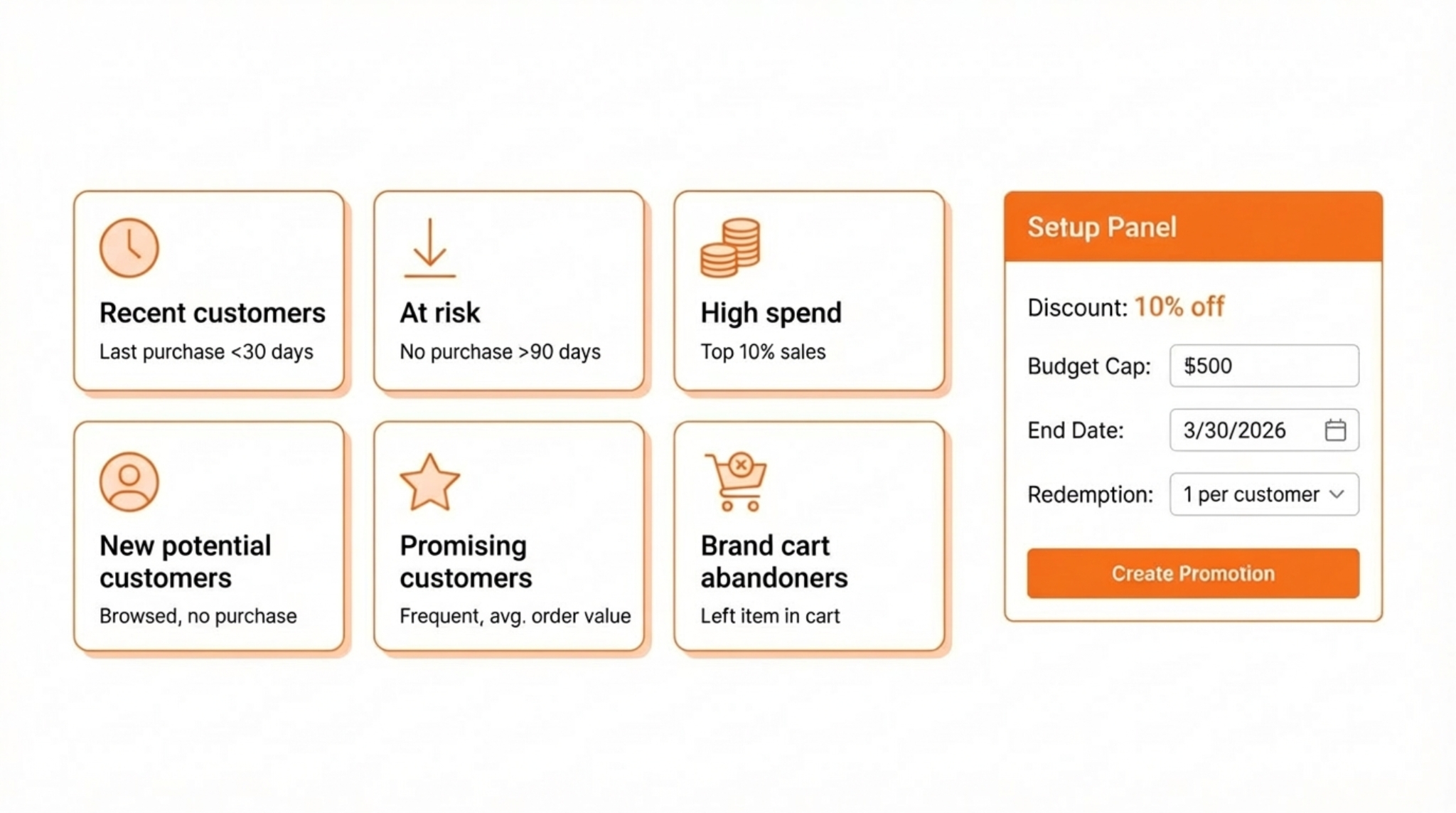
- Select an audience. Choose one audience per promotion to keep reporting clean.
- Set the discount. Start at 10 percent unless you have a clear reason to test higher.
- Set the budget cap. Use a daily maximum that matches your inventory and margin comfort.
- Set the end date. Choose the longest allowed end date, then renew as scheduled.
- Limit redemptions per customer. Keep it at 1 to reduce abuse.
- Submit and repeat. Create one promotion for each audience you want to test.
Common mistake
Looking only at low ACoS and forgetting the discount cost. Always evaluate combined impact: ad efficiency plus discount.
Recommended Audience and Discount Playbook
Keep the setup simple. Build one promotion per audience. Apply a single naming rule to make results easier to review.
Practical starting settings
- Discount: start at 10 percent and test higher only if redemption is weak and margins allow.
- Redemption per customer: keep at 1.
- Duration: set the longest end date allowed, then renew on a schedule.
- Budget cap: set a cap that protects inventory and margin while still allowing learning.
How SellerSprite helps
SellerSprite Keyword Research, Keyword Mining, and Reverse ASIN help you discover high-relevance keywords, target profitable competitors, and strengthen your product listing. This drives higher conversion rates, making both your PPC campaigns and promotions perform more efficiently and with less wasted spend.
The Five-Step Weekly Optimization Routine
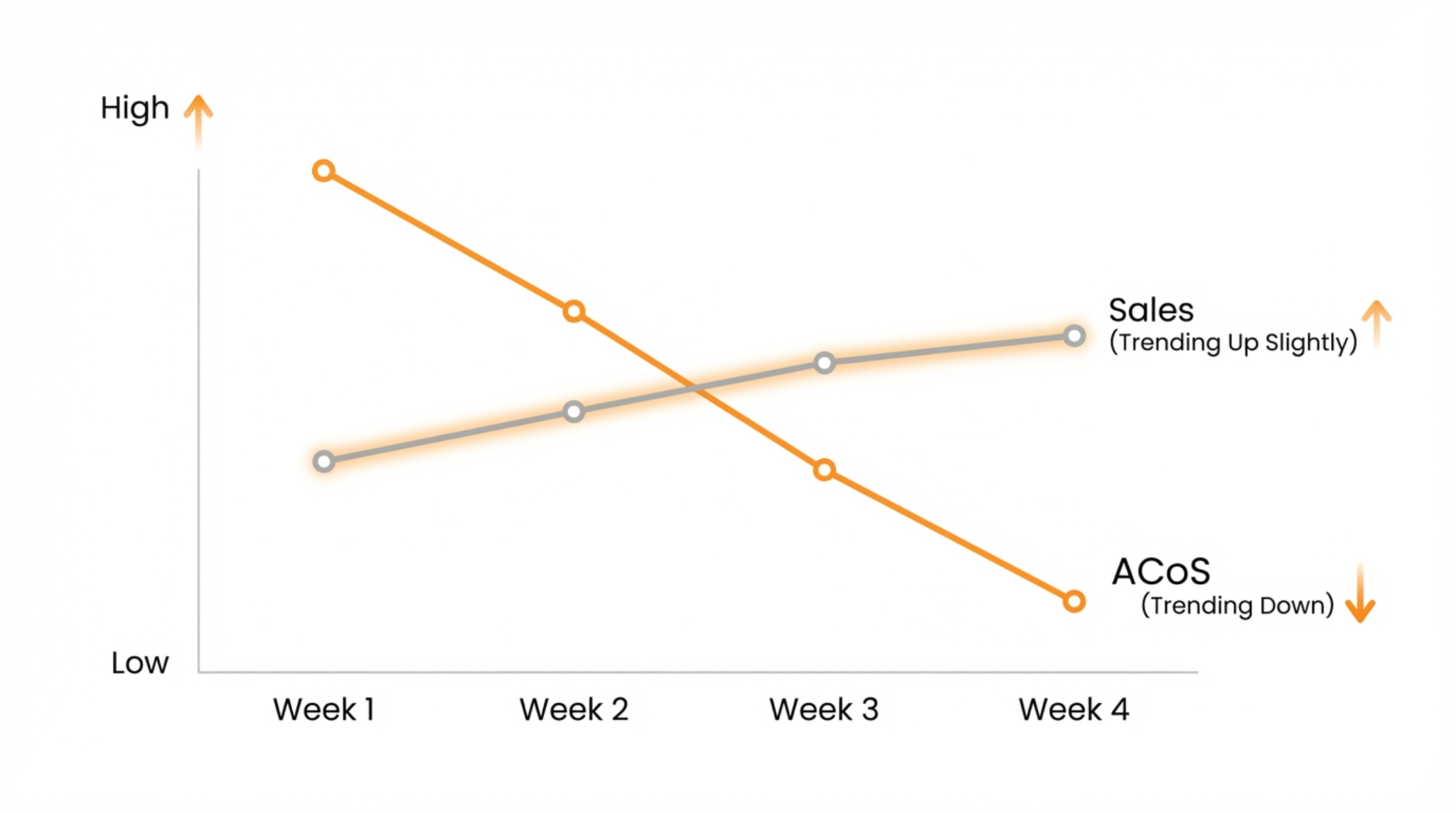
Implement this process weekly to systematically divert spend from inefficiencies to high performers, thereby lowering ACoS and driving sales stability.
Weekly setup
In Campaign Manager, set the date range to the last 60 days so you have enough data to make stable decisions.
Step 1: Set a clear target ACoS
Choose one target ACoS for the product or portfolio you are optimizing. Keep it realistic for your margins and growth stage.
Step 2: Lower bids on clicks with zero sales
For any keyword or product target with 11 or more clicks and zero sales, set the bid to a low baseline, such as $0.15-$0.20. This plugs budget leaks without fully removing coverage.
Step 3: Lower bids on low CTR, high impression targets
For targets with 1,000 impressions or more, CTR below 0.15 percent, and zero sales, lower bids to the same low baseline. This is a conservative filter that reduces future waste.
Step 4: Increase bids on winners below target ACoS
If a target is converting and has an ACoS below your goal, increase its bid gently to capture more volume. This is how you scale profitable keywords and placements.
Step 5: Decrease bids on losers above target ACoS
If a target has ACoS above your goal, reduce bids using the formula in the next section. This pushes ACoS back toward the target while keeping some learning active.
Tip
Keep bid increases smaller than bid decreases. It is easier to lose money than make money, so scale winners carefully.
Simple Bid Adjustment Math
Use these formulas to adjust bids based on performance. They are designed to be easy enough for a weekly routine and consistent enough to work over time.
Increase bids on winners
If ACoS is below target and the target is converting, increase the bid by a small multiplier.
Rule
New bid = average CPC × 1.2
Decrease bids on losers
If ACoS is above target, scale the bid down in proportion to how far you are from the goal.
Rule
New bid = (target ACoS ÷ current ACoS) × average CPC
Comparison and Selection
Use this table to decide what to implement first based on your current stage.
| Item | Best for | Time cost | Expected impact |
|---|---|---|---|
| Brand Tailored Promotions | Brand-registered sellers who want quick retargeting wins | Low | Incremental sales with low effort |
| Weekly five-step routine | All sellers who want stable improvement | Medium | Lower waste and better allocation |
| SellerSprite targeting inputs | Sellers who want better keyword and competitor coverage | Medium | Faster learning and cleaner performance |
Examples and Templates
Example 1: Promotion naming convention
Copy and paste template
[Audience] | [Discount] | [Duration]
Promising customers | 10 percent | 90 days
Brand cart abandoners | 10 percent | 90 days
Example 2: Weekly worksheet columns
- Campaign
- Target type
- Target
- Impressions
- Clicks
- CTR
- Orders
- ACoS
- Avg CPC
- New bid
- Notes
FAQs
Q1: Are Brand Tailored Promotions only for brand-registered sellers?
A: Yes. If you do not see the option in Seller Central, confirm brand registration status and eligibility.
Q2: What discount should I start with?
A: Start at 10 percent. Increase only if redemption is weak and margins allow.
Q3: Why lower bids instead of pausing non-converting targets?
A: Lower bids reduce waste while keeping a small chance to convert at a cheaper CPC. If a target remains unproductive, pause it later.
Q4: How often should I run the five-step routine?
A: Weekly is ideal. Monthly is often too slow when competition shifts.
Summary and Next Steps
Brand Tailored Promotions give you fast retargeting coverage with minimal setup. The five-step weekly routine reduces waste and increases focus on what converts. Together, they create a calm PPC system you can run consistently.
Keep your actions simple, repeat them weekly, and let the data guide you. The results will follow.
Next step action checklist
- Create one Brand-Tailored Promotion per audience, offering a 10% discount.
- Set a calendar reminder to renew promotions before the end date.
- Run the five-step routine weekly on the last 60 days of the date range.
- Use SellerSprite Seller Tools to refine keyword and competitor inputs before increasing spend.
- Ask for feedback in SellerSprite Community if you want a second set of eyes.
Share Your Sourcing Journey With SellerSprite Community
Join the SellerSprite community on the Facebook Group to share your sourcing journey, ask questions, and get support from fellow Amazon sellers.
View The SellerSprite Course Directory
Ready for the next step? Open the SellerSprite Academy course directory to continue building your Amazon FBA skills chapter by chapter.
About the author
SellerSprite Team publishes practical, execution focused playbooks for Amazon sellers, combining platform workflows, SellerSprite Seller Tools, and reusable templates so you can scale with fewer mistakes.


