If you want more control over spend, cleaner reporting, and a more intentional way to push priority keywords, exact match campaigns deserve a central place in your Amazon PPC workflow. The key is not just creating an exact match campaign correctly. The real advantage comes from knowing when to use exact, how to structure campaigns by keyword importance, and how to keep discovery campaigns feeding proven search terms into your exact layer over time.
Key takeaways
- Exact match gives tighter control, but on Amazon, it still includes close variations such as misspellings, plural forms, acronyms, and translations.
- Use exact match after keyword research and harvesting, not as your only campaign type.
- A practical starting structure is to separate high volume, mid volume, and low volume keywords so budget and bid decisions stay clearer.
- Treat search volume thresholds as heuristics, not universal rules. Adjust by category CPC, conversion rate, price point, launch stage, and reporting volume.
- Broad, phrase, and auto campaigns are still valuable because they help uncover search terms you can later move into exact match campaigns.
Table of contents
- 30-second answer
- What exact match really mean on Amazon
- When an exact match is the right choice
- Exact vs Phrase vs Broad vs Auto
- Recommended exact campaign structure
- Step-by-step setup in Amazon Ads
- How to choose bids by goal
- When to use negative keywords
- Mini workflow example
- How SellerSprite fits into the workflow
- Common mistakes
- FAQ
- References
- About the author
30-second answer
Exact match campaigns are most useful after you already know which keywords deserve budget. They help you isolate priority terms, adjust bids with more confidence, and read performance at a cleaner keyword level. That matters when your goals are ranking support, cost control, or both.
A practical workflow looks like this: discover terms in auto, broad, and phrase campaigns, validate them with listing relevance and conversion data, then move the strongest search terms into exact match campaigns where they can receive more intentional bids and budgets.
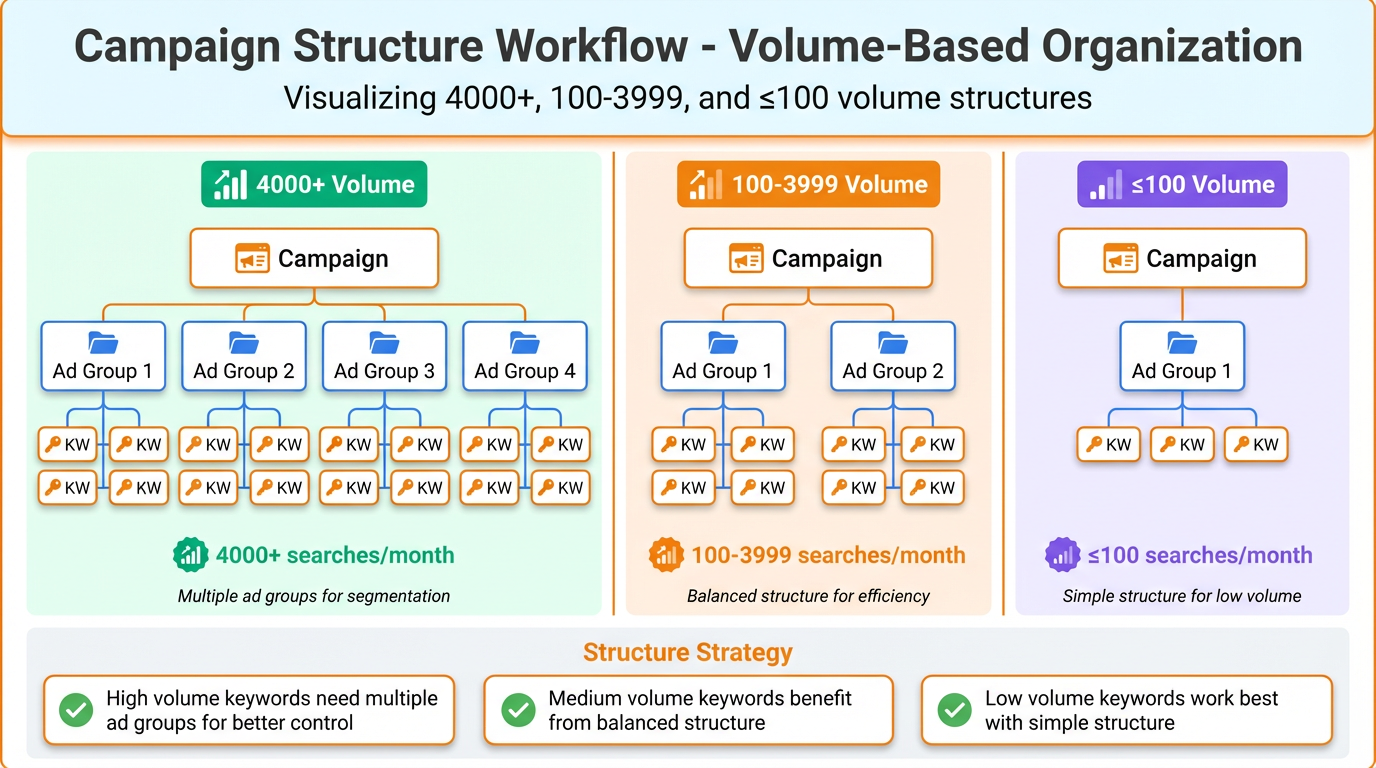
For campaign organization, a simple starting framework is to split keywords by demand level. Put your biggest terms into single keyword exact campaigns, group mid-volume terms in smaller exact sets, and keep low-volume long tails together until they prove they deserve more budget.
Who this is for
- Sellers who already have keyword research or search term data and want a cleaner structure
- Launches where a few priority keywords need dedicated focus
- Accounts where an exact match is currently mixed with too many unrelated terms and is hard to optimize
What exact match really mean on Amazon
Exact match on Amazon is not always literal exact-string matching. In practice, it still includes close variations. That means your ad can match misspellings, plural forms, acronyms, and translations of the keyword you target. For beginners, this is one of the most important things to understand because an exact match is precise, but it is not infinitely narrow.
That is why an exact match should be treated as a high-control campaign type, not a guarantee that every shopper query will be identical to the keyword you typed into Amazon Ads. You still need to review reports, watch performance by query, and decide which terms deserve their own campaign, which terms should stay grouped, and which should be excluded.
When an exact match is the right choice
An exact match is most useful when you already know a keyword is relevant enough to deserve deliberate spend. It is usually the right choice in the following situations:
- You have validated keyword relevance. Your listing, offer, and product positioning align with the keyword.
- You want tighter bid control. Important keywords are easier to manage when they are not buried inside a mixed campaign.
- You want a clearer ranking push. Dedicated exact campaigns make it easier to focus on a shortlist of priority terms.
- You want cleaner reporting. Campaign structure becomes easier to read when search volume and keyword intent are organized with purpose.
Pro tip
Exact match works best as the performance layer of your PPC system. Let auto, broad, and phrase discover opportunities. Let Exact manage the opportunities that are already worth intentional spend.
Exact vs Phrase vs Broad vs Auto
These campaign types do not compete with each other. They do different jobs. A healthy PPC account uses them together, with each campaign type handling a different stage of discovery and control.
| Campaign type | Best use | Strength | Watch-out |
|---|---|---|---|
| Exact | Priority keywords, ranking support, and tighter profitability control | Cleaner reporting and stronger bid discipline | Can become too fragmented if you isolate too many weak terms too early |
| Phrase | Controlled discovery around your core terms | Good middle ground between control and reach | Can still pull in queries that need filtering later |
| Broad | Wider harvesting and language discovery | Useful for finding new search directions | Needs tighter monitoring to avoid wasted spend |
| Auto | Fast launch, query discovery, and search term harvesting | Useful when you need data quickly | Less control, so harvested terms should be reviewed and migrated deliberately. |
Recommended exact campaign structure
Below is a practical starting framework for campaign organization. These thresholds are heuristics, not universal rules. Adjust them based on CPC, category competition, product price, launch stage, and how much data volume you need before making decisions.
| Estimated monthly search volume | Recommended structure | Why |
|---|---|---|
| 4000 plus | One keyword per exact campaign | These terms usually deserve their own bids, budgets, and reporting visibility |
| 100 to 3999 | Group about five keywords per exact campaign | You keep campaigns manageable without over-fragmenting the account |
| 100 or fewer | Combine into one long-tail exact campaign | Low-demand terms usually need to prove themselves before they earn a dedicated structure. |
This framework is useful because it gives priority keywords dedicated space while keeping the rest of the account readable. If a low or mid-volume term begins to outperform, it can always graduate into its own campaign later.
Step-by-step setup in Amazon Ads
The goal is to build a clean, exact campaign without unnecessary friction. Instead of treating setup like a 15-step checklist, focus on the decisions that actually affect targeting, structure, and optimization.
1. Create a Sponsored Products campaign and choose Manual targeting
Exact match belongs in a manual campaign because you want direct control over the keywords you target and the bids attached to them.
2. Choose the right ASIN and use Keyword targeting
Select the product you want to advertise, then choose Keyword targeting rather than product targeting. This keeps the campaign aligned with search term control.
3. Paste a reviewed keyword list
Do not rely only on suggestions inside the ad console. Start from a keyword list you have already reviewed for relevance, search demand, and listing fit.
4. Select Exact only
If a phrase or a broad is selected in the same build flow, the campaign stops being a clean, exact campaign. Keep the signal clean from day one.
5. Set a starting bid that matches your goal
Suggested bids are useful starting points, especially early on. Start higher when you need data or visibility faster. Start more conservatively when margin protection matters more than speed.
6. Choose a bidding strategy on purpose
Fixed bids are a strong default if you want high control. Dynamic bids can only work well when you want more protection on spend. The right choice depends on whether your current priority is visibility, learning speed, or efficiency.
7. Name campaigns so reporting stays readable
A simple naming format, such as Product Name | Exact | Main Keyword or Product Name | Exact | Target ACoS, makes later analysis much easier.
8. Launch, then verify that structure and targeting are clean
After launch, confirm that the campaign contains the intended ASIN, exact match keywords only, and the bid and budget settings you planned. Clean setup reduces future optimization noise.
How to choose bids by goal
There is no universal starting bid that works for every product. The better question is what the campaign is supposed to do first. Start with the goal, then choose the bid style.
| Goal | Bid posture | Good starting option | What to watch |
|---|---|---|---|
| Launch | More aggressive | Upper half of the suggested bid range, often with Fixed bids or careful Dynamic down only testing | CTR, CPC, and whether impressions are arriving fast enough |
| Rank push | Focused and intentional | Dedicated exact campaigns for priority terms, with bids high enough to stay competitive | Conversion quality and whether spending is concentrated on the right terms |
| Profit control | Conservative | Lower to mid suggested bid range, often with Fixed bids or Dynamic down only | ACoS, TACoS, and whether the campaign is still collecting enough data to improve |
Common mistake
Using the same bid logic for every campaign. Launch, rank push, and profit control are different jobs. Your bids should reflect that.
When to use negative keywords
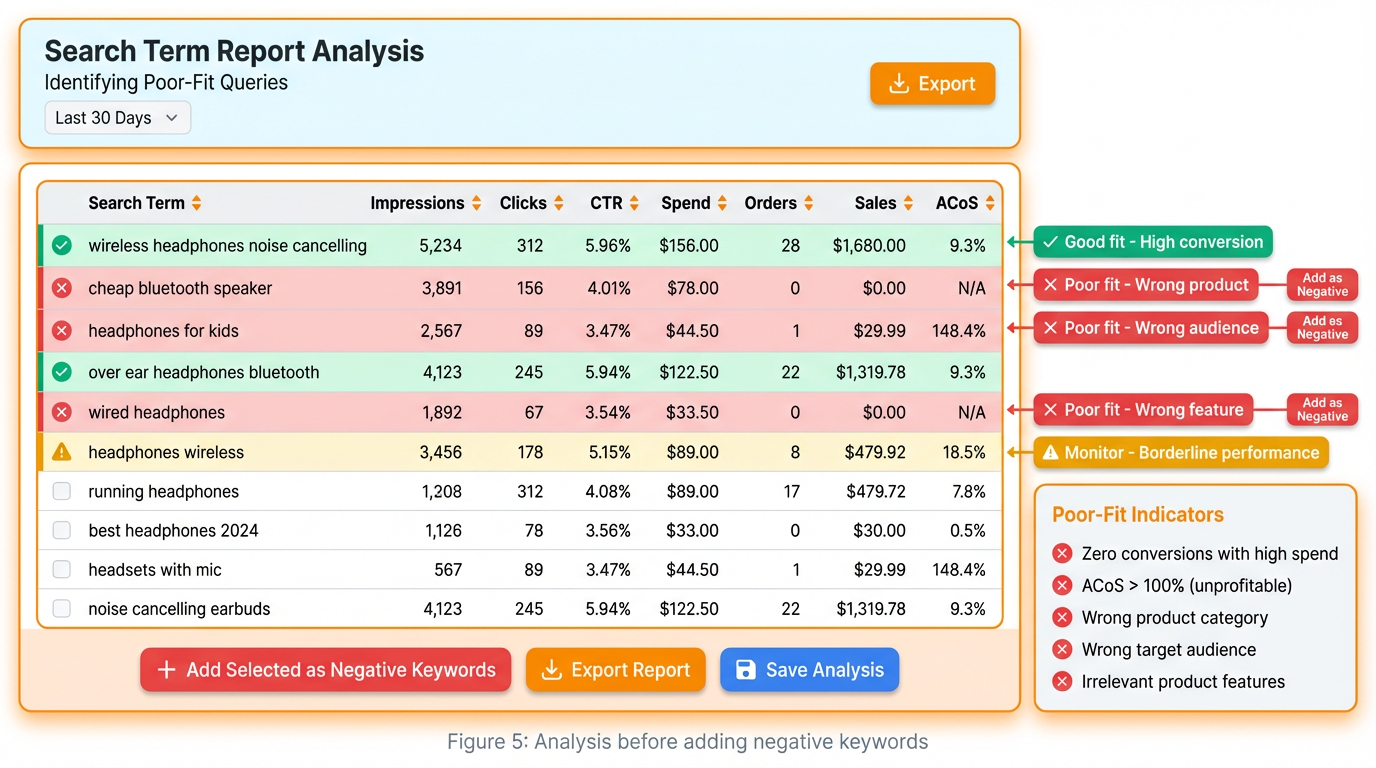
Negative keywords are not something you must force into every exact campaign on day one. They become useful when they solve a real problem. That usually happens in three cases:
- The query is irrelevant. It spends but does not fit the product, customer intent, or listing.
- The query belongs elsewhere. You want to keep one campaign focused while sending a different search pattern to another structure.
- The query keeps consuming budget without helping the campaign goal. That can happen in discovery campaigns and sometimes in broader keyword groups.
For many clean exact campaigns, you may not need negative exact immediately. But it is too absolute to say negatives are never useful. Amazon supports negative targeting, including negative exact and negative phrase, so use them when the data tells you they will reduce waste or improve clarity.
Mini workflow example
Imagine you sell travel pins and your keyword research shows a clear split between a few high-demand terms and a long list of lower-volume supporting terms. Instead of putting everything into one exact campaign, you separate the account like this:
- High volume terms such as enamel pin, pride pin, and label pin each get their own exact campaign.
- Mid-volume terms are grouped in sets of about five per exact campaign.
- Long-tail terms stay together in one exact campaign until they prove they deserve their own budget.
This kind of structure makes decisions easier. You can push bids on the biggest terms without disturbing the rest of the account. You can lower bids on weak mid-volume groups without starving your strongest exact keywords. And you can keep harvesting new terms from phrase, broad, and auto campaigns into the exact layer as they prove their value.
The main lesson is simple: an exact match becomes more powerful when the account structure mirrors keyword importance.
How SellerSprite fits into the workflow
SellerSprite is most useful before campaign launch and during ongoing harvest cycles. The workflow is straightforward:
- Build a relevant keyword list based on the product and market.
- Sort keywords by estimated search volume so you can spot which ones deserve dedicated exact campaigns first.
- Use those demand signals to decide which terms should stand alone, which can stay grouped, and which belong in a long-tail bucket.
- Return to your search term reports on a regular cadence and move proven search terms into the right exact structure over time.
This is where exact match stops feeling like a setup task and becomes a repeatable system. Research feeds structure. Reports feed refinement. Discovery campaigns feed exact campaigns.
Share Your Sourcing Journey With SellerSprite Community
Join the SellerSprite community on the Facebook Group to share your sourcing journey, ask questions, and get support from fellow Amazon sellers.
Common mistakes
- Treating exact match like literal exact-string matching. Amazon still includes close variations.
- Putting every exact keyword into one campaign. You lose visibility on what deserves dedicated spend.
- Using exact too early for weak or unvalidated terms. Some keywords need more discovery first.
- Ignoring bid intent. Launch, rank push, and profit control should not all use the same starting logic.
- Failing to migrate proven search terms. Exact campaigns work best when search term harvesting is ongoing, not one-time.
FAQ
What is an exact match campaign in Amazon PPC?
It is a manual keyword-targeted campaign where you choose specific keywords and set bids more deliberately. It offers tighter control than broader discovery campaign types.
Does an exact match on Amazon mean only one exact query?
No. Amazon's exact match still includes close variations such as misspellings, plural forms, acronyms, and translations, so the shopper query may not be a literal character-for-character match.
Should I use an exact match for every keyword?
Not usually. Exact is best for keywords you already believe are relevant and valuable. Auto, broad, and phrase still help you discover additional search terms.
How should I organize exact match campaigns?
A practical starting point is to give high-volume terms their own exact campaigns, group mid-volume terms in smaller exact sets, and keep low-volume long-tail terms together until they prove they deserve more budget.
What bidding strategy should I start with?
Fixed bids are a practical default if you want cleaner control. Dynamic down only can also work well when spending protection matters. Choose the option that matches your goal, not just the one that looks simplest.
Do I always need negative exact in an exact campaign?
No. Many clean exact campaigns do not need negatives immediately. Use negative keywords when a query is irrelevant, belongs in another structure, or repeatedly consumes spend without serving the campaign objective.
How often should I review exact campaigns?
Review cadence depends on spend and velocity, but the core habit stays the same: monitor search term reports, adjust bids based on objective, and move proven terms into the right exact structure over time.
View The SellerSprite Course Directory
Ready for the next step? Open the SellerSprite Academy course directory to continue building your Amazon FBA skills chapter by chapter.
References
- Amazon Ads Support Center: Understand keyword match types
- Amazon Ads: A guide to targeting with Sponsored Products
- Amazon Ads Support Center: Suggested bid and bid range
- Amazon Ads Support Center: Bidding strategies for Sponsored Products
- Amazon Ads Support Center: Targeting report for Sponsored Products
About the author
SellerSprite Team. We publish practical playbooks for Amazon sellers, with a focus on keyword research, PPC workflows, listing optimization, and data-backed growth systems that are easier to apply in real seller accounts.


