Amazon A+ Content is one of the fastest ways to lift your A+ Content conversion rate without changing your price or ads. When it is built with a clear shopper story, strong visuals, and keyword-aware structure, it can help you increase sales with A+ Content by improving confidence, reducing confusion, and guiding comparisons.
This playbook is written for Amazon US and EU sellers (US, UK, DE, FR, IT, ES). The same A+ Content best practices apply across marketplaces, but you should localize copy, units, compliance claims, and image text for each store language.
Key takeaways
- Basic Amazon A+ Content can increase sales by up to 8%, and Premium A+ Content can increase sales by up to 20%, according to Amazon.
- Use a repeatable SOP: keyword and competitor research, selling point extraction, module layout, copy and visuals, then testing and iteration.
- Mobile placement matters: A+ appears early on mobile, so your first 2 modules must communicate the core promise fast.
- Treat A+ as a conversion system, not decoration: every module should remove doubt, answer a question, or simplify a choice.
- Validate impact with data: combine Amazon A/B testing (Manage Your Experiments) with SellerSprite Traffic Comparison to verify before and after changes.
Table of contents
- What Is Amazon A+ Content and Why It Increases Sales
- Who Should Prioritize A+ Content
- Step-by-Step Workflow to Build High-Converting A+ Content
- A+ Content Examples and Copyable Templates
- Best Practices for Amazon Premium A+ Content in 2026
- Case Study: Anonymized Example of A+ Lifting Conversion
- Checklist and Next Steps
- FAQ
- About the author
- References
What Is Amazon A+ Content and Why It Increases Sales
Amazon A+ Content upgrades the product description area into structured, visual modules that help shoppers understand your product faster and trust it more. The outcome you care about is simple: better comprehension leads to higher conversion rate, fewer returns, and cleaner expectations before purchase.
Pro Tip
Use a single source of truth for claims across images, bullets, and A+. If your main images say "fits 10 inch pans" but A+ implies "fits 12 inch pans", you will increase returns even if conversion goes up temporarily.
Official Amazon guidance also calls out that A+ helps sellers reduce returns by representing products accurately and answering common questions, and that A/B tests are available through Manage Your Experiments. For the official overview and the 8% and 20% benchmark, see Amazon's A+ Content page: A+ Content on Sell on Amazon.
Who Should Prioritize A+ Content
You should prioritize Amazon A+ Content when a shopper needs more context than a title, bullets, and 7 images can provide. The best candidates share one of these patterns.
- New launches where you must build trust fast and explain why you exist.
- High AOV or complex products like electronics, appliances, and supplements where objections cause hesitation.
- High return categories where sizing, compatibility, or expectations are frequently misunderstood.
- Multi-ASIN brands where comparison charts and Brand Story can drive cross-sell.
- Competitive keywords where small conversion lifts help organic rank and ad efficiency over time.
Common mistake
Building A+ for every ASIN at once. Start with your top 5 to 10 revenue drivers or the ASINs with the biggest conversion gap vs category benchmarks, then expand with templates.
Step-by-Step Workflow to Build High-Converting A+ Content
This SOP is designed to be repeatable across categories and marketplaces. It connects research, module decisions, copywriting, and measurement so you can optimize listing performance instead of guessing.
Step 1: Research your shoppers and competitors
Start with real demand and real objections. Your A+ should reflect how shoppers search, what they worry about, and what competitors fail to explain.
- Pull keyword demand: use SellerSprite Keyword Miner to collect high intent terms and long-tail phrases that signal purchase intent.
- Reverse engineer competitors: use Reverse ASIN to see what keywords top listings win, then identify messaging gaps you can own in A+ modules.
- Extract objections: scan negative reviews, Q&A, and competing listings for repeated confusion points (fit, durability, included parts, how to use).
Step 2: Define your core selling points
Convert research into a ranked list of selling points. Each selling point should map to one shopper question and one proof element (visual, spec, comparison, or demonstration).
Simple selling point framework
- Promise: what outcome the buyer wants (faster, cleaner, safer, quieter).
- Proof: what feature causes the outcome (material, design, certification, test result).
- Context: when it matters (scenario, use case, audience segment).
Step 3: Choose the right A+ modules and layout
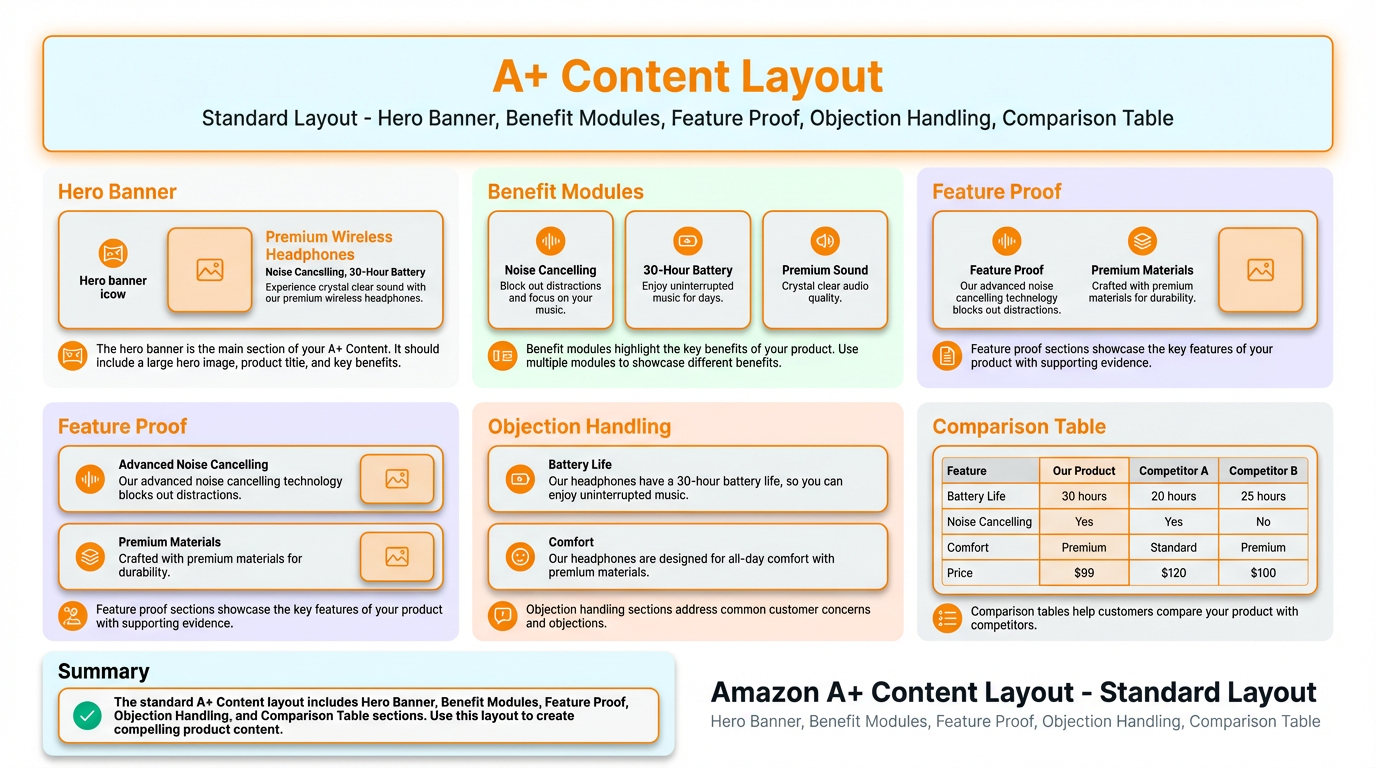
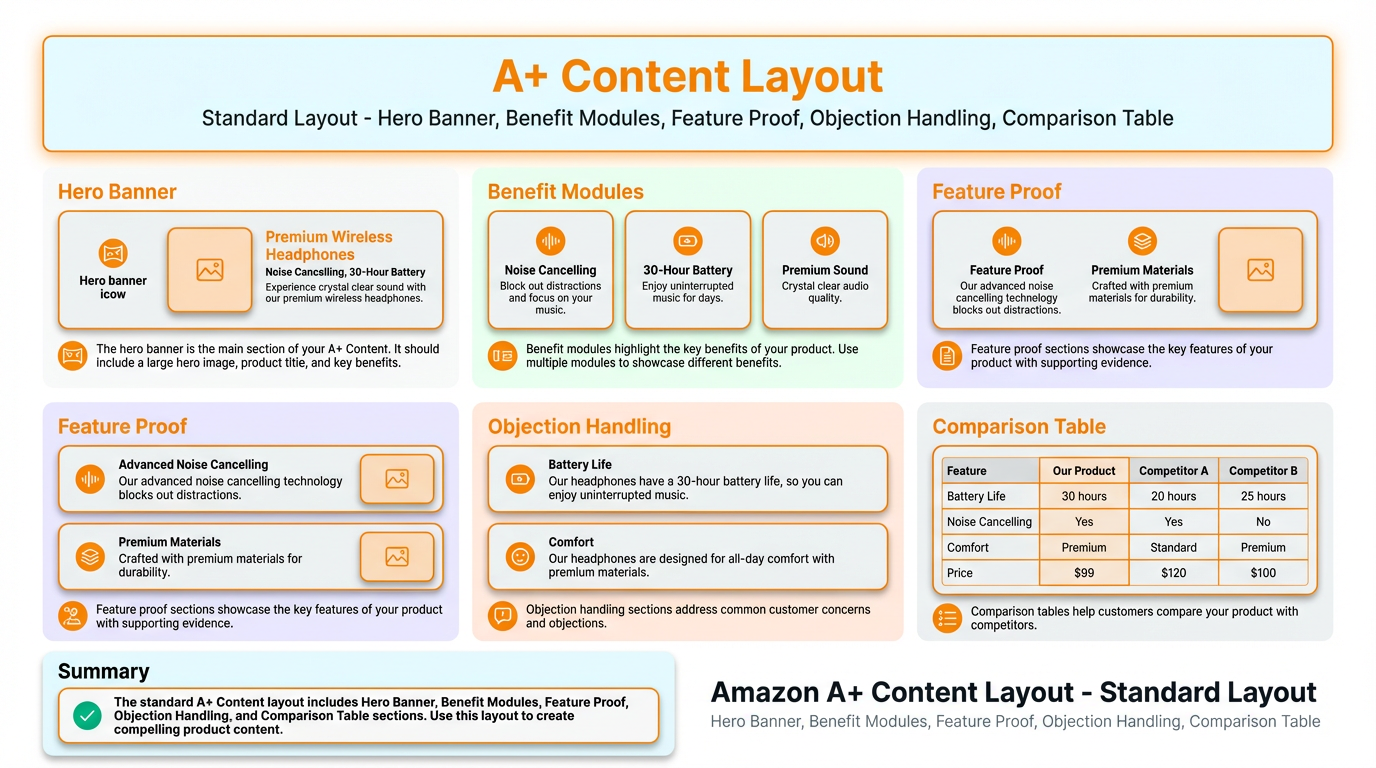
Your module order should match the buyer journey: promise, benefits, proof, objections, then comparison. This is where most A+ Content examples win or lose.
Step 4: Write conversion-focused copy
A+ copy should be short, scannable, and proof-oriented. Use simple sentences, avoid hype, and make it easy for shoppers to say yes.
Copy templates you can paste and adapt
- Benefit line: Get [outcome] with [feature], so you can [use case].
- Proof line: Built with [material or spec] to reduce [pain point] in [scenario].
- Objection line: Works with [compatibility] and includes [what is in the box].
Step 5: Design visuals for mobile-first
In 2026, most sessions are mobile, and A+ is often seen before bullets. Design for small screens first, then scale up for desktop.
- One message per module: avoid crowded collages and tiny text.
- Readable typography: ensure headlines stay readable on a phone without zoom.
- Consistent style: same fonts, icon system, spacing, and tone across modules.
- Show scale: include size references, fit guides, and use context visuals.
Step 6: Publish, test, and validate impact
A+ is only finished when you have data. Use Amazon A/B testing when available, and always track before and after performance for the ASIN.
Micro tutorial: validate A+ with SellerSprite Traffic Comparison
- Publish your A+ update, then wait for a clean comparison window (commonly 14 days before vs 14 days after).
- Open SellerSprite Traffic Comparison and add your target ASIN.
- Compare core metrics like impressions, clicks, and conversion movement, and annotate major changes (A+ update, price change, promo, ad shifts).
- If conversion improves but returns rise, revisit expectation-setting modules (fit, what's included, how to use).
Start Traffic Comparison Tip: sign up first if you do not have an account.
For controlled tests, Amazon recommends using Manage Your Experiments to run A/B tests on A+ Content, and the official A+ page also lists Premium eligibility requirements and testing options. See: Amazon A+ Content overview and testing notes.
A+ Content Examples and Copyable Templates
If you searched for A+ Content examples, you likely want something you can copy. Below are three proven layouts you can adapt based on category complexity.
Template A: Simple, commodity-like products (Home and Kitchen, basic accessories)
- Hero banner: promise + one proof
- 3 benefit blocks: outcomes in plain language
- Detail close-ups: materials, size, included items
- Use-case strip: 3 scenarios
- Comparison chart: guide to the right variant
Template B: Technical products (Electronics, tools, compatibility-heavy items)
- Hero banner: "works with X" and "solves Y"
- Compatibility table: supported models and constraints
- Feature proof: diagrams, port labels, measurements
- Setup steps: 3-step quick start
- Comparison chart: pick the right model
Template C: High trust categories (Beauty, baby, consumables)
- Hero banner: benefit + reassurance
- Ingredient or material story: what is in it and why it matters
- How to use: steps and frequency
- Who it is for and not for: set expectations
- Comparison chart: variants by need
Best Practices for Amazon Premium A+ Content in 2026
Premium A+ Content is most effective when you use interactivity to reduce friction, not to add complexity. Think of it as a faster way for shoppers to self-educate.
Premium eligibility changes over time, but Amazon's current guidance commonly requires a published Brand Story across brand-owned products and a minimum number of approved A+ projects within the last 12 months. Check the official criteria here: Premium A+ eligibility on Amazon.
Pro Tip
If you roll out Premium A+ across multiple marketplaces, localize image text, measurements, and compliance language. A perfect US module can underperform in DE if the image copy and units are not native.
Case Study: Anonymized Example of A+ Lifting Conversion
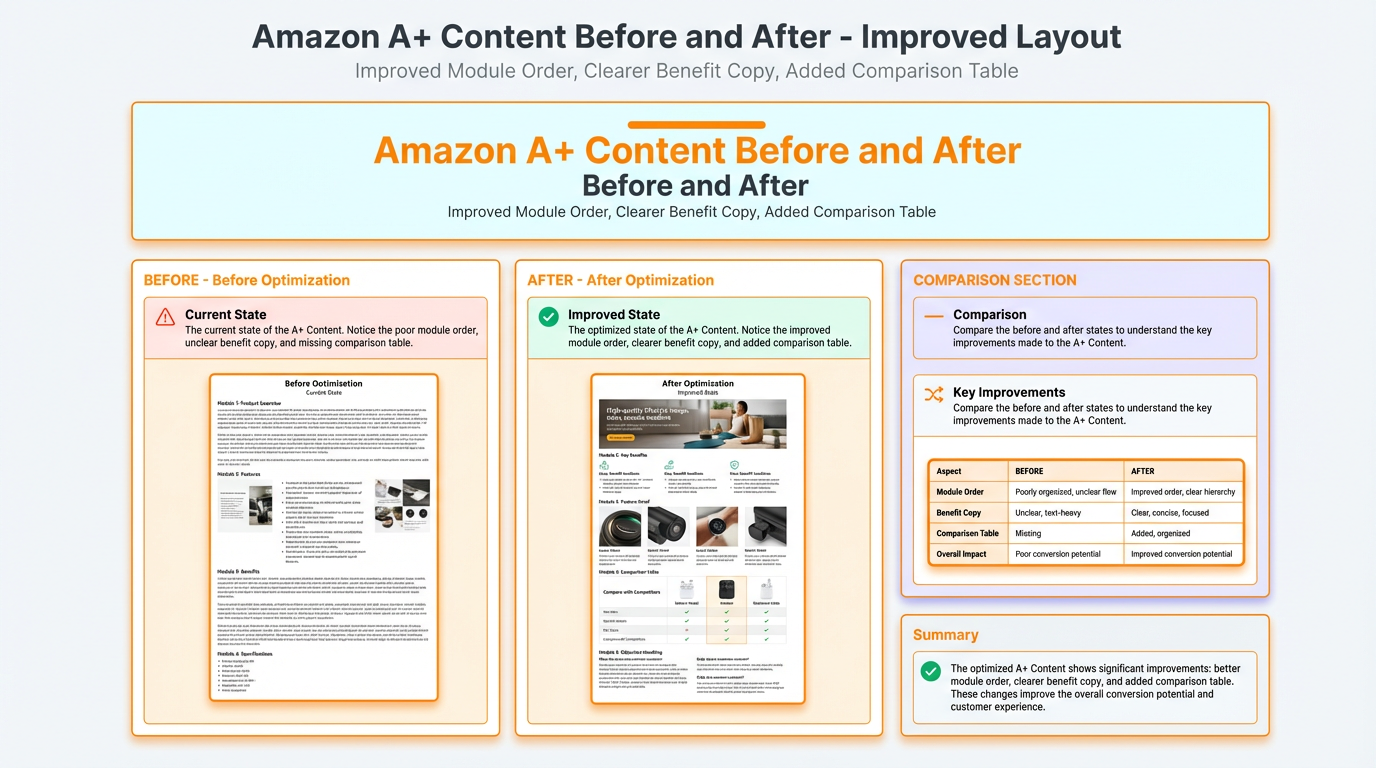
This anonymized example shows how a structured A+ redesign can increase sales with A+ Content. Numbers are representative for a mid-volume listing and are meant to be a realistic template you can benchmark against.
Category: Home and Kitchen (drinkware accessory)
Marketplace: Amazon US
Goal: improve A+ Content conversion rate and reduce returns from sizing confusion
What changed in A+
- Rebuilt the first 2 modules to state the core promise and the top benefit clearly for mobile.
- Added a size and compatibility visual to reduce confusion and set expectations.
- Inserted a comparison chart to guide buyers to the right variant instead of bouncing to competitors.
- Updated image alt text to align with top keywords from the SellerSprite master list.
Share Your Sourcing Journey With SellerSprite Community
Join the SellerSprite community on the Facebook Group to share your sourcing journey, ask questions, and get support from fellow Amazon sellers.
Checklist and Next Steps
Use this checklist to ship faster and keep your A+ compliant, clear, and conversion-driven.
- I mapped top keywords to selling points using SellerSprite Keyword research.
- My first 2 modules communicate the promise and top benefit for mobile.
- Every module answers a question, removes doubt, or supports a decision.
- I included a size or compatibility visual if returns are driven by confusion.
- I added a comparison chart if I have multiple ASINs or variants.
- I avoided prohibited content like pricing and promotional language.
- I planned measurement: Traffic Comparison before vs after, and A/B tests when available.
Next step: build your keyword master list, draft a 5-module layout, then measure the A+ Content conversion rate movement over a clean time window. If you want to move faster, start with one template and roll it out to your top ASINs first.
FAQ
Does A+ Content help SEO and keyword coverage?
Amazon does not publicly disclose every ranking factor, but A+ can support discoverability indirectly by improving conversion and clarity. Treat keywords in A+ as supportive context and prioritize readability. Use your highest intent terms where they fit naturally and keep modules scannable.
How many modules should I use?
Enough to answer the top questions, not enough to overwhelm. For most listings, 5 to 7 modules is a practical range: promise, benefits, proof, objections, and comparison.
How do I unlock Premium A+ Content?
Requirements vary, but Amazon currently lists criteria such as having Brand Story published across brand-owned products and a minimum number of approved A+ projects within the last 12 months. Always verify your current eligibility inside A+ Content Manager and the official A+ guidance page.
Why did my A+ get rejected?
Rejections often come from promotional language, pricing references, time-sensitive claims, or content that looks like an ad. Keep A+ evergreen, product-focused, and aligned with Amazon content guidelines.
About the author
SellerSprite Team. SellerSprite is an Amazon seller platform used by 1.6M+ registered sellers worldwide, with 700K+ browser extension installs, refined over 8+ years of product and workflow iteration. We publish step-by-step playbooks to help sellers improve listing performance with clearer decisions, better execution, and measurable results.
References
- Amazon: A+ Content overview, types (Basic, Premium, Brand Story), sales lift benchmarks, and testing notes
- Amazon PDF: A+ Best Practice Guide
- Amazon KDP: A+ Content guidelines and common rejection reasons (promotional language, time-sensitive claims)
View The SellerSprite Course Directory
Ready for the next step? Open the SellerSprite Academy course directory to continue building your Amazon FBA skills chapter by chapter.


